
Real-Time-Bidding API
The Retreaver Real-Time-Bidding API allows users to create an agent pre-qualifying ping/post system, which seeks to return an available endpoint/buyer picked out from their existing Retreaver campaign routing pool.
The RTB API effectively allows lead generators the ability to ping Retreaver campaigns for a transfer number, by prequalifying the lead and reserving an available buyer to take their call.
Real-Time-Bidding Workflow Overview
Lead generators will send a POST request to the RTB API, and the following events will occur:
- Retreaver will tag the caller id with a publisher id & any data/tags provided in the RTB request.
- Retreaver will trigger any ‘Passthrough’ webhooks present on the campaign, checking for agent availability & evaluating ping post responses to determine dynamic payouts.
- If a buyer/agent is available & the lead fulfills any present Geo/Zip/Lead filters - the RTB request will return an inbound_number, conversion timer and payout value.
- The publisher will route the call using the inbound_number returned by the request.
- If the connected call duration exceeds the conversion buffer, Retreaver will convert the call based on the provided conversion criteria placed on the campaign.
Creating A Retreaver ‘Real-Time-Bidding’ Link
Step 1) Enabling Real-Time-Bidding for your Retreaver Account
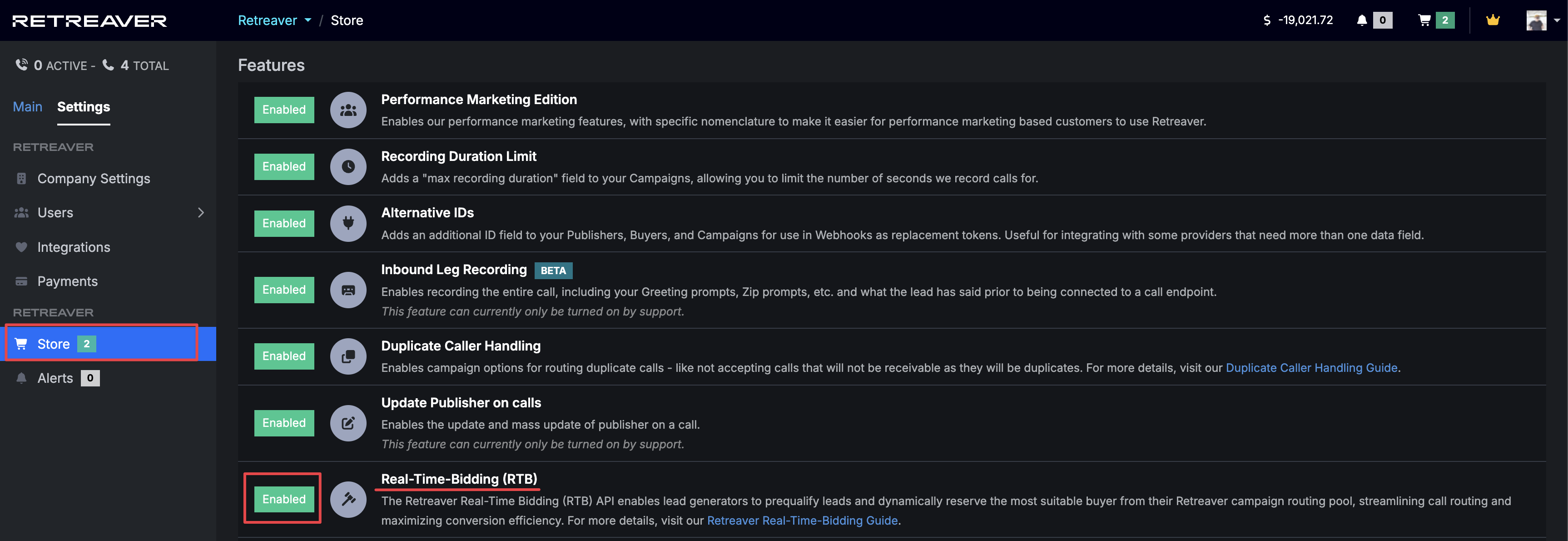
RTB is an optional feature that can be enabled in the Store. To enable RTB, click Settings -> Store then click Enabled where it says “Real-Time-Bidding (RTB)”.
Step 2) Creating a Real-Time-Bidding Webhook
As the campaign owner looking to purchase calls from a lead generator, navigate to a Retreaver campaign overview page and create a new postback key for Real Time Bidding (postback keys are essentially API keys tied to a specific endpoint, with extra controls):
How to Add a new RTB Postback Key:
Visit your Campaign -> Postback Keys -> Add Key -> Select “Real Time Bidding”

Note
You do not need to create more than one RTB postback key on a campaign. If one is already present, use that one instead and swap out the publisher ID as covered in the next step.
Configuring the RTB Postback Key settings:
Enter the Inbound Number and select a Publisher ID from the dropdown. Alternatively you can leave the Publisher ID dropdown blank and manually pass in a [publisher_id] in the RTB API URL.
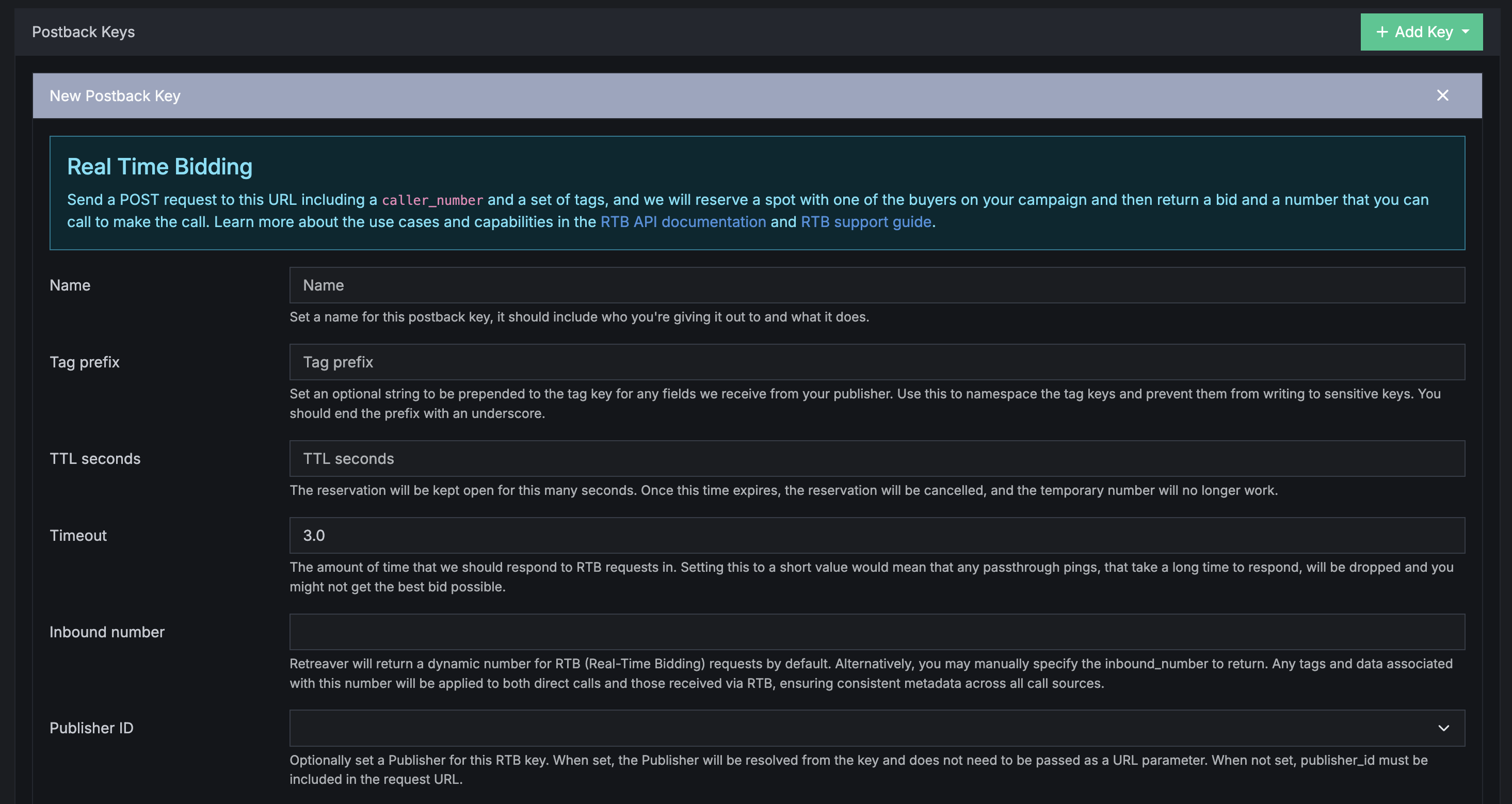
RTB Postback key options:
- TTL - The TTL (Time-To-Live) value dictates how long to keep a successful RTB reservation open pending a transfer from the publisher, the default recommendation is 15 seconds.
- Timeout - Timeout period dictates how long to wait for downstream ‘PassThrough’ webhooks to complete before continuing, the default recommendation is 5 seconds.
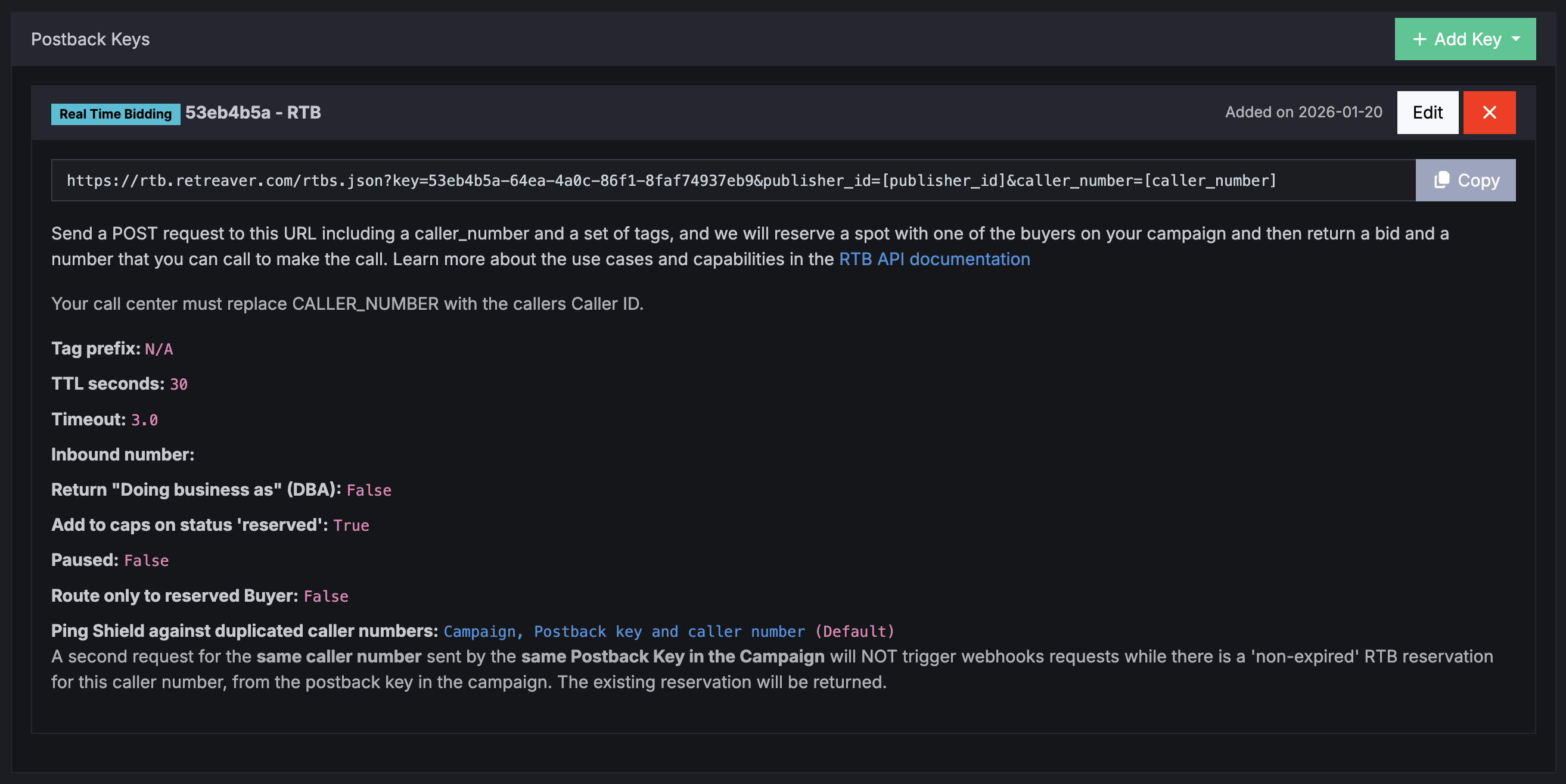
Completed RTB Postback Key:
Step 3) Configuring the Real-Time-Bidding Webhook
You can pass data to the RTB API using HTTP params such as caller_number and caller_zip.
https://rtb.retreaver.com/rtbs.json?key=1915260e-da0c-4443-a35b-8fb9d9843e42
&publisher_id=4321ABCD
&caller_number=[caller_number]If you did not pre-select a Publisher ID within the Postback Key form, make sure to include a publisher_id= in the webhook URL parameter so that Retreaver can identify who sent the RTB request. Publisher ID is found on each publisher page:

Important
You will also need to create a new conversion criteria on your campaign matching this publisher if it has not already been created in order to accredit this publisher for any converted calls that they have routed to your campaign.
Failure to create a valid conversion criteria for this publisher will force the RTB request to return a payout of ‘$0’, which will impact the likelihood the publisher will be willing to route the call over to your campaign.
Tip
Specify which routing number to use: If you would like to control which Retreaver tracking number is used to route and receive the call, you can append an additional &inbound_number=+18885551234 parameter. The value of the inbound_number parameter can be any Retreaver tracking number on the campaign with the RTB postback key. Note, this will not tag the call with any tags present on the tracking number - this feature was added to support overridden routing paths using unlocked tracking numbers.
RTB Posting Instructions for Publishers
Retreaver requires that each RTB request includes a publisher_id and caller_number parameter value. They may also provide additional caller details by appending them to the end of the webhook similar to example below:
https://rtb.retreaver.com/rtbs.json?key=1915260e-da0c-4443-a35b-8fb9d9843e42
&publisher_id=[publisher_id]
&caller_number=[caller_number]
&caller_zip=[caller_zip]&caller_state=[caller_state]&first_name=[first_name]&last_name=[last_name]Be sure to send a POST request to the provided RTB webhook.
If the campaign contains an available agent at the time of the request, Retreaver will return a transfer inbound_number under a JSON response for you to route into.
Example Response Payload
{
    "uuid": "66b905ef-bc03-420e-ad43-e8eeae03918f",
    "status": "reserved",
    "retreaver_payout": 1.173,
    "retreaver_seconds": 95,
    "inbound_number": "+18444021146",
    "expires_at": "2024-05-29T16:16:18.246Z"
}You will then need to manually parse the retreaver_payout, retreaver_seconds, inbound_number properties to extract the desired transfer number.
Example JSON response parsing using JavaScript:
JSON.parse(Webhook_Response).retreaver_payout;
JSON.parse(Webhook_Response).retreaver_seconds;
JSON.parse(Webhook_Response).inbound_number;Provided that the conversion payout and conversion buffer seconds meet your criteria, please transfer the provided caller ID to the inbound_number returned by the RTB request.
Warning
Retreaver RTB Reservations expire. The default reservation time is 15 seconds.
If no call is received to the inbound_number from the provided caller ID, the call reservation will expire. Dialing an expired inbound_number will lead to a dead line as the inbound_number is no longer reserved.
You will now be able to request for a reserved transfer number from your affiliates campaign and route calls to a prequalified available buyer. You will receive credit for any converted calls that you successfully transfer over to a Retreaver campaign.
Working With Downstream Bidding Webhooks
Triggering Downstream Bidding Webhooks when using RTB
When working with Downstream Bidding Webhooks, (such as having Buyers using Retreaver or other call tracking platforms), its important to set the webhook trigger from “Start - When a call starts” to “Passthrough” - This ensures the webhook will trigger when an RTB request is received from a publisher.

Creating Conversion Criterias for buyers using Bidding Webhooks
Downstream bidding webhooks typically return a dynamic/unique conversion timer and bid value. By default, the webhook configurator “Auto-Buyer” setup option will create a conversion criteria on the buyer profile, but this will not apply towards a publisher payout. If your publisher reports that they are receiving bids of $0, its because a conversion criteria containing a payout revshare value must be created on the campaign.
On the Retreaver campaign containing the RTB key, you will need to create a conversion criteria utilizing the timer & bid tags specific to a webhook-integrated buyer.
-
For the example below, we have a buyer using the tags
retreaver_rtb_44407_timer&retreaver_rtb_44407_bid. -
We then set the Payout as a 70% percentage of the bid value.
-
We also tag the buyer to the conversion criteria, so it is chosen anytime this particular buyer is chosen by the Real-Time-Bidding reservation system.
This ensures that if this buyer is chosen via RTB, the publisher will receive 70% of the retreaver_rtb_44407_bid value, and will receive a conversion required duration of retreaver_rtb_44407_timer.

Real-Time Bidding, Confirmations and Caps
When Retreaver receives a Real-Time Bidding (RTB) request, it can reserve a call in the Call Buyer caps even before the call actually arrives, since the system expects the call to follow. The caps are Concurrency Cap, Hard Cap, Hourly Cap, Daily Cap, Monthly Cap.
In practice, thousands or even tens of thousands of RTB requests may be received for every single call, so reserving in advance is usually unnecessary.
If you want calls to be reserved in the Caps at the RTB stage, you must now explicitly enable this behavior by setting add_to_caps_on_status_reserved for the Postback key (Visit Campaign → Scroll to Postback Keys), or require the Publisher to confirm the reservation by sending a second status="confirmed" request.
Confirming a reservation
Retreaver allows publishers to check for availability, and if they decide to send the call, they can ensure an agent is reserved by sending a second request with status="confirmed". When this confirmation request is received, Retreaver checks the configured caps for the Call Buyer/Endpoint. If sufficient capacity is available, the Call Buyer/Endpoint is reserved.
Check out the full documentation at Retreaver API Docs
Retreaver RTB with SIP
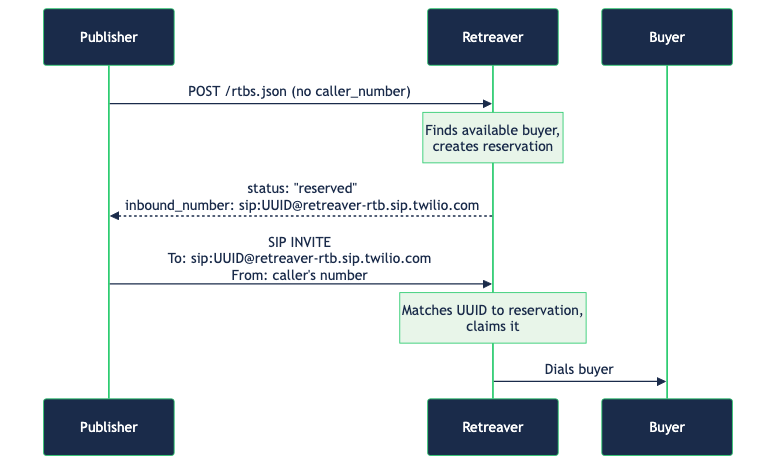
Some publishers do not want to provide the caller’s phone number at the time of the RTB request or they might not even have one and are just pinging for “general availability” to see “what’s up”. (Yeah, we have mixed feelings about those). Many publishers are sending fake phone numbers that are flooding databases. Some of them genuinely have a real caller on the phone that is looking for a service and they want to check for a buyer before they send this caller number in the industry (We like those). They simply want to check if a buyer is available before routing the call. This is supported by enabling “Allow no caller number” on the RTB postback key.

The flow of requests and information is the following:
However, it’s important to understand what is lost when no caller number is provided:
-
Geographic matching may not work. Retreaver uses the caller’s area code, state, and ZIP to match calls to the right buyer. Without a caller number, none of this information is available unless the publisher passes it explicitly as parameters in the request (e.g.
caller_zip,caller_state). -
Caller lists cannot be checked. Caller lists for suppressed and accepted numbers rely on the caller’s phone number. Without it, there is no way to determine if the caller is blocked or pre-approved.
-
Buyer matching is limited. The only thing Retreaver can confirm is whether a buyer exists and is potentially available — not whether this specific caller would actually be accepted by the buyer.
-
Webhooks to buyers requiring [caller_number]. When firing a webhook to a buyer clients could configure [caller_number], [nanp_caller_number] and other tokens that will be replaced with the caller number before sending the request to the buyer. These webhooks might not work.
Because of these limitations, it’s important that the publisher, the Retreaver client, and the buyer agree on what information will be provided with each request. Exactly what needs to be synced depends on the parties involved and what the buyer expects in order to return an accurate availability or bid.
The SIP address
When no caller number is provided, Retreaver returns a SIP address instead of a phone number. The format is:
sip:{uuid}@{domain}
For example:
sip:2e11554b-9bc7-4a19-b4b5-a79dc79ccce1@sip.rtb.retreaver.com
The uuid uniquely identifies this reservation. When the publisher dials this SIP address, Retreaver recognizes the UUID and connects the call to the reserved buyer — no caller number needed.
Note that domain is also something dynamic that might change and different domains might be available. The value of the domain is not an API. Do not rely on it.
SIP authentication
Every RTB key now has a SIP authentication setting with two choices:
- IP Whitelist (default) — calls are accepted only from the publisher’s pre-approved IP addresses. This stays the recommended option whenever the publisher has static IPs; nothing changes for your existing keys.
- Credentials — calls are authenticated with a username and password instead of an IP. Use this when the publisher’s system has dynamic IPs (for example an AI agent) and can’t be whitelisted.
It’s one or the other per key — the publisher doesn’t need both, and no one is forced into an IP they can’t provide.
IP Whitelisting
Some third-party platforms publishers work with simply cannot send SIP credentials. That’s a limitation of those platforms, not of SIP — but it may in the future block otherwise-good publishers from bringing their calls into Retreaver at all.
That’s why publisher could authenticate using a process know as IP Whitelisting. Let us know the IP addresses from which the requests will be coming.
Example with IP Whitelisting
Sending the request without a caller number returns and inbound number with a sip format.
curl -X POST -s "https://rtb.retreaver.com/rtbs.json?key=502bfdce-244c-4288-9cb5-e1d451701f33" | jq
{
  "uuid": "750488b8-f00d-43d8-883f-446b23bbf4af",
  "status": "reserved",
  "retreaver_payout": 0.0,
  "retreaver_seconds": 90,
  "inbound_number": "sip:750488b8-f00d-43d8-883f-446b23bbf4af@sip.rtb.retreaver.com",
  "expires_at": "2026-04-06T10:29:18.273Z"
}
The call could then be send using many different SIP clients. A developers tool is pjsua ()
Here is an example request
./pjsua \
  --id "sip:+12025550100@sip.rtb.retreaver.com" \

 after the request press m and type

 > sip:750488b8-f00d-43d8-883f-446b23bbf4af@sip.rtb.retreaver.com
This will dial the sip address.
‘750488b8-f00d-43d8-883f-446b23bbf4af’ is the uuid we received after send a curt request. +12025550100 is the number the caller is calling from - this will become the caller_number
SIP Credentials
When a publisher wins an RTB bid, we hand back a dynamic SIP address for that specific reservation, and the publisher’s system connects the call to it.
AI voice agents and hosted dialers (and many modern SIP/CPaaS platforms) don’t give the publisher a stable IP to whitelist. They rotate through dynamic IPs, or never expose one at all. What they do provide is a username and password. Some publishers simply can’t share or commit to a fixed IP range. For these publishers an IP whitelist is a non-starter — there’s no IP to list. They need to prove who they are with credentials instead.
When a key is set to Credentials, the SIP server challenges the call with 407 Proxy Authentication required. The publisher’s SIP client must answer that challenge with the username and password configured on the key.
Example with SIP Credentials
The RTB request is unchanged. The response includes a sip_address to dial:
curl -X POST -s "https://rtb.retreaver.com/rtbs.json?key=502bfdce-244c-4288-9cb5-e1d451701f33&caller_number=12025550100" | jq
{
  "uuid": "86f28dbc-7f5d-4908-b765-5ffa5f8eb345",
  "status": "reserved",
  "retreaver_payout": 0.0,
  "retreaver_seconds": 90,
  "inbound_number": "+18777433002",
  "sip_address": "86f28dbc-7f5d-4908-b765-5ffa5f8eb345@retreaver-rtb-cred.sip.twilio.com",
  "expires_at": "2026-07-17T08:55:55.342Z"
}
The difference is on the SIP client — it now has to present the credentials. With pjsua you pass --username and --password, and you must also pass --realm so the client can answer the authentication challenge:
./pjsua \
  --id "sip:12025550100@retreaver-rtb-cred.sip.twilio.com" \
  --realm "*" \
  --username "pk-502bfdce" \
  --password "your-key-password"

 after the request press m and type

 > sip:86f28dbc-7f5d-4908-b765-5ffa5f8eb345@retreaver-rtb-cred.sip.twilio.com
sip_address is the value returned by the RTB request; here 86f28dbc-7f5d-4908-b765-5ffa5f8eb345@retreaver-rtb-cred.sip.twilio.com is the address you dial after pressing m.
--realm "*" is the important part. The SIP server challenges the call with a specific realm (for example sip.twilio.com), and pjsua will only attach the credentials if it has one whose realm matches. The * wildcard matches whatever realm the server sends back. If you omit --realm, pjsua has no matching credential and the call is dropped with:
sip_auth_client.c  Unable to set auth for ...: can not find credential for sip.twilio.com/Digest
...
Call 0 is DISCONNECTED [reason=407 (Proxy Authentication required)]
The --username and --password are the credentials configured on the RTB key. Everything else — the caller number, dialing the SIP address — works exactly as it does with IP Whitelisting.
How To Troubleshoot RTB Requests
If the campaign contains an available agent at the time of the request, Retreaver will return a transfer inbound_number under a JSON response for you to route into.
If no agent was available at the time of the RTB request, there will not be an inbound_number in the response body of the RTB request.
In order to determine the exact reason why no buyer was available, the RTB UUID will need to be forwarded to the Retreaver campaign owner for them to look into the RTB request further.
Note
The RTB UUID might be removed after a few days, as the RTB request database might be regularly flushed.
Example Response
{
  "uuid": "1212e30a-cff2-4f2f-ae84-dfdf5b952204",
  "status": "rejected",
  "info": "Unable to determine payout until the call converts"
}The Retreaver account owner would copy the UUID and navigate to the following url: https://retreaver.com/call_reservations/1212e30a-cff2-4f2f-ae84-dfdf5b952204
Navigating to the above URL will bring them to the following page:
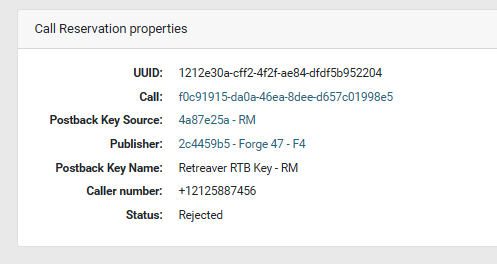
From this page, click on the Call link, where you can then view the call flow at the bottom of the page.
The call flow will then determine the exact course of events in the RTB request, pay particular attention to the attempted buyers on the routing queue, as it will report if any buyers were closed, were filtered out, or were unavailable and for what exact reason.
This information is limited to the Retreaver account holder as it may contain sensitive information that should only be visible to the campaign owner.
Frequently Asked Questions
What does “The call reservation expired because the TTL was reached” mean?
Successful RTB requests will reserve a routing number and buyer, however these call reservations have a time out period which is 30 seconds by default. If the publisher does not route the submitted caller ID within the timeout period, the call reservation expires.
What does a “status”:“no-target” RTB response mean?
A status of ‘no-target’ means that no buyer was available to take the call. We recommend that you send the RTB UUID to your buyer and ask them to review the call flow to determine why no bid was returned. It could be that certain required caller lead details were missing, or that a downstream buyer down the chain has strict geo/zip filtering. Reach out to your buyer for more information.
Why are my publishers not routing calls to my campaign?
Not every successful RTB call reservation will result in a call, as your publishers are likely communicating with multiple other systems and buyers, which are all competing for the same call. Simply put, their system may have decided to route to another buyer if a higher bid was offered by a competing affiliate.
Why are my buyers reporting we are not routing calls to them?
Not every successful bid response will result in a call, as your campaign is likely communicating with multiple other systems and buyers, which are all competing for the same call. Simply put, the Retreaver campaign may have decided to route to another buyer if a higher bid was offered by a competing affiliate.
Why are my publishers reporting that RTB is not returning bids?
The RTB campaign had no compatible buyer available, it could be that none of your buyer filters matched or that your dynamic buyers did not offer a bid for that lead.
Why are my dynamic buyers not returning bids?
In order to determine why your dynamic buyers are not returning bids, it is best to look at the ‘fired pixels’ page when viewing a call flow, this will help you analyze which API requests were made, and what the API response was. It could be that the buyer system was closed, the supplied lead request was missing some critical details, or the API could not find a match for that caller at that time.
Can publishers send a fake caller id to determine buyer availability?
The caller ID supplied to a RTB request must match the transferred lead caller id in order to successfully route to the reserved buyer. This is because the RTB system has reserved a buyer specific to the supplied caller ID in the request.
What is the ‘inbound number’ parameter used for?
The inbound number is an optional parameter used to force a Retreaver tracking number as an inbound_number response. This allows for a consistent routing number when making RTB requests.
Can a publisher supply lead information on the RTB request?
Publisher can supply caller lead information by appending additional &key=value parameters when making RTB requests.
What is the Retreaver Ping Shield, and what does it do?
The Retreaver Ping Shield is used to detect & prevent spam, or temporarily bottleneck a sudden surge of traffic, or filter out recently sent/received or duplicate leads from being evaluated.
Other platforms may implement similar systems to ‘rate limit’ or ‘deflect’ RTB requests. These systems are also attempting to detect & prevent spam, or temporarily bottleneck a sudden surge of traffic, or filter out recently sent/received or duplicate leads from being evaluated.
RTB Status Terminology
| Status | Description |
|---|---|
| claimed | Retreaver has received the buyer’s bid and sent them the call! |
| expired | Retreaver received the bid from your buyer, but didn’t receive the call from the publisher prior to TTL expiry |
| no-target | Retreaver could not match this call to any buyers based on tag requirements or hours of operation |
| rejected | Retreaver could not connect to the buyer, there may be an issue with the RTB URL or the target may be paused |
| reserved | Retreaver has received a bid and selected a buyer for routing, call connection is contingent on publisher. Upon connection, call will be marked “claimed” |
| considering_targets.single | The buyer (target) is not paused, not capped and is open |
| target_disqualified | Retreaver could not connect the call to a buyer due to tag requirements or hours of operation |
| target_disqualified_by_cap | Retreaver could not connect the call to a buyer due to buyer cap settings |
| target_simulcapped | Retreaver could not connect the call to a buyer due to buyer concurrency cap settings |
| targets_closed | Retreaver could not connect to a buyer due to buyer operating hours settings |
| targets_duplicate_deprioritized | Retreaver found this callerID would be a duplicate for a particular buyer, so we prioritized fresh buyers over this one |
| targets_paused | Retreaver could not connect to a buyer as they were paused |
| undialable_expression | Retreaver could not connect the call to a buyer as a transfer number was not received or is malformatted |
| ping_shield_postback_key_claim_based_limited | Retreaver has throttled this RTB endpoint, as the publisher is below the claim-to-ping ratio |
| ping_shield_postback_key_caller_number_already_reserved | Retreaver has already received this callerID and reserved a session with a buyer for it |
| ping_shield_postback_key_caller_number_already_processing | Retreaver has already received this callerID and is working on reserving a buyer for it |
Help us improve this article or request new support guides.