
Data Posting - Applying Tags to Calls using Call Data Writing
Call Data Writing
Retreaver users can create data posting links that give publishers and buyers the ability to apply tags to a call using call data writing. These tags can be applied at any time, either before or after a call has been processed within a Retreaver campaign.
Call data writing is used when you need to apply tags to calls before connecting the caller to a campaign or before transferring the call to another agent, and equally to record outcomes after the call — for example a buyer reporting a disposition, a signed contract, or a final payout.
Whatever is written becomes an ordinary tag on the call. That means it lands in the same reporting you already use for Retreaver’s own call-tracking data, so you can slice, dice, roll up, drill down, and pivot on the values your publishers and buyers send alongside revenue, duration, source/publisher, campaign, and UTM parameters — all in one place.
Where you can issue a key
A call data writing key is always issued to something, and that owner decides which calls the key may write to:
- Publisher — writes to calls attributed to that publisher.
- Buyer — writes only to calls that were routed to that buyer. A buyer’s key can’t reach across and tag another buyer’s calls, even when two calls share the same caller number.
- Buyer Group — writes to any call handled anywhere in the group. Any buyer in the group can apply data across all of the group’s calls.
- Company — writes to any call in the company.
The level is an access-control and granularity decision: use a Buyer key when each buyer should stay in their own lane, and a Buyer Group key when a group operates as one team and a single shared key is simpler than one key per buyer.
Creating a Publisher Postback Link
-
Select a publisher that you wish to create a postback link for, any tags applied to calls using this link will be attributed back to this publisher. View your publishers and sources here.
-
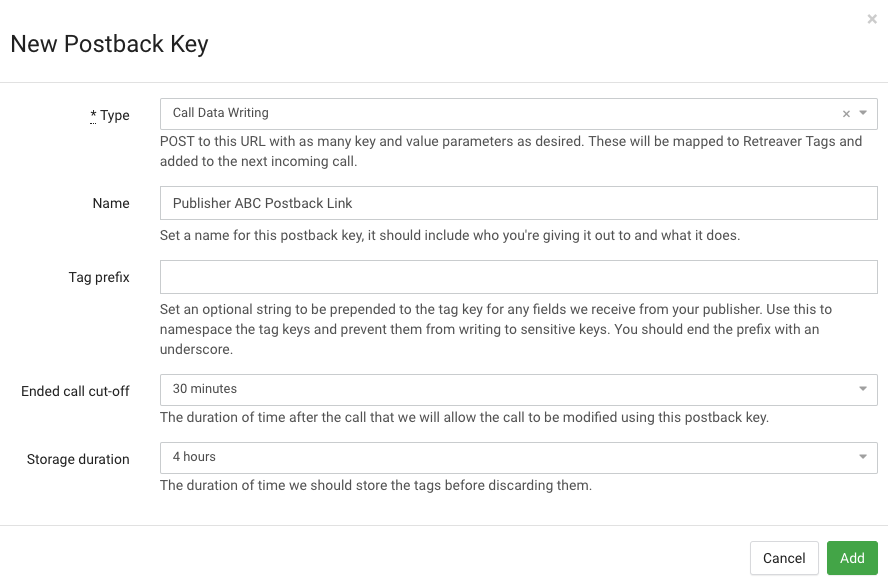
The postback key section is visible at the bottom of a publisher view page. Press the green addition button to create a new postback key, select the type: “Call Data Writing”, then insert a descriptive name and configure the end call cut-off time or storage duration if applicable. Lastly press “Add” to create the postback key.
-
This will create a new postback key that can be posted into in order to apply tags to calls.
The
PUBLISHER_KEYvalue will be automatically generated by Retreaver when creating the postback. TheCALLER_NUMBERvalue is supplied by the publisher to instruct Retreaver to apply the payload to that caller once they interact with a Retreaver campaign.Distribute this link to your publisher and instruct them to fill in the
CALLER_NUMBERvalue and any additional tags they wish to apply.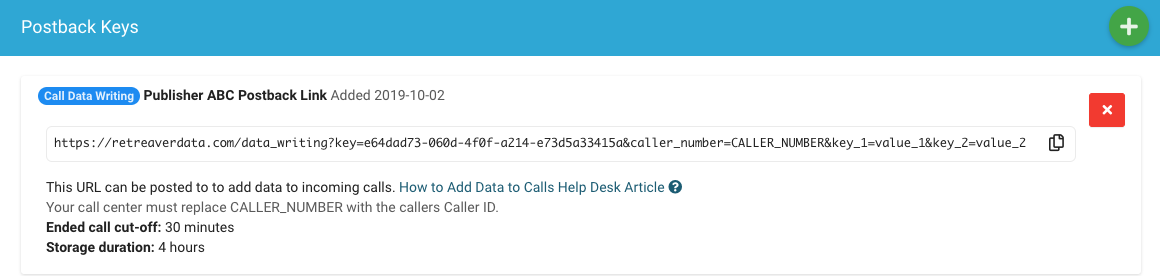
Your publisher can add URL parameters inside the posting URL using
&tag_key=tag_valuesyntax. Thekey_1=value_1&key_2=value_2is a placeholder example which can be removed.Example — posting to:
https://retreaverdata.com/data_writing?key=PUBLISHER_KEY&caller_number=CALLER_NUMBER&prequalified=trueSwipe horizontally for full code…will apply the
prequalified=truetag to the inbound caller.You can use any tag key to pass any tag value, for example:
&landing_page_click_id=abc123def456
&lead_first_name=david
&lead_has_health_insurance=true
Swipe horizontally for full code
Identifying the call: caller_number vs call_uuid
A posting link finds the call to tag by either a caller_number or a call_uuid.
caller_numberis best before the call: Retreaver stores the tags and applies them to the next matching call it receives from that number. Use this when you want to prime a call that hasn’t happened yet.call_uuidis best after the call: it pinpoints one exact call, so there is no ambiguity.
For calls that have already ended, call_uuid is the more precise identifier and the recommended direction. When a caller_number is used to find an ended call, more than one call can occasionally match the same number — not often, but it happens — and in those cases the data may be applied to a different matching call than the one you had in mind.
A practical way to adopt call_uuid: have Retreaver send the buyer a webhook at the start of the call carrying the call_uuid; the buyer holds onto it and reports against that exact call at the end. You can launch on caller_number today and move buyers to call_uuid over the following days or weeks.
Example — posting an outcome to an exact ended call:
https://retreaverdata.com/data_writing?key=BUYER_KEY&call_uuid=CALL_UUID&buyer_disposition=contract+signed
Data writing vs. conversions
Call data writing is for tags only — it records data on the call and never triggers a conversion or changes a conversion’s value.
When a conversion should actually be triggered on Retreaver, or when the value of a conversion needs to be set or modified, use a Conversion postback key instead. A conversion key can attach data to the call just like data writing, but its purpose is to fire the conversion and it can set or change the conversion amount.
Rule of thumb:
- Use Call Data Writing whenever you only want to record tags on the call — lead information sent before the call (prequalification, lead details, landing-page data) as well as dispositions and outcomes recorded after it.
- Use a Conversion postback key when a conversion should be triggered or its value set or modified — optionally attaching data at the same time.
Postback Response
Successfully posting data to Retreaver will return the following response:
{"tag_values":{"0":"","example_tag":"value123"},"caller_number":"+10123456789","status":"call not found, tags stored"}The Retreaver account manager can view the result of any incoming postbacks through the postback log.
Call Data Writing API
The API supports using call uuid instead of the number. Check details at Retreaver Call Data Writing API.
Help us improve this article or request new support guides.