
Webhook Configurator
Webhooks allow applications to communicate with other systems by sending HTTP requests to a predefined URL. The receiving system can then use the data provided by the webhook to trigger additional workflows, which makes webhooks a popular way for services to communicate in real time.
For call tracking purposes, you can use webhooks to:
- Send data from Retreaver to a database of your choice.
- Verify or enrich caller data and check eligibility for a call campaign.
- Communicate with a call center to verify if an agent is available to take a call.
- Offer the call for sale through various auction systems and evaluate proposed bids.
- Use the response of third-party systems to influence call routing behavior and more.
The webhooks configurator allows users to implement their own integrations with ease. Retreaver users can now build, analyze, tweak, and troubleshoot their call tracking webhooks.
How to work with Webhook Configurator Templates - Video Guide
How to use the Webhook Configurator
The webhook configurator can be accessed when creating a webhook:
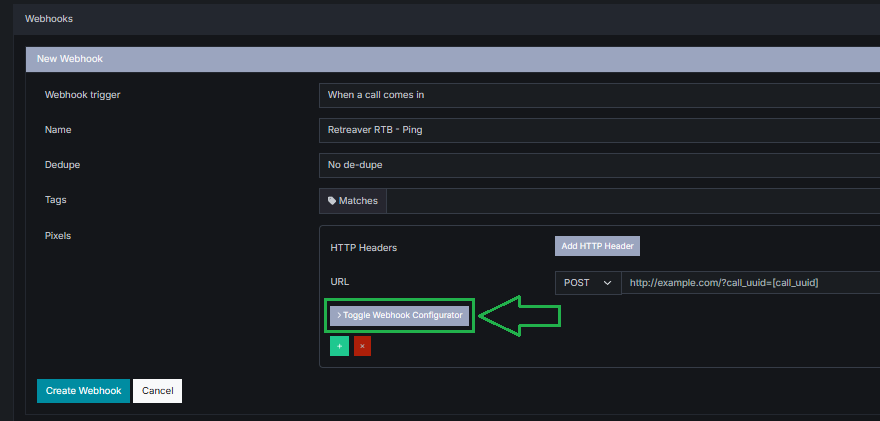
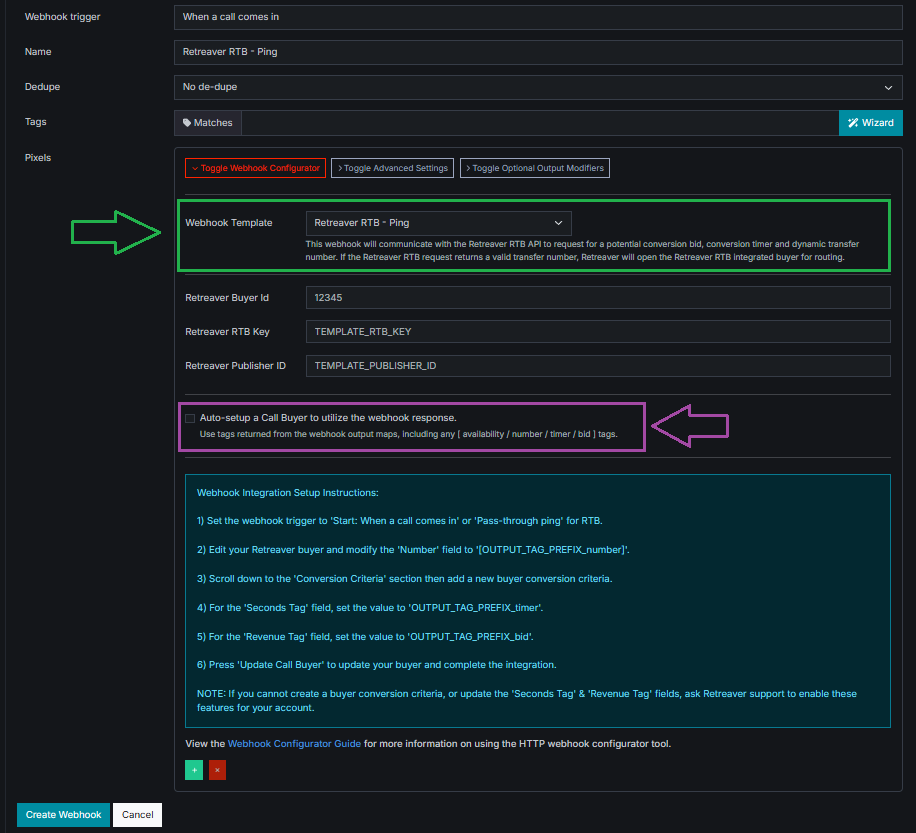
You can select a webhook template using the template dropdown highlighted in green.
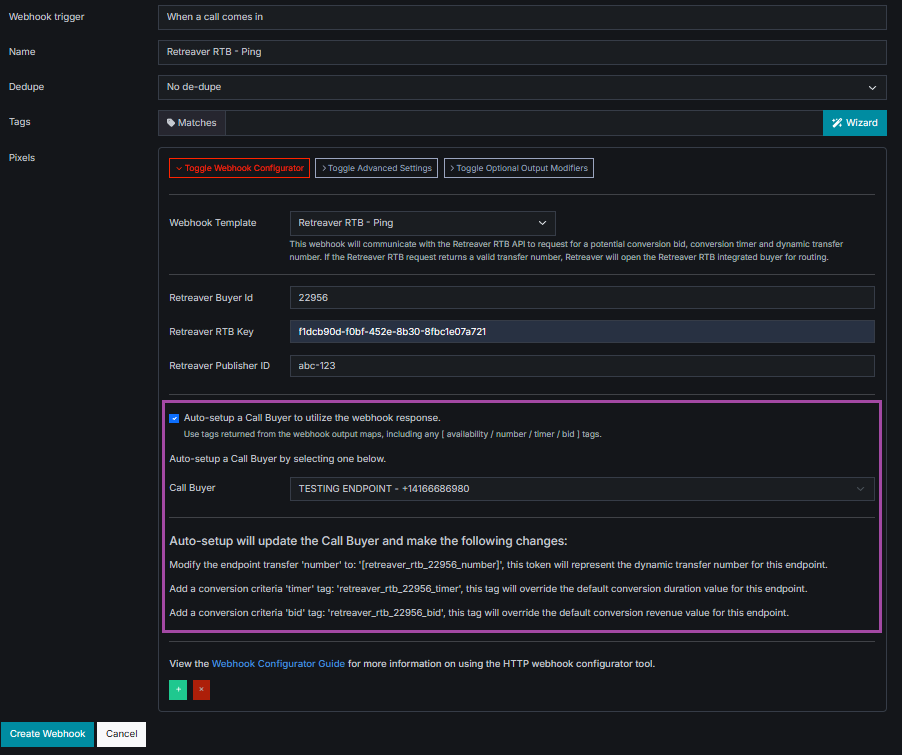
The webhook configurator can automatically tag your buyers with any relevant webhook response tags using the Auto-setup buyer tags toggle highlighted in purple:
When you enable the Auto-setup toggle, a Call Buyer dropdown menu appears. This allows you to specify which buyer profile the webhook integration is intended for. Once a call buyer is selected, a list of pending tag changes relevant to the integration will be shown.
Once the webhook is created, Retreaver will automatically generate a webhook integration with your chosen API platform and tag the selected buyer profile with any relevant tag routing conditions and conversion criteria.
No more having to create complex webhook integrations from scratch.
No more manually tagging and mapping buyers.
Retreaver is excited to see which webhook integrations you will create next.
How does the Retreaver Webhooks Configurator work?
The Retreaver Webhooks Configurator works by structuring HTTP webhook requests using templates. Webhook templates can be used to analyze and modify webhooks, allowing for more transparency and control when managing call campaign webhooks.
Available Webhook Templates
We offer the following webhook templates to help make adding webhook pixels easier to 3rd party platforms.
Note
The list of webhook templates is always expanding, so this list may be incomplete.
| Webhook Template | Integration Type |
|---|---|
| 33 Mile Radius | Ping Post |
| Accident.com | Agent Availability |
| Agent Tech | Agent Availability |
| AllCalls | Agent Availability |
| Americas Health Center | Agent Availability |
| Archenia | Ping |
| Arroyo Media | Ping |
| ApolloiLeads | Ping |
| Avenge Digital | Ping Post |
| AxQuotes | Ping |
| BenefitAlign | Agent Availability |
| Blacklist Alliance | Lead Eligibility |
| Call Grid | Bid Method, Ping Method |
| Caller Ready | Agent Availability |
| Call Sync | Ping Post |
| Call Tools | Agent Availability |
| ChaseData | Agent Availability |
| Click Thesis | Ping |
| Connie Health | Ping Post |
| Convoso | Agent Monitor Agent Availability, User Activity Agent Availability, Data Post |
| D2M | Ping Post |
| DialPad | Agent Availability |
| DigThrive | Ping |
| DNC Scrub | Lead Validation |
| Easy Health | Ping |
| ELocal | Ping |
| Enhance | Agent Availability |
| EnrollHere | Agent Availability, Export Agent Availability |
| Everquote | Ping |
| Data Post | |
| Free Voice | Agent Availability |
| Genesys USW2 | Agent Availability |
| GoHighLevel | Data Post |
| Google Analytics | Data Post |
| Health Markets | Ping Post |
| HiveHQ | Agent Availability |
| Home Appointments | Ping Post |
| Inbounds.com | Ping |
| Integriant | Agent Availability |
| Intelelead / Predictive | Ping Post |
| IntelHouse | Ping Post |
| Insurance.io | Ping |
| Inquirly | Ping Post |
| Jangl | Ping Post, Single Bid |
| Jornaya Validation | Single Query |
| LeadAmp Clearlink | Ping |
| Lead API PX | Ping Post |
| LeadPortal | Ping, Ping Post |
| Leadrilla | Ping |
| Leadspedia | Ping, Ping Post |
| LetsMakeALead | Ping Post |
| Marchex | Ping |
| MarketCall | Ping |
| Media Alpha | Ping, Ping Post |
| Modernize | Ping Post |
| Mutual Of Omaha | Agent Availability, Data Post |
| National Debt Relief | Data Post |
| Nextgenict | Agent Availability |
| Nextelco | Agent Availability |
| NextLevelDirect | Agent Availability, Ping Post |
| Nolo | Ping |
| Onyx | Ping |
| OpenHomePros | Ping |
| Phonexa | Ping |
| Pipedream | Ping |
| Pre-Ping.com | Agent Availability |
| Queue Leads | Agent Availability |
| Quinstreet | Datapass Auto Ping Post, Datapass Home Ping Post, Datapass Life Ping Post |
| QuoteWizard | Auto Ping, Health Ping |
| RateQuote | Ping Post |
| Retreaver RTB | Ping |
| Relintex | Data Post |
| Ringba RTB | Ping |
| RingPartner | Ping Post |
| Ringy | Data Post |
| Sabal Group | Agent Availability, Data Post |
| SalesRadix | Agent Availability |
| SalesRiver | Ping |
| SelectQuote | Suppression Check |
| Service Direct | Ping Post |
| Soleo | Ping |
| SpecialWeave | Agent Availability |
| SpringVentureGroup | Agent Availability, Ping |
| TalkRoute | Ping |
| TLD | Agent Availability Public Dialer, Agent Availability Vendor Ping |
| Tortx | Ping Post |
| TrackDrive | Agent Availability, Ping Post |
| Trestle IQ | Caller Validation |
| Visiqua | Ping, Ping Post |
| WisdomCo | Ping |
| WiserLeads | Ping Post |
| Winning | Agent Availability |
| Yield Pro | Data Post |
| Zoho | Data Post |
URI Encoding considerations
Webhook Template Formatting Rules
What is URI encoding? URI encoding is the process of converting certain characters, such as spaces, quotes, or special characters, into a format that can be transmitted over the internet. URI encoding ensures that URL characters are interpreted consistently across different platforms and systems.
Practical example:
The & character typically represents the beginning of a new URL parameter. If you intended to pass John&Sons in a webhook, the unencoded & would split the value into two parameters. Encoding the & into %26 results in John%26Sons, which is sent as a single value.
Retreaver automatically handles some encoding for you, such as converting spaces into %20 and quotes into %22 once a webhook URL has been edited and saved. Be careful not to leave trailing spaces or quotes in your templates, as they will be encoded and could cause webhooks to fail.
In summary, URL requests can behave differently depending on where certain URL characters appear. The general rule is to encode every character listed in the table below if it is used within a webhook configuration parameter.
List of known special characters that require URI encoding
| Special Character | Encoded Symbol | Description |
|---|---|---|
? |
%3F |
Represents the beginning of URL parameters. |
& |
%26 |
Represents a URL parameter key. |
= |
%3D |
Represents a URL parameter value. |
| space | %20 |
Represents a space character. |
" |
%22 |
Represents a quote character, typically used to enclose a JSON property. |
[ |
%5B |
Represents the beginning of a Retreaver tag token, and will be taken literally by Retreaver if enclosed and not encoded. |
] |
%5D |
Represents the end of a Retreaver tag token, and will be taken literally by Retreaver if enclosed and not encoded. |
+ |
%2B |
Represents a space character. |
Special considerations when working with URL tools:
If you are using tools to pretty print URLs or remove whitespace, be mindful that these tools can alter your template. For example, they may remove the space in an authorization token like bearer XYZ or strip <podd> operators because they are treated as HTML. Always double check your webhook configuration template if you use these tools.
Ping output dependent data (PODD)
Ping output dependent data, or PODD for short, refers to operators used to reference fields that are only available once a webhook ping step is triggered. PODD fields are typically used to confirm an event or action that was offered during a ping step.
To reference a PODD field, use the <podd_start> and <podd_end> tokens. The PODD operators swap the output map key with the value returned by the ping request, which you can then use in your post webhook step.
Example 1: If you received a verification URL from a ping step and stored it under a confirmation_url tag in your ping_output_map, your post URL parameter would appear as:
&post_url=<podd_start>confirmation_url<podd_end>Example 2: If you received a bid ID from a ping step and stored it under a ping_bid_id tag in your ping_output_map, your post_data parameter would appear as:
&post_data={"bid_id":"<podd_start>ping_bid_id<podd_end>"}Please note: If the value needs to be surrounded by quotes, surround the PODD operators with quotes.
<podd_start>tag_key<podd_end>
"<podd_start>tag_key<podd_end>"Frequently Asked Questions
How do I test webhook templates I’ve created?
- Add your webhook template into the URL portion of a webhook request.
- Set the webhook trigger to when a call starts.
- Make a test call to your Retreaver campaign.
Review our Retreaver Webhook Overview guide for more information.
How do I view the result of a webhook template?
View the pixel fired log on the call flow page to see all triggered webhooks and their responses.
How do I troubleshoot a webhook template?
Reach out to Retreaver Support. A developer can review your configuration template by replicating the request using an API tester such as Postman. If the request works in Postman, it will also work using the same specifications in the webhook configurator template.
General Webhook Troubleshooting Guidelines
- If in doubt, double check all of your configuration parameters.
- Check that JSON data structures use the correct syntax.
- Check that every field is spelled correctly and provided with a valid value.
- Check that the system you are attempting to communicate with is online.
- Check that your API credentials are correct and authorized to access the system.
Webhooks Configurator Support
If you have any questions about the Retreaver Webhooks Configurator, please open a support ticket. The Retreaver support team will assist with implementing or troubleshooting any desired integrations.
Be sure to include any relevant details such as:
- Any source material containing webhook posting instructions (API docs, API specs, etc.).
- Any references to special values (API keys, campaign IDs, specific custom properties, etc.).
- Any relevant Retreaver campaign links (for example,
https://retreaver.com/campaigns/12345). - Any relevant Retreaver buyers links (for example,
https://retreaver.com/call_buyers/12345).
Sample Template
https://retreaver.com/webhook-configurator/v1/?call_key=[call_key]&call_uuid=[call_uuid]
&output_tag_prefix=webhook_configurator
&ping_url=https://example.com/ping
&ping_method=POST
&ping_headers={"Content-Type":"application/json"}
&ping_data={"api_token":"ABC123","call_type":"health","caller_zip":"[caller_zip]"}
&ping_output_map={"PingOutputMap":{"ping_bid_id":"bid_response%5B0%5D.bid_id","ping_bid_value":"bid_response%5B0%5D.bid_value"}}
&send_post=true
&post_condition_key=ping_bid_value
&post_condition_operator=is_greater_than
&post_condition_value=0
&post_url=https://example.com/post
&post_method=POST
&post_headers={"Content-Type":"application/json"}
&post_data={"api_token":"ABC123","call_type":"health","caller_zip":"[caller_zip]","bid_id":"<podd_start>ping_bid_id<podd_end>"}
&post_output_map={"PostOutputMap":{"dynamic_transfer_number_tag":"bid.phone_number","conversion_timer_tag":"bid.conversion_timer","unmodified_bid_value":"bid.value","final_revenue_tag":"bid.value","final_payout_tag":"bid.value"}}
&payout_output_tag=final_payout_tag
&payout_modifier_percentage=1.0
&revshare_output_tag=final_revenue_tag
&revshare_modifier_percentage=1.0
&ping_decode_url_parameters=true
&post_decode_url_parameters=trueList of Webhook Configurator Properties
| URL Parameter | Description | Example Values |
|---|---|---|
call_key |
The automatically generated call key token used to tag a specific call. | (Required) [call_key] |
call_uuid |
The automatically generated call uuid token used to identify a specific call. | (Required) [call_uuid] |
output_tag_prefix |
The string prefix used to name the output tags of a configured webhook. | (Required) Any lower-case string following a snake_case naming convention, for example my_webhook will prepend tags so that the output appears as my_webhook_response. |
ping_url |
The URL representation of the HTTP ping destination. | (Required) https://example.com/ping |
ping_method |
The HTTP method used to send a webhook. | (Optional) POST or GET |
ping_headers |
The HTTP headers used to provide additional information about the request or response, such as content type or authentication. | (Optional) JSON-formatted headers, for example {"Content-Type":"application/json"} |
ping_data |
The HTTP data used to provide information about the request or response, such as call type or caller details. | (Optional) JSON-formatted data, for example {"call_type":"health","caller_zip":"[caller_zip]"} |
ping_output_map |
The map representing the location of desired HTTP response output tags. The left field represents the pending output tag name, while the right field represents the location of the tag value given a successful HTTP response. | (Optional) JSON-formatted data, for example {"PingOutputMap":{"ping_bid_id":"bid_response[0].bid_id","ping_bid_value":"bid_response[0].bid_value"}} |
send_post |
The boolean value used to indicate if a follow-up HTTP post request is desired. | (Optional) FALSE or TRUE |
post_condition_key |
The tag name used to evaluate whether a follow-up HTTP post request should be sent. | (Optional) ping_bid_value |
post_condition_operator |
The operator used to evaluate whether the post condition key is true. | (Optional) is_greater_than, is_less_than, is_equal, is_unequal, exists |
post_condition_value |
The value used to evaluate whether or not the post condition key is true. | (Optional) Numeric or string value, for example success or 100 |
post_url |
The URL representation of the HTTP post destination. | (Optional) https://example.com/post |
post_method |
The HTTP method used to send a webhook. | (Optional) POST or GET |
post_headers |
The HTTP headers used to provide additional information about the request or response, such as content type or authentication. | (Optional) JSON-formatted headers, for example {"Content-Type":"application/json"} |
post_data |
The HTTP data used to provide information about the request or response, such as call type or caller details. | (Optional) JSON-formatted data, for example {"api_token":"ABC123","call_type":"health","caller_zip":"[caller_zip]","bid_id":"<podd_start>ping_bid_id<podd_end>"} |
post_output_map |
The map representing the location of desired HTTP response output tags. The left field represents the pending output tag name, while the right field represents the location of the tag value given a successful HTTP response. | (Optional) JSON-formatted data, for example {"PostOutputMap":{"dynamic_transfer_number_tag":"bid.phone_number","conversion_timer_tag":"bid.conversion_timer","unmodified_bid_value":"bid.value","final_revenue_tag":"bid.value","final_payout_tag":"bid.value","final_conversion_timer_tag":"bid.conversion_timer"}} |
payout_output_tag |
The output tag that will store the modified payout value using the payout_modifier_percentage. | (Optional) A tag key listed in your HTTP output map, for example final_payout_tag |
payout_modifier_percentage |
The percentage value used to multiply the payout_output_tag value with. | (Optional) Float value between 0.0 and 1.0 |
revshare_output_tag |
The output tag that will store the modified revshare value using the revshare_modifier_percentage. | (Optional) A tag key listed in your HTTP output map, for example final_revenue_tag |
revshare_modifier_percentage |
The percentage value used to multiply the revshare_output_tag value with. | (Optional) Float value between 0.0 and 1.0 |
timer_offset_tag |
The output tag that will store the modified timer value using the timer_offset_modifier. | (Optional) A tag key listed in your HTTP output map, for example final_conversion_timer_tag |
timer_offset_modifier |
The seconds value that will be added to timer_offset_tag. | (Optional) Integer value between -999 and 999 |
ping_decode_url_parameters |
The boolean value used to indicate if the HTTP ping request contains URL parameters. | (Optional) FALSE or TRUE |
post_decode_url_parameters |
The boolean value used to indicate if the HTTP post request contains URL parameters. | (Optional) FALSE or TRUE |
Help us improve this article or request new support guides.