
Configuring Call Recording Settings
The Health Insurance Portability and Accountability Act of 1996 ( or HIPAA for short ) is a federal statute created to protect the health care information of patients from fraud or misuse.
Affiliates working in the health insurance verticals will be asked to limit or disable call recordings to align with the requirements of the HIPAA act.
For this use case, Retreaver provides the ability to set duration limits on call recordings, and even disable call recordings altogether for certain buyer profiles.
Call Recording Configuration Options
Setting Call Recording Duration Limits on Campaigns
You can configure the maximum call recording duration on a campaign by editing the “Max recording duration” field when editing a campaign:
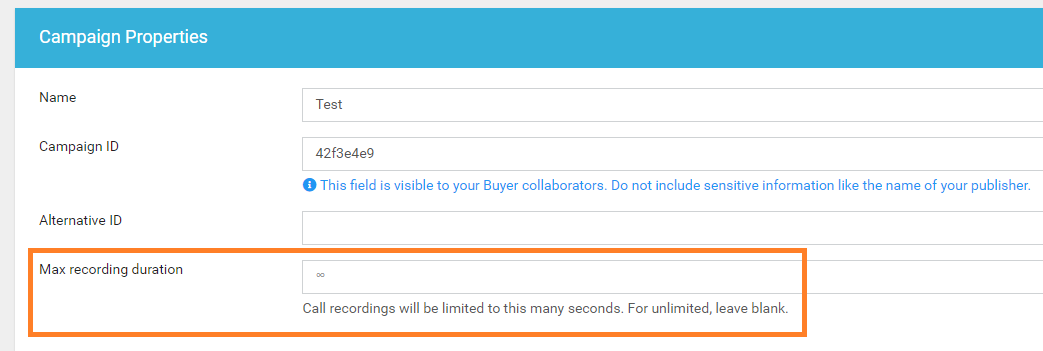
To enable this feature, please contact Retreaver support to enable it on your account:

Disabling Call Recordings for a Buyer
You can disable call recordings for a specific buyer by editing the buyer profile and toggling the “Block Recording” field. This will disable call recordings from being generated for calls routed to this particular endpoint:
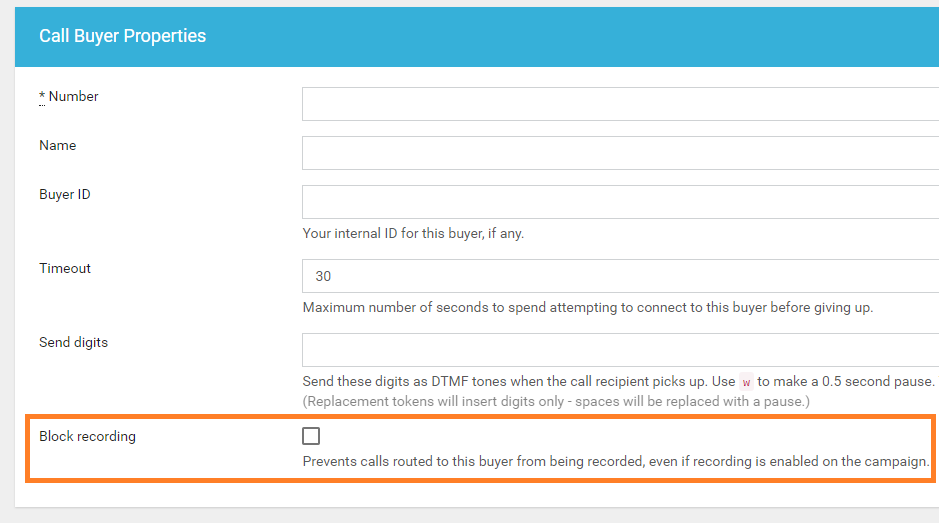
Note
This feature can only be enabled and toggled by a Retreaver admin at this time. To enable this feature, please contact Retreaver support to enable it on your account.
Help us improve this article or request new support guides.