
Duplicate Caller Handling
When routing a call or deciding how to respond to a Real-Time-Bidding (RTB) request, Retreaver can consider whether the caller has already been connected with a buyer in a previous call and has made a conversion. In other words, it can determine if the current call is a duplicate.
Tracking duplicate calls is one of Retreaver’s key features. You can learn all about it at What is Call De-Dupe?, where you’ll also find information on what constitutes a duplicate call and what “De-Dupe” means.
An additional feature called “Duplicate Caller Handling” allows Retreaver to use a caller’s duplicate status to make more informed decisions, such as which buyer the call should be routed to or what bid should be returned in an RTB response. This feature can be enabled or disabled for a specific company and configured at the campaign level.
Business Scenarios for Using Duplicate Caller Handling
Scenario 1: A buyer doesn’t want to be connected to a caller they’ve already spoken with.
Here’s how it typically works:
- A caller dials in and gets connected to a buyer.
- The buyer speaks with the caller, and the call is either converted (the buyer makes a sale) or the buyer determines the caller is not a good fit for their offer.
- If the same caller calls again, there’s no value for the buyer to talk to them again since they’ve already had a conversation. The buyer might refuse to pay to be connected to that caller a second time.
- In this case, the call could be routed to a different buyer who hasn’t spoken to the caller and would be interested in engaging with them.
Scenario 2: A publisher sends an RTB request to your campaign with a caller’s number. A bid should only be returned for buyers who have never spoken with that caller before.
Here’s how it typically works:
- A user visits a publisher’s landing page and is given a phone number to call.
- The user dials the number, and the call is routed into the publisher’s campaign.
- The publisher’s campaign sends an RTB request to multiple buyers, including you.
- Your campaign receives the RTB request and checks if the caller has already spoken with any of the buyers on your campaign.
- Your campaign should return a bid taking into account only buyers who have not previously converted that caller. If no such buyers are available, the system should respond that there is no suitable buyer in the campaign to accept the call.
How to Enable Duplicate Caller Handling
Warning
By default, Duplicate Caller Handling is disabled, as it’s an advanced feature that can cause calls to drop. This can happen if a campaign is set to only connect with buyers who have not previously spoken with the caller. If no such buyers are available, the call will be dropped.
Enabling at the Company Level
- Log in to Retreaver — Visit Retreaver and sign in to your account.
- Go to the Retreaver Store — Navigate to the Retreaver Store.
- Enable Duplicate Caller Handling — Search for “Duplicate Caller Handling” in the store and enable the feature for the entire company.
Once this feature is enabled at the company level, you can choose to activate it for individual campaigns.
Configure Routing for Specific Campaigns
After enabling Duplicate Caller Handling for the company, you can set it up for specific campaigns by doing the following:
- Go to the Campaign — Open the campaign you want to configure.
- Select “Toggles” — In the campaign settings, find and click on “Toggles.”
- Enable Duplicate Caller Handling — Look for the Duplicate Caller Handling options and activate them as needed for the campaign.
How to Use Duplicate Caller Handling with Calls
Duplicate Caller Handling can be used to manage how calls and RTB (Real-Time Bidding) requests are routed.
By default, enabling Duplicate Caller Handling will not change your existing routing settings. Calls will still be routed according to all other configured options.
To start using Duplicate Caller Handling for a specific campaign, follow these steps:
- Go to the Campaign — Open the campaign you want to configure.
- Select “Toggles” — In the campaign settings, find and click on “Toggles.”
- Configure Duplicate Caller Handling — Look for the Duplicate Caller Handling options. You can choose either “New Convertible Buyer” or “New Convertible Handler”, depending on the terminology you’re using.
Once selected, this feature will apply the new routing logic based on your choice.
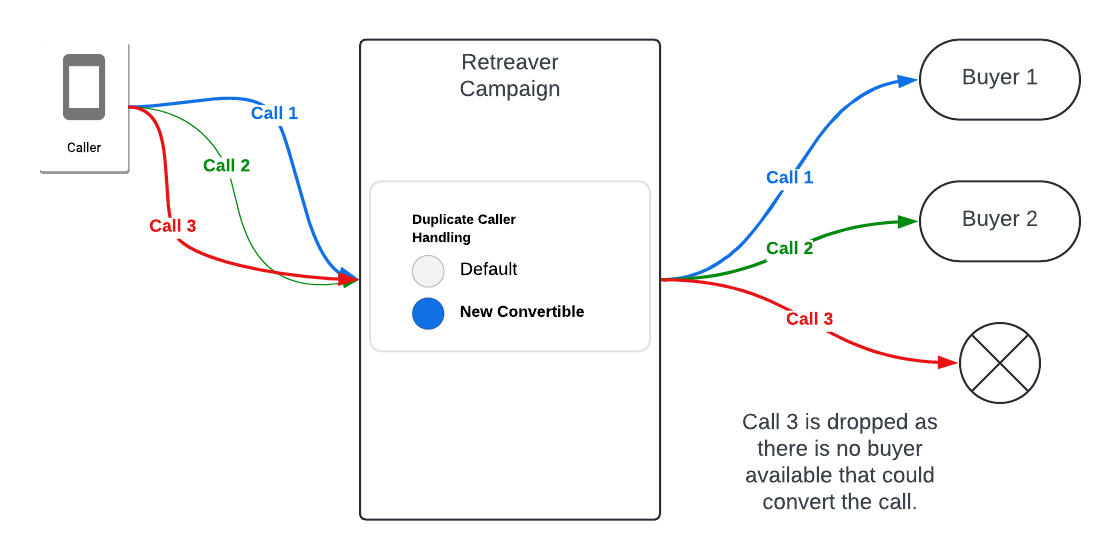
When the “New Convertible” option in Duplicate Caller Handling is turned on, Retreaver will check if the call will be considered a duplicate for the buyer at the end of the call. If the caller is a duplicate, that buyer will be excluded as a possible target for the call.
Caution
Call Drops: If all buyers consider the caller a duplicate, the call will be dropped.
To prevent dropped calls, we recommend either redirecting the call to another campaign as a last resort, or having a fallback buyer who accepts duplicate calls and has no deduplication settings in place.
How to Use Duplicate Caller Handling With RTBs
When the New Convertible option is selected, and an RTB (Real-Time Bidding) request is sent to a campaign, Retreaver ensures that the caller is connected to the best available buyer who does not consider the caller a duplicate.
If all potential buyers consider the caller a duplicate, Retreaver will return a “no-target” response, indicating that no suitable buyer is available for the call.
curl -X POST "http://api.routingapi.com/rtbs.json?key=490530d2-9f24-4be2-894b-a80e971390df&publisher_id=XXX&caller_number=+19175470066"
{
  "uuid": "46d18a33-9b7e-4943-8c06-8856b97f4fa0",
  "status": "no-target"
}Help us improve this article or request new support guides.
Previous
Creating Retarget Lists using Active Campaign
Next
How to Track Calls as Goals in Google Analytics