
Troubleshooting RTB Requests
If your Retreaver Real-Time Bidding (RTB) request is not returning a buyer or shows errors like no target, use the checks below. Most RTB issues are caused by request format, invalid caller data, or account access.
Common Issues
1. Use the correct RTB endpoint format
Your RTB request should be sent to:
https://rtb.retreaver.com/rtbs.jsonInclude required parameters such as:
keypublisher_idcaller_number
Example:
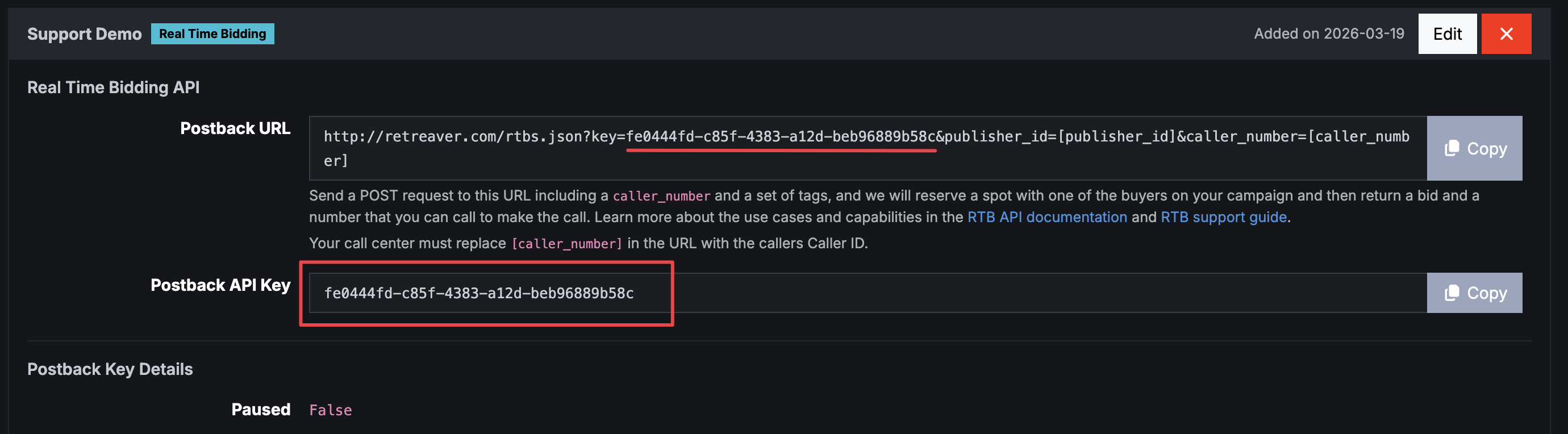
https://rtb.retreaver.com/rtbs.json?key=YOUR_POSTBACK_API_KEY&publisher_id=YOUR_PUBLISHER_ID&caller_number=15555551234&caller_zip=90210Where to find RTB API Key
The key parameter will be available under the Postback Keys section, once you have created an RTB Postback Key it will be titled Postback API Key
2. Send the request as a POST
RTB requests must be sent as a POST, not a GET.
If you paste the URL directly into a browser, that usually sends a GET request and may not work as expected. Make sure your posting platform or webhook tool is configured to use POST.
3. Pass a valid caller number
The caller_number must be a real, valid phone number.
Common issues:
- Placeholder values are not being replaced, such as:
[caller_number]caller_number
- Invalid or malformed numbers
- Empty values
Use a properly formatted number, for example:
caller_number=155555512344. Avoid empty required fields
If you include fields like caller_zip or caller_state, make sure they contain valid values. Empty parameters may reduce match success depending on buyer requirements.
Example of a better request:
https://rtb.retreaver.com/rtbs.json?key=YOUR_POSTBACK_API_KEY&publisher_id=YOUR_PUBLISHER_ID&caller_number=15555551234&caller_zip=902105. If you receive no target
A no target response usually means no buyer was available or eligible to take the call.
In that case:
- Copy the RTB UUID or call UUID
- Contact the buyer directly
- Ask them to review why the call was not accepted
Retreaver cannot diagnose buyer-side routing rules from the publisher side.
6. Verify buyer profile access for RTB setup
If support asks for your buyer profile, send the URL of the buyer endpoint page, which looks like:
https://retreaver.com/call_endpoints/123456You can find buyer profiles here:
https://retreaver.com/call_endpoints/If you see “not authorized to access this page”, you may be logged into a publisher collaborator role. Use the account switcher in the top-left corner to switch to your main account.
RTB Matched but Calls Not Reaching the Buyer
If RTB pings are matching but calls are not ringing through, the issue is usually related to buyer availability, routing settings, or publisher behavior after a reservation is made.
Check the call flow
Open a call from your Call Log and review its Call Flow to see exactly where the call stopped. The call flow will show whether no buyer matched, the buyer was closed, the caller did not meet geo or tag requirements, or the call never entered Retreaver at all.
Guide: How to View Call Details and read a Call Flow
RTB Log vs Call Log
These logs show different things:
- RTB Log: ping activity, including reservations that may never become calls
- Call Log: actual calls that entered Retreaver
Common RTB statuses:
- Reserved: a slot was held for the publisher to send the call
- Expired: the publisher got the reservation but never sent the call
- No target: no eligible buyer was available
If you see many expired RTBs but no calls, the publisher is not routing the reserved calls to you.
Verify buyer availability
Make sure the buyer can actually take the call:
- Business hours are open
- Geo targeting matches the caller
- Required tags/filters are present
- The buyer endpoint/webhook is responding correctly
- The buyer’s direct phone line does not go to voicemail
If a direct test call to the buyer goes to voicemail, the issue is on the buyer side, not in Retreaver.
Review routing priority and weight
A buyer may be configured correctly but still receive few or no calls if it is too low in the routing waterfall. Check Priority order and Weight settings.
Avoid unusual priority values like -1, 0, 1. Use standard ascending priorities instead: 1, 2, 3.
Check number-level business hours
If the tracking number itself has business hours applied, calls outside those hours may never pass through the number. Edit the number and confirm it is open when you are testing. If appropriate, set it to 24/7.
Confirm your call log filters
If you cannot find your test calls, reset all filters, expand the date range, and search by number or UUID. A narrow date filter is a common reason calls appear “missing.”
What to send Support
To speed up troubleshooting, include:
- The full RTB request format you are using
- Whether the request is sent as POST
- A call detail URL or RTB UUID
- The buyer profile URL
- A screenshot of the response, if available
For full setup details, see: Working with the Retreaver Real-Time-Bidding API
Contact support here https://learn.retreaver.com/tickets/new if you have any more questions.
Help us improve this article or request new support guides.