
How to Route Calls to a SIP Address
Retreaver offers the option of routing calls to a Session Initiation Protocol (SIP) address instead of a phone number. Instructions below will guide you on using SIP for inbound and outbound call routing.
Outbound SIP
Outbound SIP is configured by editing the Buyer (Call Endpoint) and changing the Number field. Once you begin typing sip: the screen will change to allow entry for the username and password fields required.
Numbers include optional [token] replacements such as buyer ids, tags, or other data from your Retreaver system.
Setting up SIP on a Buyer profile
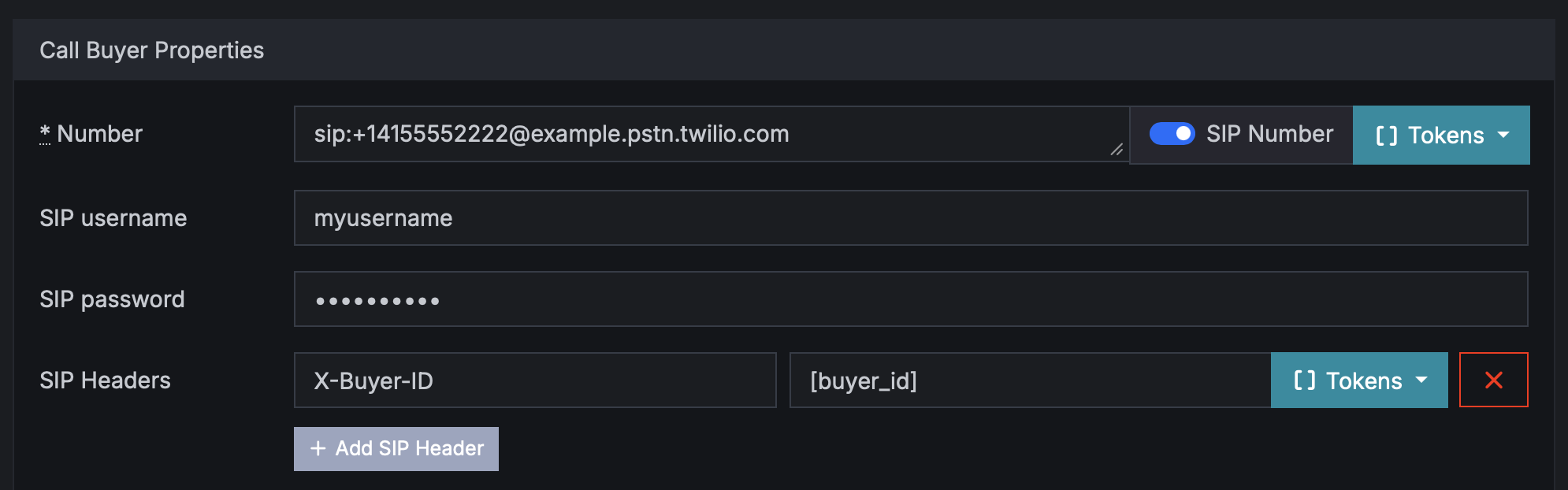
After adding a valid SIP number to a Buyer there are no changes needed to the Retreaver system to do outbound SIP, but it is important to know how the Buyer will authenticate the calls via SIP to their system.
SIP Username and Password (optional)
You may authenticate using one of the following three methods:
- No authentication - just leave Username and Password blank.
- With a Username and password.
- By Whitelisting Twilio IP addresses. Leave the Username and Password blank for this option. If using this method, below is what you will need to provide your Buyer.
SIP Number vs Username and Password
For a SIP target, the value in Number like sip:username@example.com is the destination SIP address we dial. In other words, the username in the URI is the user/extension/address part of where the call should go, not the authentication login by itself.
The SIP Username and SIP Password fields are separate. When you fill them in, our system passes them as outbound SIP authentication credentials to the provider when placing the call. If you leave them blank, we still dial the SIP URI in Number, but we do not derive auth credentials from that URI and we do not send SIP auth unless those form fields are explicitly set.
So the practical difference is:
sip:username@example.comtells us where to send the callSIP Username/SIP Passwordtell us how to authenticate with that SIP server, if authentication is required
SIP Headers
A common SIP Header usecase is routing the call differently on the buyer’s PBX based on metadata.
Example: you send a call to:
sip:agentqueue@example.com
and include a SIP Header like:
X-Campaign-ID: 1234   <- NOTE: You can use replacement tokens such as [campaign_id] to automatically populate IDs

X-Publisher-ID: 5678
Their SIP server can read those headers and decide things like:
- send calls from campaign
1234to a specific queue - prioritize certain publishers
- save metadata to a dialer/CRM
Once you enter a sip number, click Add Header to add as many SIP headers as you need.
Default SIP headers
Calls to Buyers using SIP will automatically include several SIP headers in the INVITE request. These headers include X-PH-RetreaverUUID, the UUID for the call; X-PH-RetreaverKey, the postback key for the call; X-PH-RetreaverAFID, the publisher ID of the responsible Publisher; and X-PH-RetreaverSID, the sub_id of the responsible sub-affiliate/sub-publisher if one is set.
Inbound SIP
Inbound SIP will need to be set up manually with the help of a member if the Retreaver team so contact us to get started. Once an admin has enabled this for your account, you can begin setting up the inbound SIP.
Inbound SIP is authenticated in one of two ways:
- With a Username and Password. A Retreaver admin will provide this for you during setup. Example: sip:+18882223333@retreaver.sip.twilio.com
- By Whitelisting IP addresses where traffic will come from. Send a list of any source you need whitelisted to support@retreaver.com.
Example:
sip:+18882223333@retreaver-ip.sip.twilio.com
Any number you pull from the system can receive calls via SIP from any country. Just replace the example above with the phone number you want SIP calls to come in on - and don’t forget the plus and the country code!
SIP IP Whitelisting
If you choose to use IP whitelisting on your SIP PBX server, please contact us to retrieve a full list of signalling IPs.
Help us improve this article or request new support guides.