
Postback Keys
A Postback Key is a scope-limited API token that lets an external system — a publisher, a buyer, an internal automation, or your own backend — interact with a specific slice of your Retreaver account through the Retreaver API. Each key is issued on a single Retreaver entity (a Campaign, Publisher, Buyer, or Buyer Group) and is locked to one behavior:
- Writing data to calls
- Receiving RTB pings
- Recording conversions
- Rejecting or transferring calls
- Reading call data
- Managing caller lists
Postback Keys are the connective tissue between Retreaver and everything else in your pay-per-call stack. They are how a publisher pushes an RTB ping into your campaign, how a buyer marks a conversion, how a buyer’s IVR enriches a call mid-conversation, and how a caller-suppression list gets updated from outside Retreaver, all without giving anyone access to your full account.
This guide explains what Postback Keys are, walks through every key type at each level, and shows how to create and use them.
What is a Postback Key?
A Postback Key is a unique API key that Retreaver generates for you. You hand that key out (usually embedded in a URL) to a third party. When the third party hits that URL with the agreed-upon parameters, Retreaver:
- Confirms the key is valid and not paused.
- Identifies which entity it belongs to (Campaign, Publisher, Buyer, or Buyer Group).
- Performs the action the key is authorized to perform — and only that action.
- Returns a response (JSON or plain text, depending on the action) indicating success, failure, or any tags / IDs that were applied.
Important
Keys are scoped. A Caller List Management key on a Campaign can only update caller lists for that campaign — it cannot ping for a call, write tags, or read other campaigns. This minimizes blast radius if a key is ever leaked.
Anatomy of a postback URL
Most Postback Keys produce a URL of the form:
https://api.retreaver.com/<endpoint>?key=POSTBACK_KEY_HERE&<parameter>=<value>&<parameter>=<value>RTB keys hit rtb.retreaver.com, and Call Data Writing / Reading / Conversion keys hit retreaverdata.com — the URL the UI generates for each key already has the right host baked in.
The one exception to the ?key= query parameter form is the Conversion key, which puts the key in the URL path:
https://retreaverdata.com/postbacks/POSTBACK_KEY_HERE?caller_number=...&value=...Several parameter values are typically filled in by the calling system at request time. They’re written as replacement tokens (token substitutions) you embed in the URL when you hand it off. Common Retreaver replacement tokens:
| Token | What it expands to |
|---|---|
[call_uuid] |
Retreaver’s unique ID for the call |
[caller_number] |
The caller’s phone number (E.164) |
[publisher_id] (or [source_id] in the default locale) |
The publisher’s Retreaver ID |
[campaign_id] |
Retreaver’s campaign identifier |
[call_key] |
A per-call API key (used for buyer-side data writing via SIP / webhook) |
Conversion postback URLs templates in the UI use uppercase placeholders (CALLER_NUMBER, CALL_UUID, CALL_DURATION, CALL_START_EPOCH, REVENUE) — those are filled in by the buyer’s system, not by Retreaver macros.
The levels — Campaign, Publisher, Buyer, Buyer Group
Postback Keys are created on the entity they operate on. The entity determines which key types are available and which scope the resulting URL controls:
| Level | Available key types | Typical use case |
|---|---|---|
| Campaign | Real Time Bidding, Caller List Management | Accepting inbound RTB pings from publishers; managing campaign-wide caller suppression / acceptance lists. |
| Publisher | Real Time Bidding, Call Data Writing | Authorizing an individual publisher to push RTB pings or to write data onto calls they’ve sent you. |
| Buyer | Conversion, Caller List Management | Letting a buyer post conversions back to Retreaver after the call; managing per-buyer caller lists. |
| Buyer Group | Call Rejection, Call Transfer, Call Data Reading, Conversion | Live-call control (reject / transfer) and group-level data exchange between Retreaver accounts. |
A Company-level option also exists for Call Data Writing and Caller List Management, useful when you want one key that operates across the whole company rather than a single entity.
Note
Some types are gated by feature flags or admin toggles. Real Time Bidding requires the real_time_bidding feature. Call Transfer requires live_call_control. The legacy Call Reservation type is no longer creatable — existing keys keep working, but new ones must use Real Time Bidding instead.
Important
You may have multiple keys of the same type on the same entity — for example, three RTB keys on one campaign, one per publisher integration. Use descriptive names (Publisher_A_RTB, Publisher_B_RTB) so they’re easy to revoke individually if a partner relationship ends.
Security considerations
Postback Keys are bearer tokens, anyone with the URL can use it. A few hygiene rules:
- Treat the key like a password. Never paste full postback URLs into public Slack channels, Jira tickets, or shared docs.
- Always send postback URLs over HTTPS.
- When a partner relationship ends, delete the key in Retreaver. The URL becomes invalid immediately.
- Use one key per partner / per integration, not a shared key across multiple partners. Granular keys = clean attribution + clean revocation.
- If a key only needs to be paused temporarily (e.g. during a partner outage), use the Paused toggle on the key rather than deleting it.
Important
If you suspect a key has been leaked, delete it and re-issue a new one, then update the partner. Do not “rotate” by reusing the same name - the underlying token must be regenerated.
Campaign-Level Postback Keys
Campaign-level keys are how publishers push reservation requests into your campaign and how external systems manage the campaign’s caller lists. They’re the keys most often involved in RTB integrations.
Real Time Bidding (RTB)
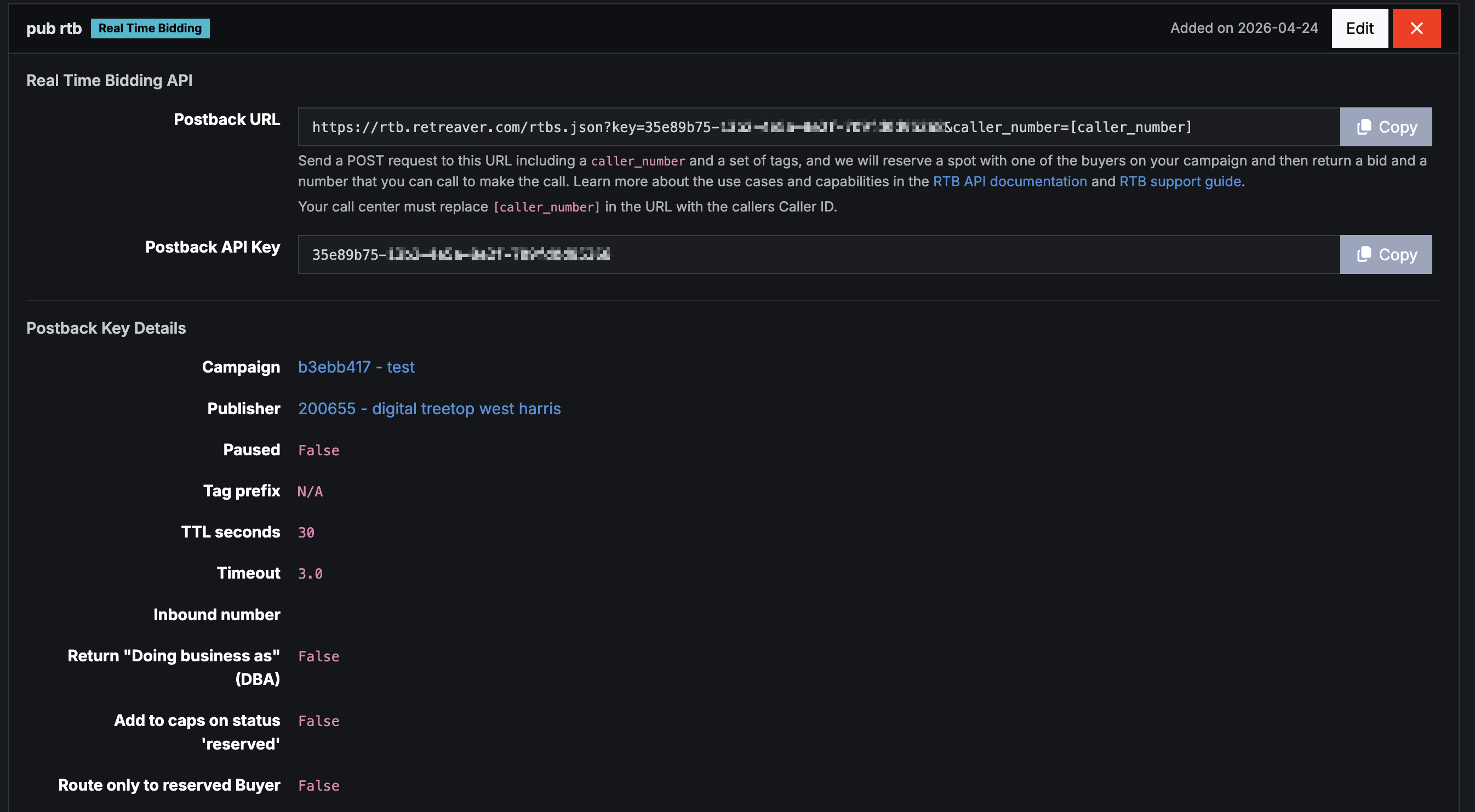
The Real Time Bidding key accepts inbound ping requests from a publisher’s ad-tech stack. The publisher pings Retreaver with a caller’s number; Retreaver evaluates available buyers against the caller profile and returns a reservation (a phone number + UUID) the publisher can then send the caller to.
URL shape (from the UI):
https://rtb.retreaver.com/rtbs.json?key=POSTBACK_KEY&source_id=<publisher_id>&caller_number=[caller_number]When the key is bound to a specific publisher, source_id (or publisher_id in publisher-facing locales) is baked in and the publisher only supplies caller_number.
Required parameter when the publisher pings:
caller_number— the inbound caller’s phone number.
Key configuration options:
- Name — human-readable identifier (required).
- Publisher — the publisher profile this key is tied to (optional; bind it if you want one key per publisher).
- Tag prefix — string prepended to any tags the publisher sends along with the ping.
- TTL (
ttl_seconds) — how long Retreaver should hold a successful RTB reservation open while waiting for the publisher to transfer the call. Must be between 10 and 999 seconds. Default recommendation:15. - Timeout — how long Retreaver should wait for downstream pings to complete before continuing. Default recommendation:
5. - Inbound number — optionally constrain RTB to a specific tracked number on the campaign.
- Return DBA (
return_dba) — include the matched buyer’s DBA name in the response. add_to_caps_on_status_reserved— whentrue, the reservation immediately decrements your concurrency / hard / hourly / daily / monthly caps at the RTB stage (rather than waiting for the call to arrive). Use this when you’d rather over-reserve than over-deliver.route_only_to_reserved_target— whentrue, the inbound call from this reservation will only route to the buyer that was matched at ping time, skipping the rest of the buyer pool.allow_no_caller_number— allow RTB requests without acaller_number(rare; usually for test integrations).- Ping Shield — optional rate-limit settings (
ping_shield_outbound_count_limit,ping_shield_outbound_ms_limit) and inbound-claim limits (claim_percent_threshold,blocked_inbound_percent) for protecting the integration from runaway traffic.
Important
One RTB key per campaign is technically enough, but most teams issue one per publisher integration so they can monitor and revoke individual partners separately.
Example response (scrubbed):
{
  "uuid": "a1b2c3d4-1234-5678-90ab-cdef01234567",
  "status": "reserved",
  "inbound_number": "+1XXXXXXXXXX",
  "expires_at": "2026-05-15T14:25:33Z",
  "retreaver_payout": 12.5,
  "retreaver_seconds": 90,
  "retreaver_target_dba": "Example Buyer DBA"
}The publisher then has until expires_at to transfer the caller to inbound_number for the reservation to be claimed.
Caller List Management (Campaign level)
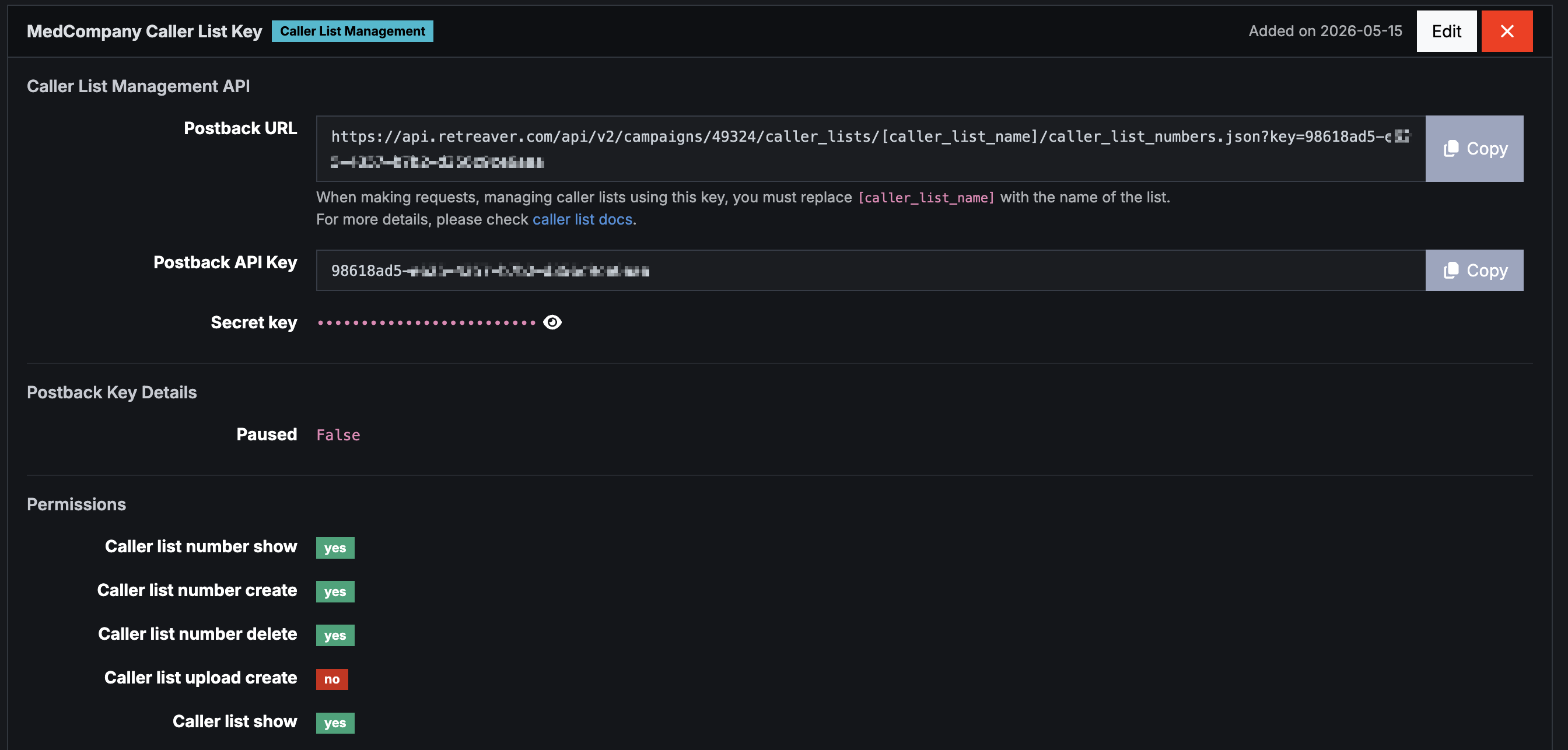
The Caller List Management key lets an external system update a campaign’s caller lists via API. Caller lists associate phone numbers with routing behavior:
- Suppression lists — lists whose names start with
suppressedblock matching callers from being routed to a buyer. - Acceptance lists — lists whose names start with
acceptedonly allow matching callers through to a buyer.
These prefixes are enforced by Retreaver’s routing logic — name.start_with?("suppressed") and name.start_with?("accepted") — so naming matters.
URL shape:
https://api.retreaver.com/api/v2/campaigns/<id>/caller_lists/<list_name>/caller_list_numbers.json?key=POSTBACK_KEYThe list name is part of the URL path, not a query parameter.
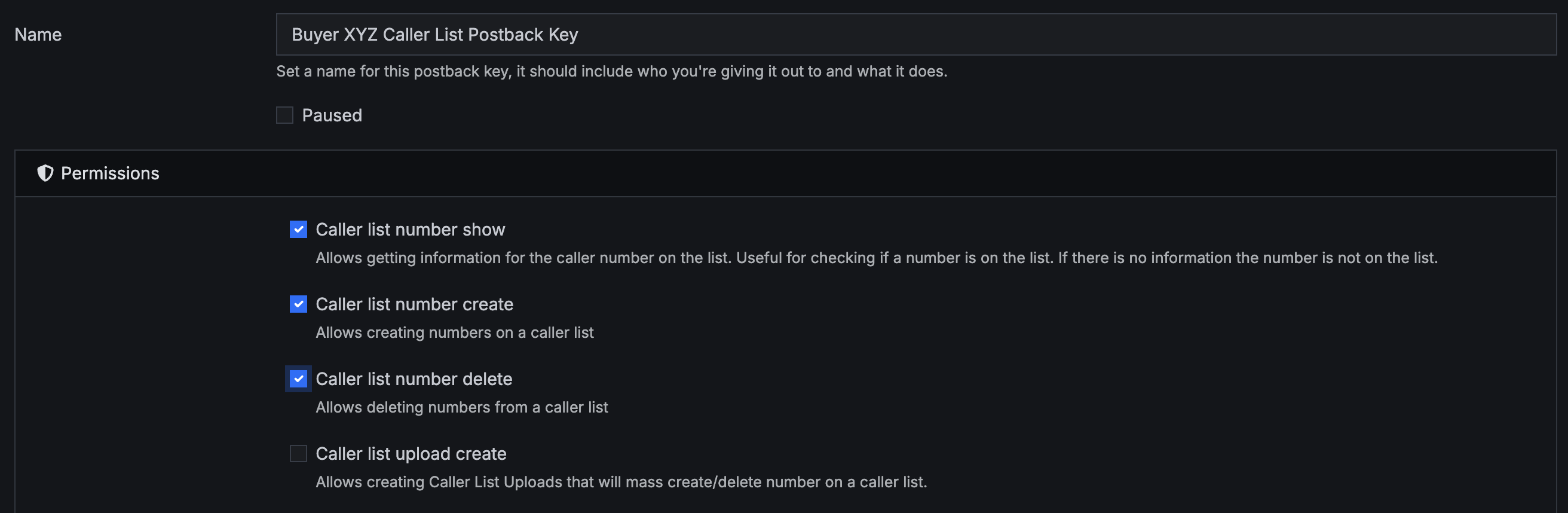
Key configuration options:
- Name — human-readable identifier.
- Permissions — fine-grained toggles for
caller_list__show/index/create/delete/update,caller_list_number__show/create/delete,caller_list_upload__create, andcaller_list_check__create. Grant only what the integration needs. - Secret Key — a separate 24-char base58 secret, viewable in the key’s detail screen (eye-icon toggle to reveal).
Use cases for a Campaign-level Caller List Management key:
- Maintaining a campaign-wide DNC (do-not-call) list updated from your CRM nightly.
- Auto-suppressing callers who’ve already converted, to prevent duplicate-call payouts.
- Adding “high-value” callers to an acceptance list to ensure they hit your best buyers.
Note
Pair this key with your CRM’s webhook system to keep caller lists in sync with conversion / opt-out events automatically.
Call Reservation (deprecated)
The Call Reservation type is no longer creatable. It was a precursor to RTB. Existing reservation keys keep working, but new integrations should use Real Time Bidding instead.
Publisher-Level Postback Keys
Publisher-level keys live on the Publisher record. They authorize that publisher (or a system acting on their behalf) to push RTB pings into your campaigns or to write data onto calls attributed to them.
Real Time Bidding (Publisher level)
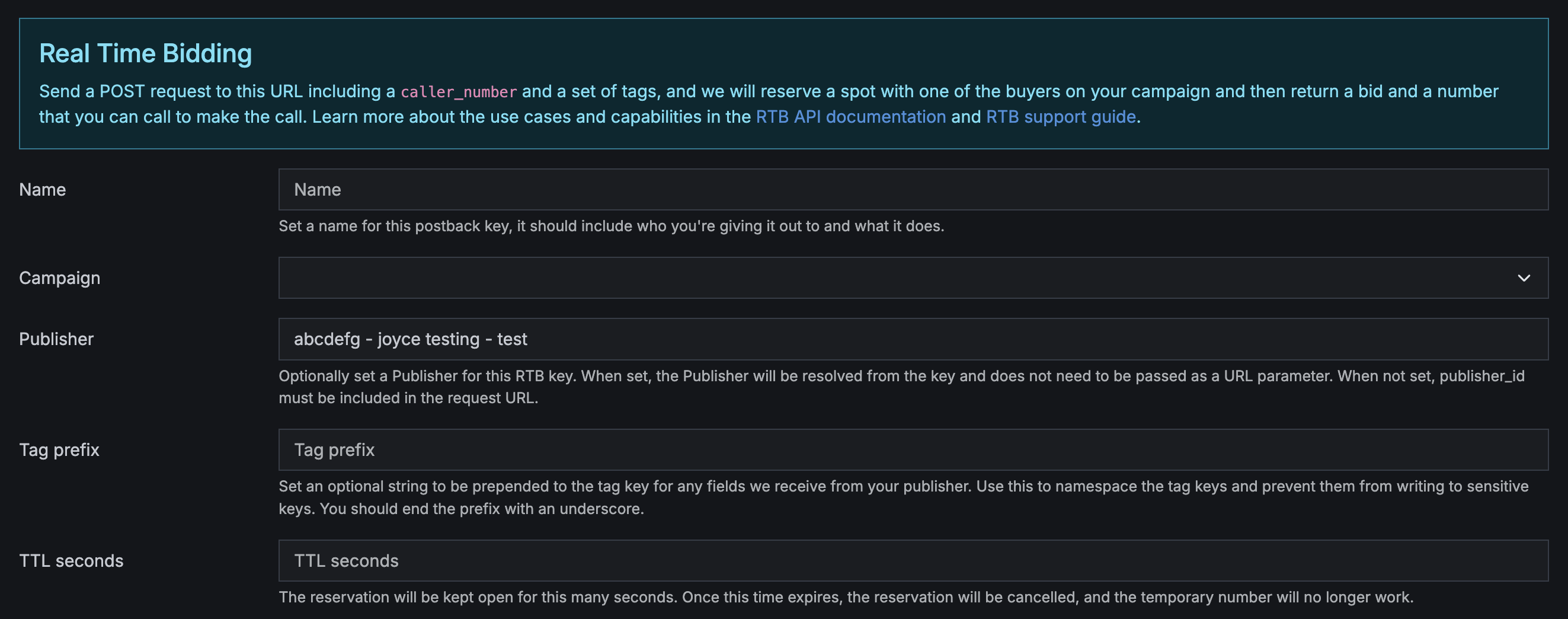
A Real Time Bidding key on a Publisher is the publisher-scoped equivalent of the campaign-level RTB key — same parameters and response shape, but bound to a specific publisher so you (and they) can track and revoke it independently. Configuration fields are identical to the campaign-level RTB key (TTL, timeout, ping shield, etc.).
Important
Whether you place RTB on the Campaign or on the Publisher is mostly an organizational choice. Campaign-level keys are convenient when one campaign accepts pings from many publishers. Publisher-level keys are convenient when one publisher pings into many campaigns. Most accounts use both.
Call Data Writing (Publisher level)
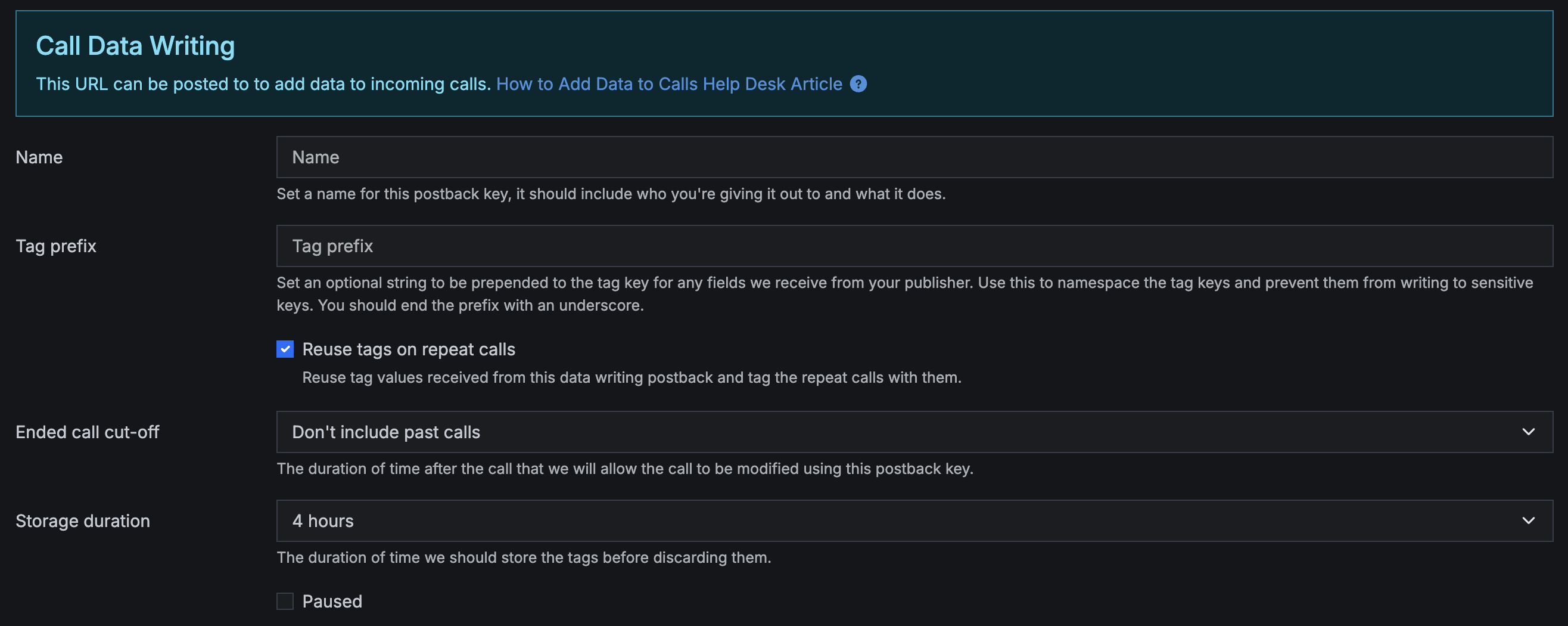
The Call Data Writing key lets the publisher (or any authorized external system) attach tags to calls by posting to Retreaver. This is useful when the publisher’s landing page captured form data and you want it appended to the call record automatically.
URL shape:
https://retreaverdata.com/data_writing?key=POSTBACK_KEY&caller_number=[caller_number]&key_1=value_1&key_2=value_2You can pass any tag key/value pair after the required key and caller_number (or call_uuid if you have it).
Required parameter: one of caller_number or call_uuid.
Key configuration options:
- Tag prefix — string prepended to every tag key the integration sends. Useful for namespacing (e.g.
publisher_a__lead_first_name). start_seconds— how far back to look for a recently-ended call to attach tags to. Options: don’t include past calls, 30 minutes, 1, 2, 3, 4, 12, or 24 hours.end_seconds— how long after a call ends the key can still write tags onto it. Options: 1 minute through 1 day.- Reuse tags on repeat calls (when enabled for your account) — whether tags should carry over to subsequent calls from the same caller.
Example response:
{
  "tag_values": { "example_tag": "value123" },
  "caller_number": "+1XXXXXXXXXX",
  "status": "in-progress call found, tags may be ignored"
}The status field varies by what Retreaver found:
"completed call found, tags applied"— a recently-ended call matched, tags were attached."in-progress call found, tags may be ignored"— a live call matched. Tags are stored but may not affect routing already in progress."call not found, tags stored"— no matching call yet. Tags are cached against the caller number; when a call from that caller arrives, the cached tags are applied. This is how you can write data before the call happens (e.g. from a landing-page form submit).
Buyer-Level Postback Keys
Buyer-level keys live on the Buyer record. They authorize the buyer to mark conversions and to manage caller lists scoped to that buyer.
Conversion
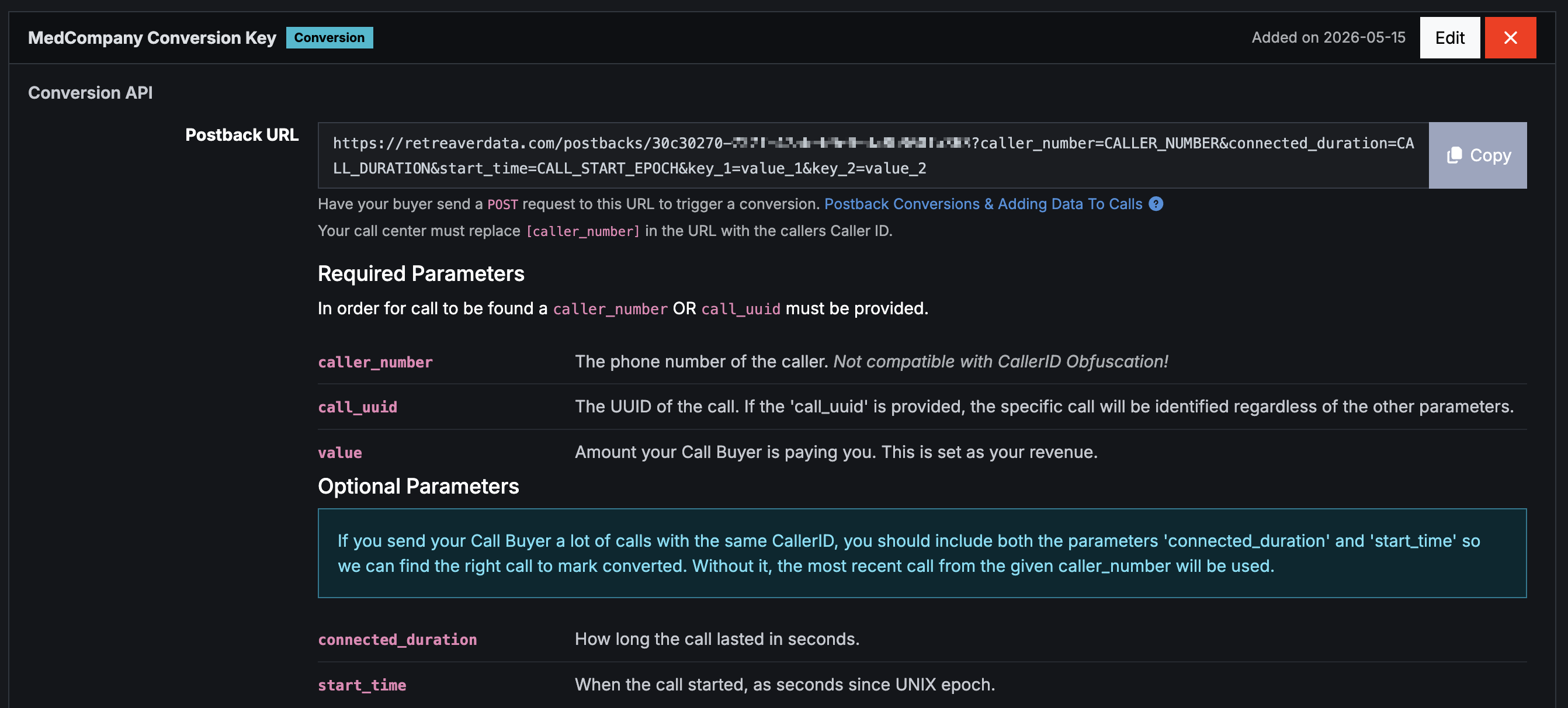
The Conversion key gives the buyer a URL they can POST to in order to mark a call as converted. This is the inbound-from-buyer side of the conversion handshake — the buyer’s CRM or sales tooling hits this URL when a sale closes, and Retreaver records the conversion (and the revenue value, if provided).
Important
Don’t confuse this with outbound conversion Webhooks (called “Webhooks” in the UI). Outbound webhooks are how Retreaver tells your publisher’s tracker that a call converted — those are configured separately under Webhooks, not as Postback Keys.
URL shape:
https://retreaverdata.com/postbacks/POSTBACK_KEY?caller_number=CALLER_NUMBER&call_uuid=CALL_UUID&value=REVENUENote the key is in the path, not a ?key= query parameter.
Required parameters (the buyer must supply at least one identifier):
caller_numberorcall_uuid—call_uuidis preferred when available because it identifies the specific call unambiguously.caller_numberworks but matches the most recent call from that number.value— dollar amount of the conversion. Sets the revenue on the call.
Optional disambiguation parameters (use when a buyer handles many calls from the same caller number):
connected_duration— call length in seconds.start_time— UNIX-epoch seconds when the call started.
Response is plain text:
SUCCESS a1b2c3d4-1234-5678-90ab-cdef01234567 125.00or:
FAILED <reason>Pairing with a Campaign ‘Postback’ Conversion Criteria. Creating the key only generates the URL. For the conversion to actually fire, you also need to configure a Postback conversion criteria on the campaign — including a filter tag (so only calls from this buyer can trigger the conversion) and an optional posted-value payout modifier. See Postback Conversions & Adding Data To Calls for the end-to-end flow.
Caller List Management (Buyer level)
Functionally identical to the campaign-level Caller List Management key, but scoped to caller lists that live on the buyer.
When to use the buyer-level version instead of the campaign-level version:
- The buyer maintains their own DNC list and you want to sync it without exposing the rest of the campaign.
- You want to grant the buyer self-service control over their caller lists.
- The buyer’s tracking system fires “opt-out” or “do-not-contact” events you want to honor automatically.
URL shape, configuration fields, and prefix-driven behavior (suppressed* / accepted*) are the same as the campaign-level variant — only the URL path’s parent segment changes (targets instead of campaigns).
Buyer Group-Level Postback Keys
Buyer Group (formerly “Handler Group”) keys cover live-call control and group-level data exchange. They’re less commonly used than the other levels but valuable for specific integration patterns.
Call Rejection
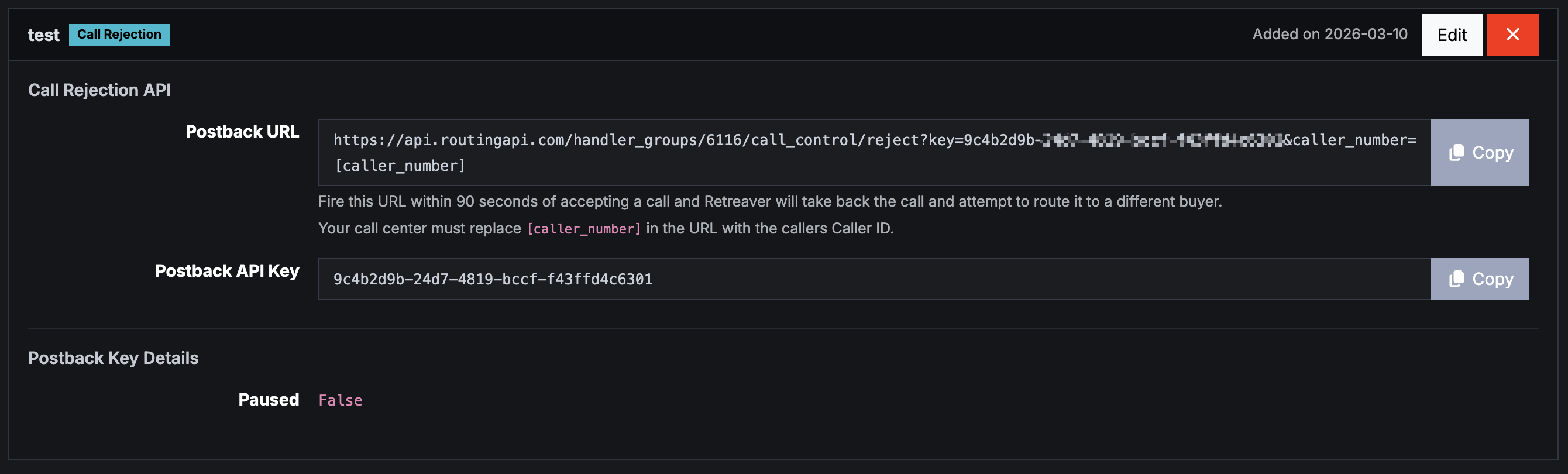
A Call Rejection key lets the buyer (or any authorized system) hand a call back to Retreaver within 90 seconds of accepting it. Retreaver will then attempt to route the call to a different buyer in the group.
URL shape:
https://api.retreaver.com/handler_groups/<id>/call_control/reject?key=POSTBACK_KEY&caller_number=[caller_number]Response (plain text):
SUCCESS call <uuid> rejectedor:
FAILED rejectedCall Transfer
A Call Transfer key lets the buyer transfer an active call to a number in a configured Directory. Requires the live_call_control feature flag on your account.
URL shape:
https://api.retreaver.com/handler_groups/<id>/transfers/interface?key=POSTBACK_KEY&caller_number=[caller_number]Key configuration option:
- Directory - the directory the transfer destination numbers are drawn from.
Call Data Reading
The Call Data Reading (data_sharing) key returns the values of specified tags on a call — useful for passing data between Retreaver accounts via Start Ping, or for a buyer to fetch caller metadata they don’t already have.
URL shape:
https://retreaverdata.com/data_reading?key=POSTBACK_KEY&caller_number=[caller_number]&map_keys=their_key:our_key,their_key_2:our_key_2&accept_keys=Key configuration option:
- Tag key list — which tags this key is allowed to read. Anything not on the list is filtered out of responses.
Conversion (Buyer Group level)
Identical in shape to the buyer-level Conversion key, but scoped to the buyer group rather than a single buyer. Use this when you want any buyer in the group to be able to post conversions through a shared key.
How to create a Postback Key
The flow is the same regardless of level — only the available key types change based on whether you’re on a Campaign, Publisher, Buyer, or Buyer Group.
Step-by-step
- Open the Campaign, Publisher, Buyer, or Buyer Group you want the key to live on.
- Scroll to the Postback Keys section. (If no keys exist yet, you’ll see “No postback keys have been added.”)
- Click the + Add
<Type>Key button for the key type you want — the dropdown of available types is filtered to what’s valid for that entity:- Campaign: Real Time Bidding, Caller List Management
- Publisher: Real Time Bidding, Call Data Writing
- Buyer: Conversion, Caller List Management
- Buyer Group: Call Rejection, Call Transfer, Call Data Reading, Conversion
- Give the key a descriptive name. Examples:
Publisher_A_RTB_InboundsBuyer_Alpha_ConversionCRM_Sync_Suppression_List
- Fill in the type-specific configuration fields (TTL, timeout, tag prefix, start/end seconds, permissions, directory, etc.).
- Click Create.
- Copy the generated URL from the key’s detail view and share it with the appropriate party — your publisher’s integration team, your buyer’s IVR vendor, your CRM admin, etc. The URL is also visible whenever you re-open the key.
Naming conventions that scale
A messy Postback Keys section is the source of most integration debugging headaches. A few naming patterns that hold up over time:
- Include the partner name:
Publisher_A_RTB,Buyer_Alpha_Conversion— neverRTB1orTest_Key. - Include the type:
_RTB,_DataWriting,_Conversion,_CallerList_Suppression— so anyone reading the list immediately knows what each key does. - Use stable identifiers: if a publisher rebrands, keep the old name to avoid breaking the audit trail of which key fired which conversion.
- For caller-list keys, the list name itself drives behavior: names starting with
suppressedcreate deny lists; names starting withacceptedcreate allow lists. Plan your list names accordingly.
Practical examples
Setting up a new publisher on RTB
- Open the campaign → Postback Keys → + Add Real Time Bidding Key.
- Name it
Publisher_A_RTB_Auto_Insurance. - Select Publisher_A in the Publisher dropdown so
source_idis baked into the URL. - Set TTL
15, Timeout5. - Decide whether to enable
add_to_caps_on_status_reservedbased on your caps strategy. - Save and copy the generated URL.
- Send the URL to Publisher_A. Their integration team will configure their stack to POST
caller_numberto that URL when they have a new caller. - Verify in the RTB Dashboard → Realtime tab that pings from Publisher_A are arriving with the correct postback key.
Wiring a buyer to post conversions back to Retreaver
- Open the buyer → Postback Keys → + Add Conversion Key.
- Name it
Buyer_Alpha_Conversion_Postback. - Save and copy the URL:
https://retreaverdata.com/postbacks/<key>?…. - On the campaign, configure a Postback conversion criteria. Apply a filter tag (e.g.
system_buyer_id= Buyer_Alpha) so only calls handled by this buyer can trigger the conversion. Optionally set a posted-value payout modifier (e.g.*0.8to pay 80% of the buyer’s revenue). - The buyer’s CRM POSTs to the URL when a sale closes, supplying
call_uuid(preferred) orcaller_number, plusvalue. Retreaver marks the call converted, applies the modifier, and fires any conversion webhooks.
Letting a publisher write data onto a call
- Open the publisher → Postback Keys → + Add Call Data Writing Key.
- Name it
Publisher_A_DataWriting_LP_Form. - Set
start_secondsto e.g.1 hourso the key can attach tags to a call that just ended, andend_secondsto e.g.30 minutesfor tags arriving slightly after a call ends. - Optionally set a tag prefix like
lp__so the publisher’s tags are namespaced. - Save and share the URL with the publisher.
- The publisher’s landing-page form POSTs to the URL on submit:
?key=KEY&caller_number=+1XXXXXXXXXX&lp__source=google&lp__campaign_id=abc123Swipe horizontally for full code - The tags appear on the matched call (or are cached and applied when the call arrives), visible in the Call Log, Drilldown, and CSV exports.
Auto-suppressing converted callers across a campaign
- Create a caller list on the campaign first, named with the
suppressedprefix (e.g.suppressed_already_converted). - Open the campaign → Postback Keys → + Add Caller List Management Key.
- Name it
Campaign_Auto_Ins_Suppression_Sync. - Grant the
caller_list_number__createpermission (and__deleteif you want unsubscribe support). - Save and copy the URL.
- Configure your CRM to POST to that URL whenever a conversion is recorded, supplying the converted caller’s number. Future calls from that number will be blocked from the campaign’s buyers.
Key takeaways
- Postback Keys are scoped API tokens — each one is locked to a single entity (Campaign, Publisher, Buyer, or Buyer Group) and a single behavior. Treat them like passwords.
- Eight key types across four levels:
- Campaign → Real Time Bidding, Caller List Management.
- Publisher → Real Time Bidding, Call Data Writing.
- Buyer → Conversion, Caller List Management.
- Buyer Group → Call Rejection, Call Transfer, Call Data Reading, Conversion.
- Conversion keys are inbound. The buyer POSTs to your URL to mark a conversion. Outbound notifications to a publisher’s tracker are configured under Webhooks, not as Postback Keys.
- Conversion keys are useless without a Postback conversion criteria on the campaign — including a filter tag to scope which calls can trigger the conversion.
- Caller list name prefixes are load-bearing.
suppressed*creates a deny list,accepted*creates an allow list. The name is the behavior driver. - Naming matters.
Publisher_A_RTB_Auto_Insurancewill save you twenty minutes of debugging six months from now;RTB_1will cost you those twenty minutes.
Important
When you delete a Postback Key, the URL becomes invalid immediately. Always coordinate deletion with the partner whose integration uses it, or you’ll silently break their data flow. For routine rotation, create the new key first, hand it over, confirm the partner has switched, then delete the old one.
Help us improve this article or request new support guides.