
Auto-Suppression and Auto-Acceptance with Caller Lists
Wanting to block duplicate calls on already converted calls is made much easier using Caller Lists. They allow you to control how specific callers are handled across your routing system without modifying campaign or buyer logic each time.
Caller Lists let you suppress, prioritize, or segment callers based on their number, while also supporting automatic population through call outcomes (receivable/payable) or tag conditions.
This makes it easy to manage repeat callers, prevent unwanted traffic, and ensure high-value calls are routed appropriately—all from one centralized feature.
Creating a caller list
Call Buyer and Campaign Level Caller Lists are available.
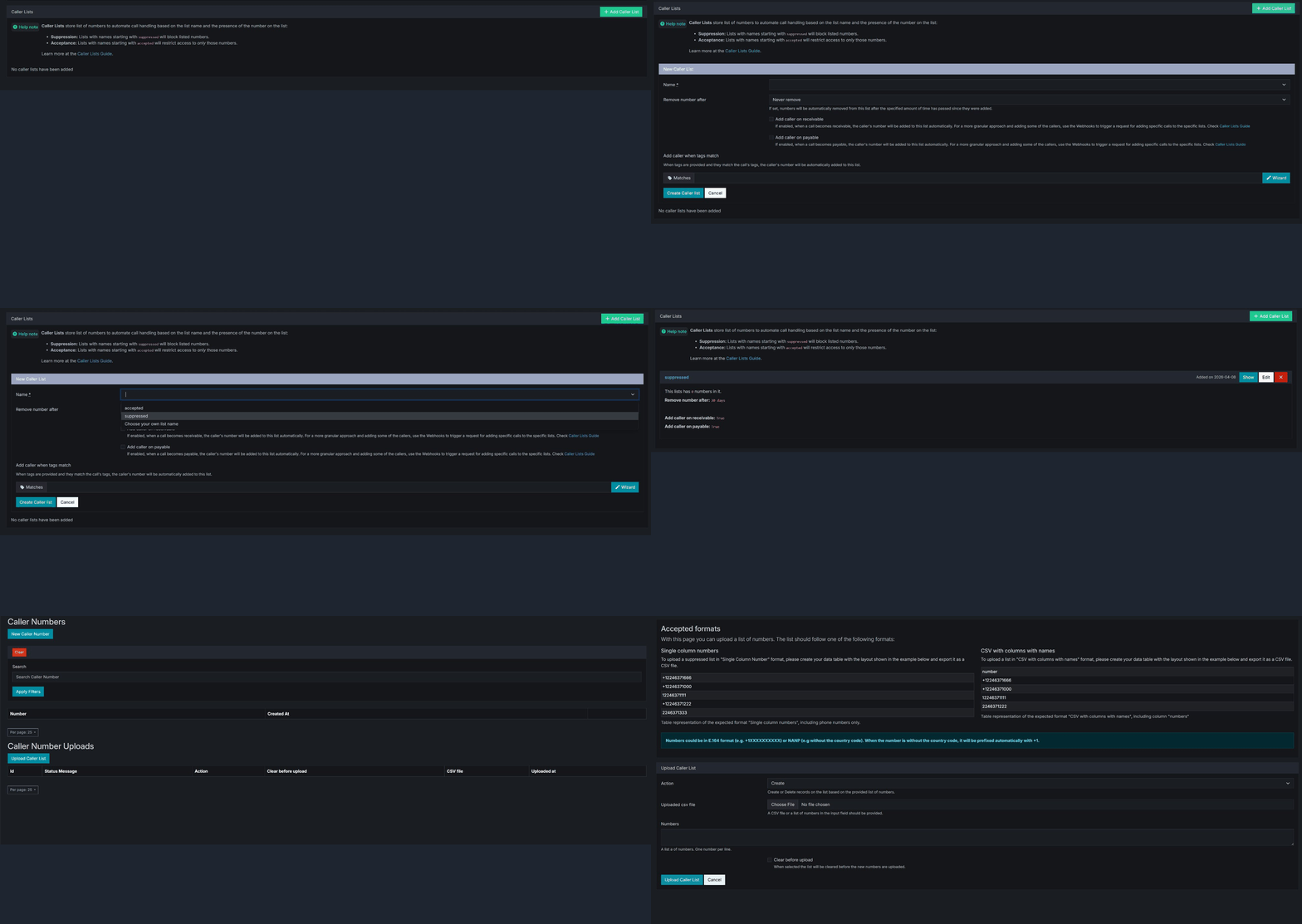
- Open the Call Buyer or Campaign.
- Scroll to the Caller Lists section.
- Click + Add Caller List.
- Enter a Name for your list.
- Configure when callers should be added (see below).
- Click Create Caller List.
Important
The name field is important: Name starts with “suppressed” → deny list (block matching callers). Name starts with “accepted” → allow list (only let matching callers through). Or create your own list using tags to determine when it applies.
Naming: Suppression vs Acceptance list
Caller Lists follow naming conventions that determine how they behave during routing.
Suppression lists
- If a list name begins with
suppressed, any caller on that list will be treated as blocked.
Acceptance lists
- If a list name begins with
accepted, callers on that list can be prioritized or allowed through routing conditions. - You can choose your own list name for custom setups.
Note
Caller Lists do not replace campaign or buyer rules—they act as an additional layer of control applied at the caller level.
Caller list settings
When creating or editing a Caller List, you’ll see the following fields:
Name
Defines the behavior and purpose of the list.
you can select the default accepted or suppressed name,
Or you can choose your own list name.
suppressed_repeat_callersaccepted_high_value_leads
Remove number after
Controls how long a caller remains on the list.
- Never remove keeps the caller permanently
- Time-based options allow temporary logic (e.g., suppress for 30 days)
Add caller on receivable
Automatically adds the caller to the list when the call is marked as receivable.
This is useful for capturing:
- Qualified calls
- Leads that meet routing criteria
Add caller on payable
Automatically adds the caller when the call becomes payable.
This is useful for:
- Converted callers
- High-value leads for future routing decisions
Tip
Using both receivable and payable will add callers on converted calls.
Add caller when tags match
Enables rule-based list population using tag conditions.
You can define logic such as:
caller_state = FLcall_duration > 60
Only callers that meet these conditions will be added to the list.
Using the tag wizard
Click the Wizard button to open the Tag Wizard.
The wizard allows you to define conditions using structured fields:
- Key (tag name)
- Operator (equals, greater than, etc.)
- Value
Available tag types include:
- Boolean
- Numeric
- Text
- Date / Date Time
- Geo
- Publisher
- Call Buyer
Once configured, these rules determine when a caller is added to the list.
How caller lists affect routing
When a call enters the system:
- The caller’s number is checked against existing Caller Lists
- If the caller exists on a list:
suppressedlists may prevent routingacceptedlists may override certain restrictions
- If the caller is not on a list:
- The system continues normal routing
- After the call:
- The caller may be added to a list based on your configuration
Common use cases
Blocking repeat low-quality callers
Use a suppressed list and automatically add callers based on low duration or failed conditions.
Prioritizing high-value traffic
Use an accepted list to route repeat or converted callers to top-performing buyers.
Recycling or segmenting leads
Add callers to lists based on tags (e.g., payable:false) and route them differently on future calls.
Automating caller segmentation
Combine Caller Lists with tag logic to dynamically group callers by:
- Geography
- Campaign
- Call behavior
Best practices
- Use clear and consistent naming conventions
- Avoid overlapping logic across multiple lists
- Use time-based removal for temporary suppression
- Combine with tags for more advanced routing control
Warning
Caller Lists directly affect routing behavior. Misconfigured lists can unintentionally block or prioritize traffic, so test changes carefully before deploying at scale.
Help us improve this article or request new support guides.