
Collaborating with Superusers, Publishers, and Call Buyers
Retreaver makes it simple to give Publishers and Buyers access to all the necessary functionality they need to track their calls. Through Publisher and Buyer roles, you can grant secure access to your partners and help them efficiently collaborate with you.
Affiliates and Buyers are able to login to Retreaver as collaborators and can view their own dashboard and Call Log. They can run reports on their calls and even interact with our API, all under the security provided by their permission-restricted role.
Inviting Users to Collaborate with Your Company
Retreaver’s call tracking platform allows companies to invite collaborators with different roles, each controlling what a user can see and do within your account. To invite a collaborator, head into Settings > Users > Collaborators > “+New Collaborator” to create a collaborator from scratch, or simply input an email when you create a Publisher or Buyer record.
Ask your collaborator to check their inbox for a Retreaver welcome email, then remind them to switch to your company from their Retreaver account to view the correct campaigns. Collaborators will receive an error if they try to accept an invite from an email while being logged into a different Retreaver account.
The available roles are:
- Superusers — Co-administrators with full access to your Company. They can create, update, and delete items just like the owner. The only thing Superusers cannot do is remove the owner from the company.
- Publishers (Call Sources) — Used to segment call traffic by source. Grant access to the parties responsible for driving your traffic. Publishers can create phone numbers and view information about the calls they generate.
- Call Buyers (Call Handlers) — Represent the final destination that call traffic is routed into. Buyers can monitor calls in real-time, run reports, listen to call recordings, and conduct their own data analysis.
- Media Buyers — Users focused on managing media buying activities within your account.
In every case, you will be able to see what collaborators are up to in the activity log on your dashboard.
Superusers
Superusers are individuals that you grant highly privileged access to your Company. These Superusers are effectively co-administrators; able to create, update, and delete items in the Company, just like the owner. The only thing Superusers cannot do is remove the owner from the company.
Note
Superusers are only able to see the Company they are added to, and cannot see your other companies.
Adding a Superuser
In the main menu to the left, go to Settings, then Users, then Superusers. From here, click + Add Superuser to get started.
Enter the name and email and click the Add Superuser button at the bottom. Retreaver will send an invite email to them notifying them that they have been added.
You can always change your mind and remove a Superuser at any time to revoke their privileges.
Collaborators
The Publisher (Source) Role Explained
Publishers are used in the Retreaver system to segment call traffic by source. You can use the Publisher role to grant access to the parties responsible for driving your traffic.
The publisher role allows you granular control over which campaigns and phone numbers each publisher has access to. Publishers can only create new phone numbers if your per-affiliate “number cap” allows it and only for campaigns that they have been manually granted permission to access.
Publishers can view calls that were generated through any phone numbers that were assigned to them, but only limited information as defined by the collaborating publisher’s permissions. Any calls that were generated before they were granted access to a phone number will not be visible to them.
Default Publisher Permissions
Collaborating publishers can view certain call details from calls that they generated. By default publishers will not be able to view which Buyer processed their calls.
Adding Data to Calls as a Publisher
Publishers are able to attach tags to calls using Parameter Mapping. Retreaver is able to scan for certain keywords in a landing page URL managed by your publishers and then assign those keywords as tags to any resulting calls that are generated using the displayed tracking number on their page. Parameter mapping is typically used to capture the affiliate ID of a page in order to supply a publisher matching tracking number from your campaign.
Publishers can also take advantage of Call Data Writing in order to send a webhook containing various data attributes. Call Data Writing is typically used to send data into Retreaver before a call is processed by a campaign.
Limiting the Amount of Numbers Publishers Can Generate
You can limit the number of phone numbers a collaborating publisher can create by heading into the publisher edit page and modifying the “Static Number Cap” property. Once they reach this cap, they’ll be informed that they can’t create any additional phone numbers under that publisher role.
You can completely block Publishers from creating numbers by setting their number cap at 0. You’ll still be able to provision numbers for them, but you’ll need to grant them access to the numbers via the collaborator edit permissions page.
You can also set the default number cap for new Publishers by editing your company.
Enabling Access to Call Recordings as a Publisher
By default, only collaborators with a call buyer role are able to access call recordings. If you wish to enable call recording access for a collaborating publisher, please submit a support request which includes a link to the publisher you wish to modify.
The Buyer (Handler) Role Explained
Buyers represent the final destination that call traffic will be routed into. If you aren’t selling your traffic to others, you might wish to use the Buyer role to grant access to your calls’ recipients, such as individual stores, branches, or call center managers instead.
When creating or editing a Buyer, you can invite them to collaborate with you by entering their name and e-mail address under the collaboration field. Once they accept the invite, we’ll only give them access to calls that are routed to Buyers associated with them. They won’t be granted access to any calls that were unanswered by them and sent somewhere else.
Buyers are granted access to any calls that have been routed to them. Buyers can run reports, listen to call recordings, and conduct their own data analysis.
Default Buyer Permissions
Collaborating buyers can view call details from any calls that they processed. By default buyers will not be able to view which publisher generated the call.
Adding Data to Calls as a Call Buyer
Call buyers are able to manually confirm conversion and also attach additional tags to a call after it has been processed using a Buyer Postback webhook. A Buyer Postback can be used to confirm conversions, supply a revenue amount and include any final call data attributes gathered as the call was being processed.
Removing Collaborators and Superusers
To remove a collaborator or superuser, go to Settings on the left menu, then Users, where you will see a list of collaborators and superusers associated with your account.
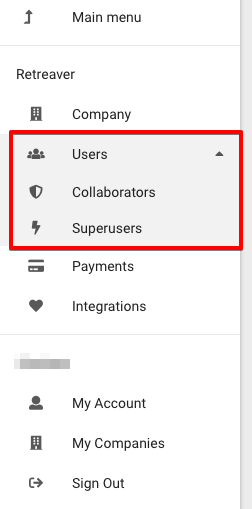
You then have the option of editing or removing a collaborator under the “Actions” column on the right of the list.
Managing Permissions
Configuring collaborator permissions can offer certain publishers or buyers the ability to view or edit their call records in your Retreaver account. This can empower them to make any urgent changes without needing to disturb you or generate customized reports on their own schedule.
Configuring Specific Collaborator Permissions
You can edit permissions for a Collaborator in the event that they manage multiple roles.
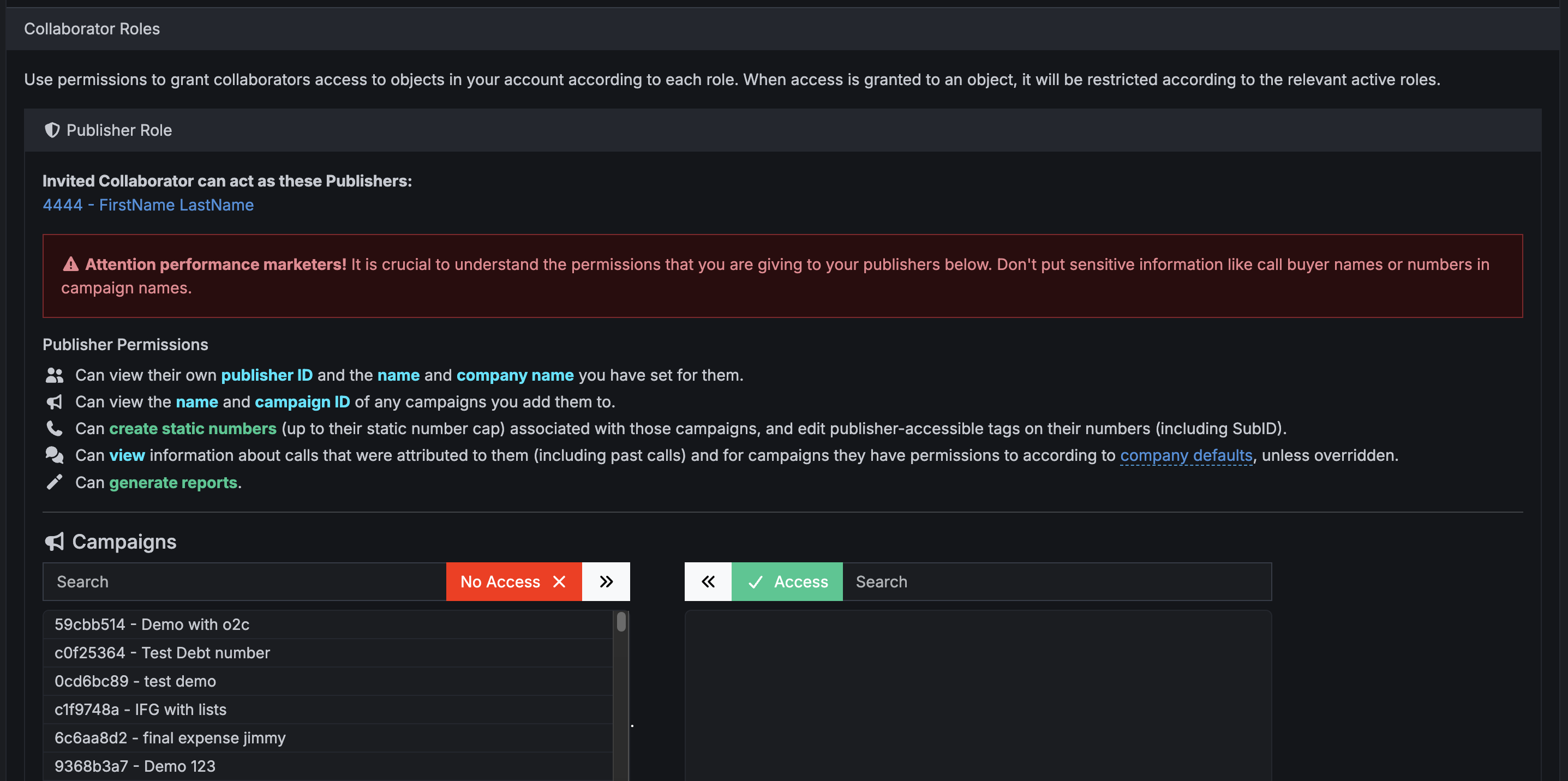
- In Retreaver, go to Settings.
- Select Users.
- Click Collaborators.
- Open the collaborator you want to update.
- Scroll to the Permissions section.
- Enable or disable the permissions you want to grant.
- Save your changes.
Collaborator Status Explained
 No Permissions status means the permissions have not yet been configured for this collaborator.
 Invited status means the recipient has not yet clicked the link in the email - be sure to check junk mail.
 Connected status means the invite has been confirmed and permissions have been set.
Override Collaborator Permissions on a specific Call Buyer
From a call buyer page:
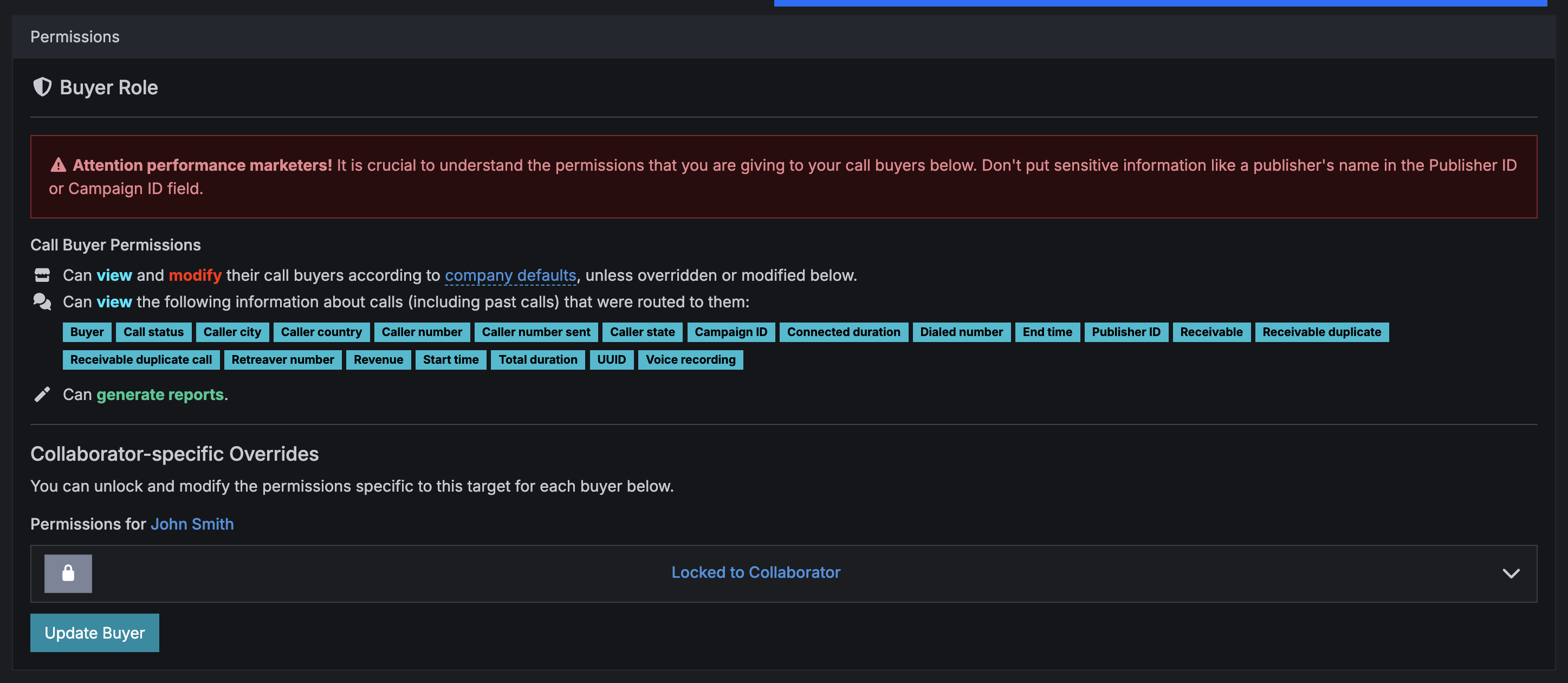
When visiting a Call Buyer page on Retreaver (/buyers/:id) you will seed a “permissions” tab, which lets you define specific permissions such as ability to modify Name or Tags.
From collaborator page:
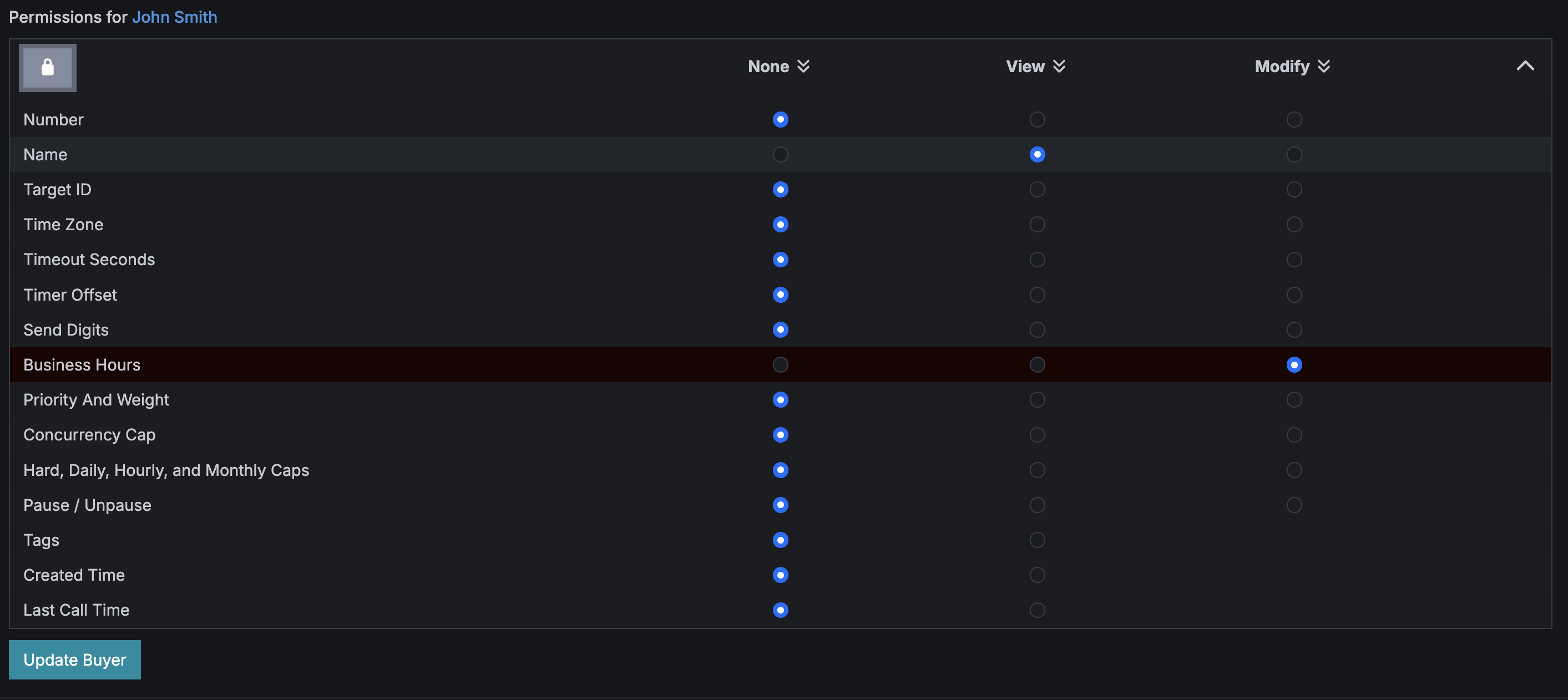
These same options will be available on the Collaborators -> Edit -> Permissions section.
Depicted in the screenshot below is a role customization for a collaborator with access to 2 different Buyers.
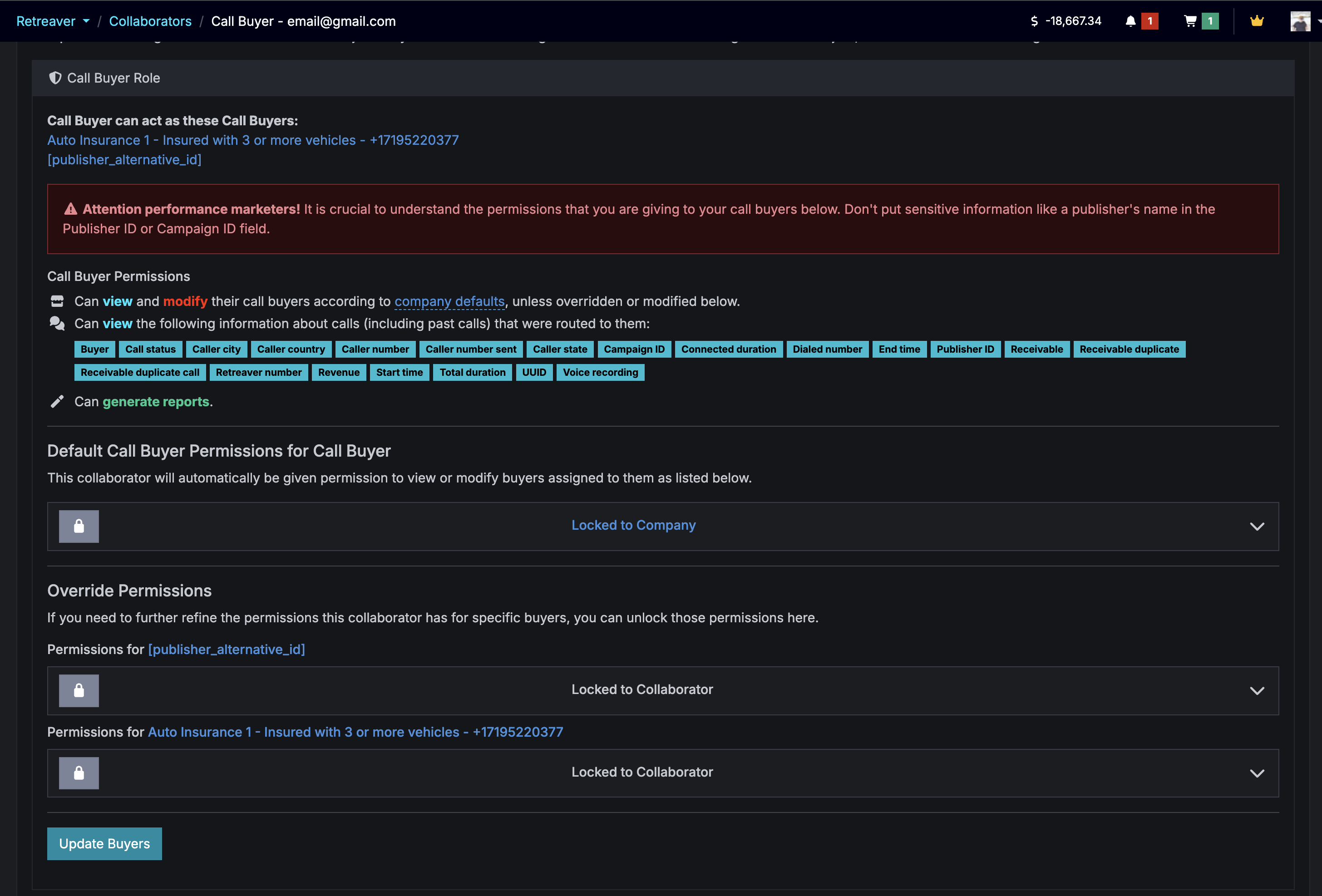
On this screen, permission settings can be unlocked and overridden using the padlock icon on the collaborator permission edit page. Either as a company-default level (applying to all buyers they have access to) or for specific buyers.
Setting Default Buyer Permissions
Company-wide default permission settings can be configured for all collaborating Buyers.
Go to Settings in the left menu and click Company, then Edit Company. Here you can choose what you would like default collaborators to be able to view and modify under this particular company.
In the example below, this person is able to modify their buyer’s number in case they need to change it, as well as pause and unpause in the event that there is an emergency. They can also view various details of the call buyer accounts that are assigned to them. The more sensitive data is hidden, as you can see with the None column.
All collaborating Buyers will have these permissions set by default unless overridden on an individual Buyer level.
Overriding Buyer Permissions
Permissions can be locked to the entire Company or to a specific Buyer Collaborator. If the Buyer is unlocked, the system will override permissions using the Buyer profile.
You can further override anything you’ve configured in the company defaults or the collaborator record above by clicking on the number on your Buyers page, then select the Permissions tab. From here, you can open the padlock and override the permissions for any collaborator managing this Buyer.
Note
This method of editing the Permissions at the Buyer level overrides all that is set in the Company or in the Collaborator levels explained above.
Configuring Publisher Permissions
Publishers are given permission on a per-campaign basis. For a publisher to view a prospective campaign, or see which calls they generated — they must be assigned campaign permission from under their respective collaborator page.
In the above example, this collaborating publisher will be able to view the name of the “Toronto Office” campaign, along with any calls they generated towards that campaign.
Why Can’t My Collaborators See Calls?
Your collaborator might not be viewing the correct company. The collaborator is viewing their own fully-functional Retreaver account, but not the company they want to collaborate with.
To switch and view calls with the company they’re collaborating with, simply click the arrow next to their name and select the desired company to view.
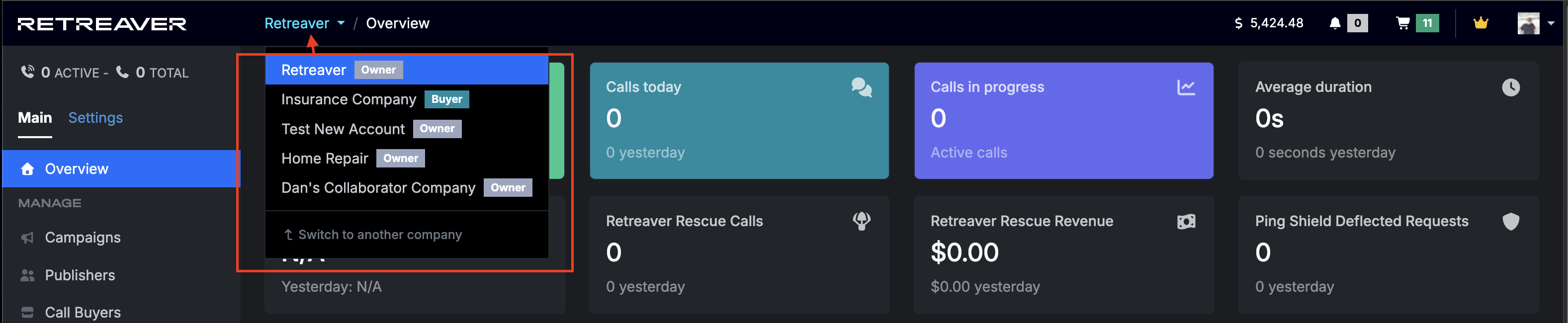
Click to show the drop down menu, then select the company and collaborator role.
Do You Not See Number Pools?
This tells us that the right company is selected, but Permissions are not given. This indicates that the collaborator has not yet been approved for any Campaigns by the company who invited them.
Changing Companies
Your Retreaver account provides you with access to each Company your email address has an association with. Whether you are an owner or invited as a superuser, collaborator, or media buyer — you are able to access each account as needed.
How to Change Companies
To switch between your associated Companies, click on through the drop-down menu in the top navigation bar, pictured below. Your permissions are based on the Company you’re actively using.
Note
When creating a Company, you are automatically switched to it and your currently selected Company will be displayed in the top of the left menu.
How to View and Manage Your Companies
Alternatively, you can view and manage multiple Companies in the Companies section, accessible under your user account menu on the top-right of the screen (click your avatar).
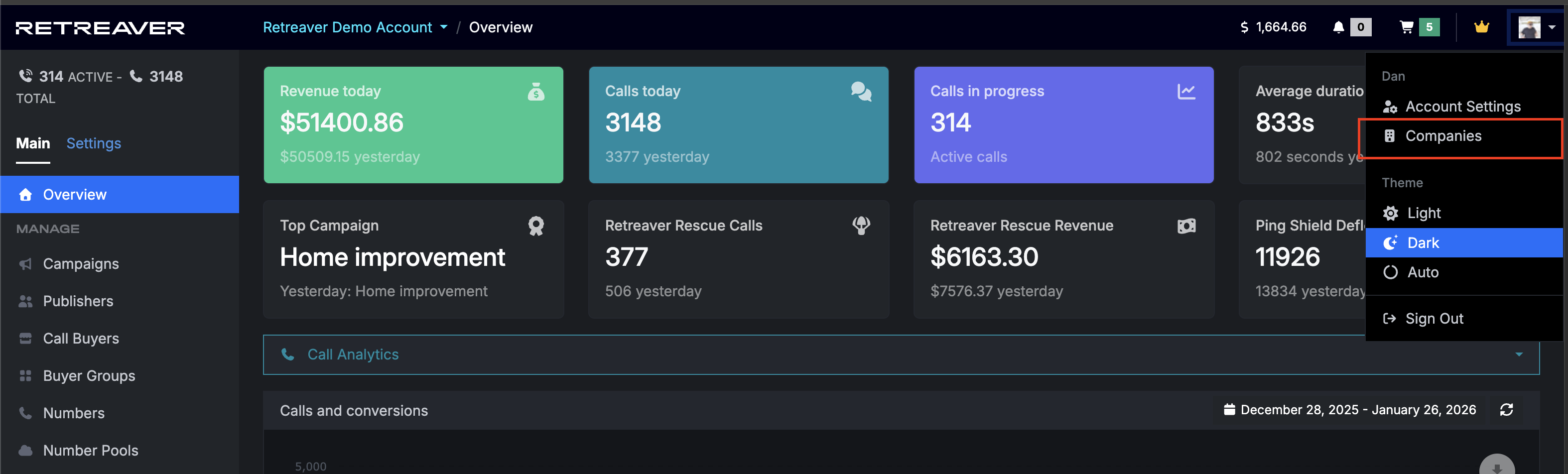
Each company has their own Publishers, Buyers, Campaigns, Calls, Tags, Number pools, and Reports — these are separate from the other Companies on your account. By default, each Company also has their own payment settings and associated credit cards, making it easy to separately bill clients. Managing multiple Companies in Retreaver is designed to be simple and straightforward.
Adding a New Company
In the top-right Account menu > Companies screen, click on + New Company. Once you give it a name, you can configure any settings you would like to be the defaults for all Campaigns created within that company. Default settings available include:
- Default Webhooks
- Default URL Parameter Sniffing
- Default Publisher Settings
- Default Role Permission Settings
Once you’ve configured these defaults, don’t forget to click Create Company at the bottom.
API Access
The Retreaver API may be used with any of the companies you have access to.
Note
Changing companies via our web interface does not affect API use.
To use the API to access objects from a Company, you need to pass the correct company_id via the query string in your request URL, or in the root of your JSON or XML object in the request body. Company IDs are found in the listing on your Companies page.
Help us improve this article or request new support guides.