
Understanding High Ping Volume vs Low Call Volume
If you are monitoring your RTB (Real-Time Bidding) traffic and noticing a large number of pings and reservations that never actually turn into live calls, you are not alone. This is a common scenario in the call routing space.
It is natural to wonder if there is a delay in your system or an issue with your receiving lines. However, high ping volume with low actual call volume is usually a byproduct of how publishers source and route their calls within the RTB ecosystem.
Here is a breakdown of why this happens, what your logs mean, and how to optimize your RTB setup.
Decoding Your RTB Logs: Reserved vs. Expired
When reviewing your Retreaver logs, you will commonly see two statuses related to this issue. Understanding them is the first step to diagnosing your traffic:
-
Reserved: This status means your system is working perfectly. You received the ping, your system checked for matching coverage, and you successfully signaled to the publisher, “Yes, we want to buy this call.”
-
Expired: An expired status means you won the ping and made the reservation, but the publisher never actually routed the call to your inbound number. After a set amount of time, the reservation simply times out and expires.
Why Are Publishers Failing to Route the Call?
In the RTB space, a pattern of high expirations typically indicates that the publisher is acting as a broker rather than generating the calls directly.
Because they are brokering traffic from third-party sources, they ping your system to see if you will buy the call before they have actually secured the live caller on their end. Your reservations are expiring for one of two main reasons:
-
They didn’t get the call themselves: They pinged your system while waiting on their upstream source, but that upstream source never ultimately delivered the call to them.
-
They sent the call to someone else: Publishers often ping multiple buyers simultaneously. Ultimately, they may route the live call to another buyer who bid higher or responded slightly faster, leaving your reservation to expire.
The Reality of the RTB Ecosystem
It is incredibly common in the RTB ecosystem to see a massive amount of pings and reservations compared to the actual number of live calls you receive.
Because of the way the industry operates, almost everyone is brokering and pinging everyone else simultaneously. A single caller might trigger a chain reaction of pings across multiple networks before the call is officially routed. Because of this interconnected environment, high reservation volume mixed with low actual call volume is a normal quirk of RTB traffic.
Why Extending TTL (Time to Live) Isn’t the Answer
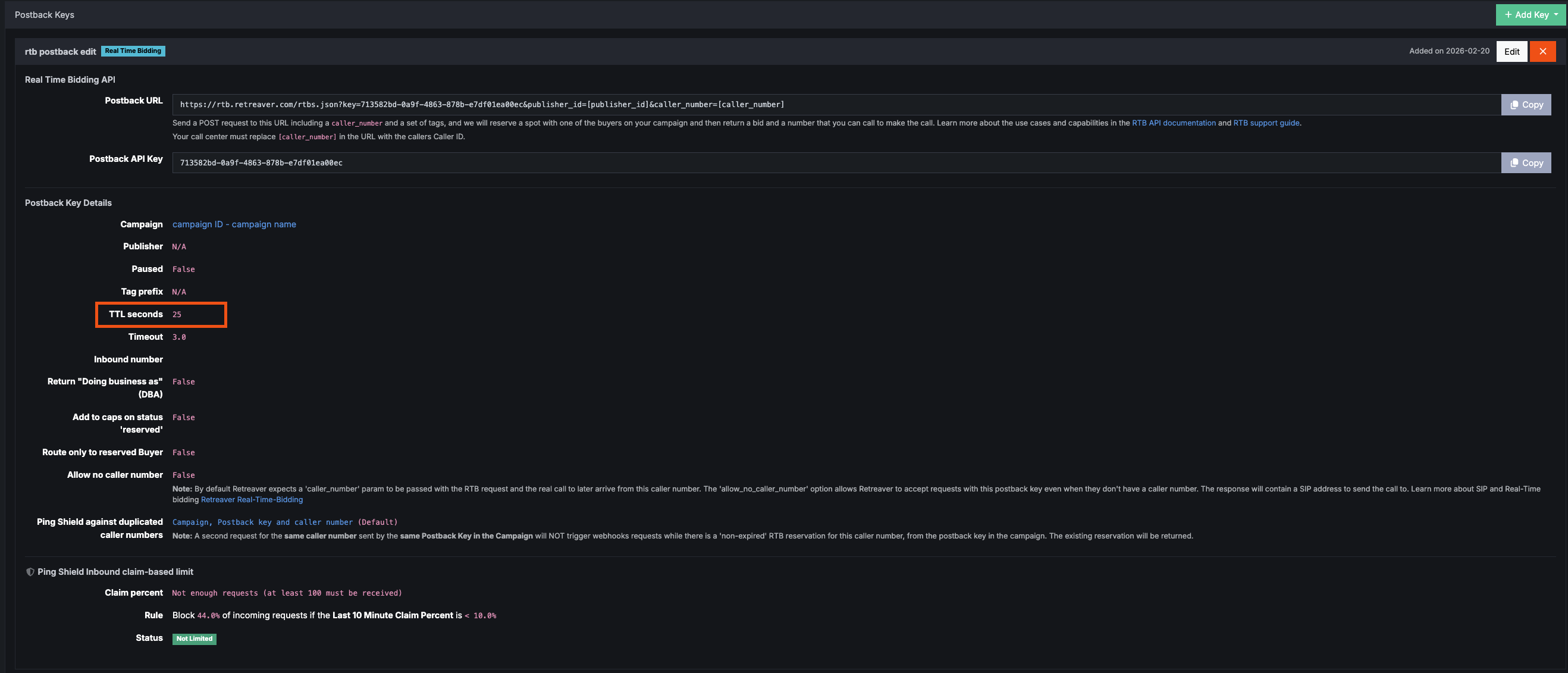
When faced with expiring reservations, a common instinct is to extend the TTL on your RTB settings (for example, bumping it up to 60 seconds) to give the publisher more time to connect. In reality, extending the TTL does not help. Usually, the TTL is optimally set to 15 to 30 seconds. In the live call space, this is plenty of time to route a call. If a publisher takes more than 30 seconds to send the call after a reservation is made, they have almost certainly already sold and routed it to someone else. Holding the reservation open longer will not increase your connection rate.
Built-In Protection: Retreaver’s Organic Rate Limiter
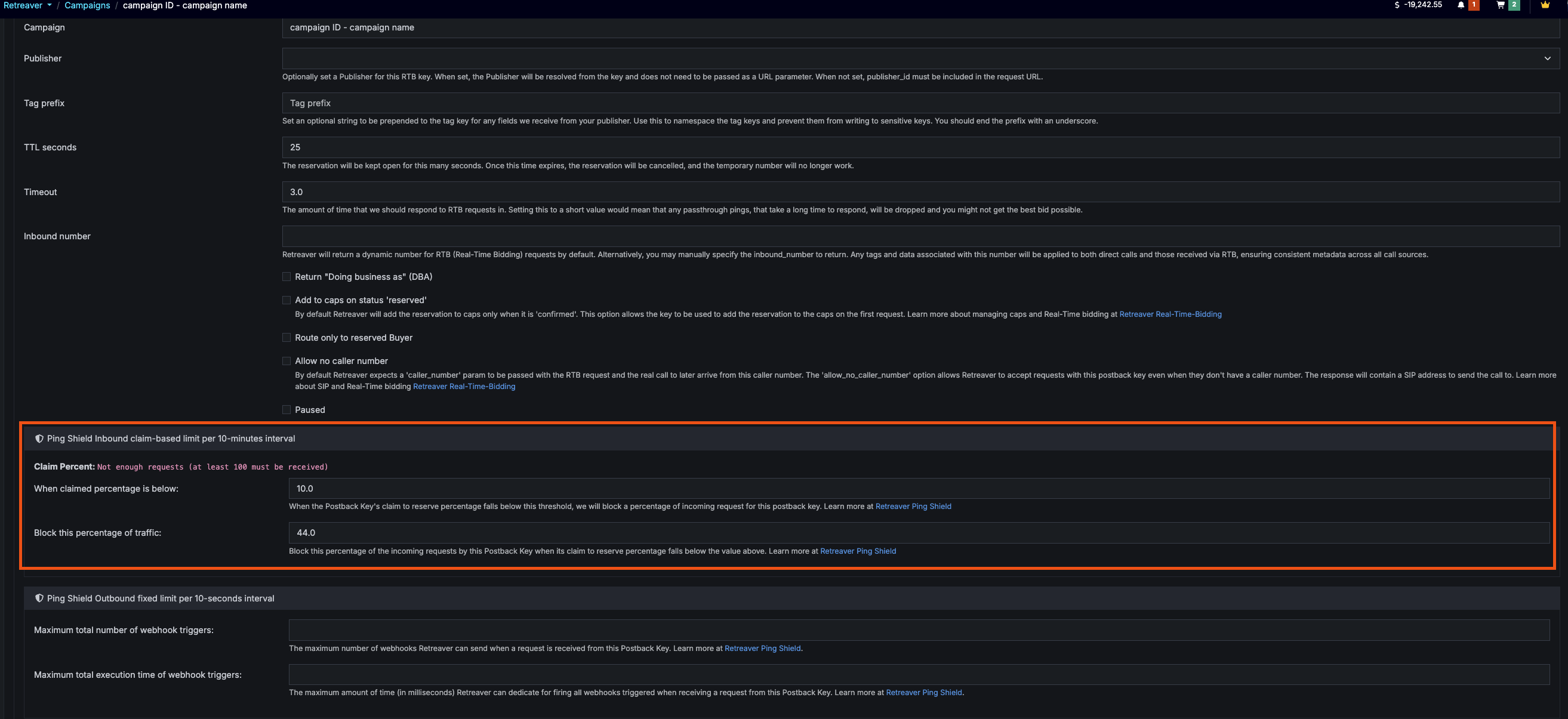
To protect your campaigns from being overwhelmed by this type of “noise,” Retreaver utilizes an organic rate limiting function (often visible in logs related to “Ping Shield”).
If a publisher makes too many reservations without actually routing the live calls (claim-based limiting), the Retreaver system automatically throttles their RTB key.
-
What this means for the publisher: Their key will be temporarily limited, stopping them from sending further pings until the system un-rate-limits them. It takes time for this organic penalty to lift.
-
What this means for you and your buyers: This function actively frees up valuable bandwidth. By automatically roadblocking the “bad apple” publishers who are just generating noise, the system ensures that your good, reliable publishers have a clear path to send real calls. Because the bad traffic is filtered out before it gets passed downstream, your own buyers are much less likely to rate limit you.
Identifying “Bad Apple” Publishers with the RTB Drilldown Table
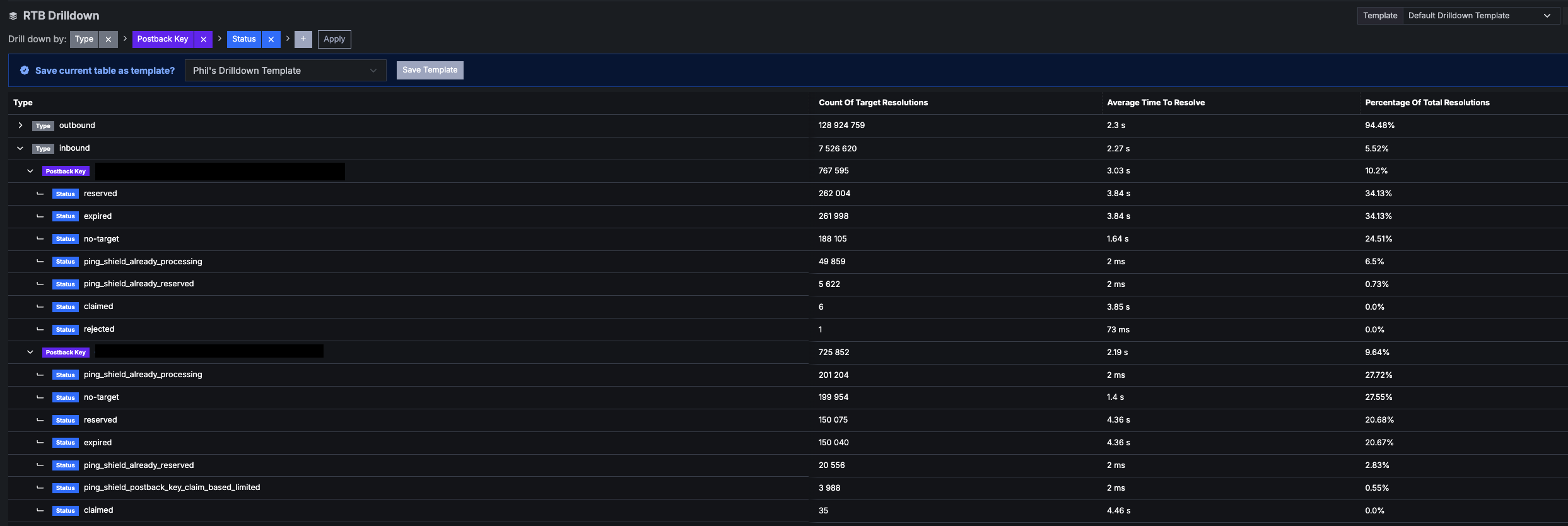
While the system automatically limits abusive pinging, you can and should manually review your traffic sources to permanently pause or remove inefficient publishers. The easiest way to spot these “bad apples” is by using the RTB Drilldown table in your platform.
When looking at the drilldown table, you want to focus on two specific metrics:
-
Reserved: The number of pings you actively said you wanted to buy.
-
Claimed: The actual number of calls that had an RTB reservation and were successfully routed to you.

The Golden Rule
You must check the Total Reserved vs. Total Claimed. If a publisher has a massive amount of reserved pings but only a tiny fraction (or zero) claimed calls, their connection percentage is awful. They are clearly generating empty noise rather than actual calls and should be targeted for cleanup.
Next Steps: Managing High-Noise Traffic
If your drilldown table reveals specific sources continually failing to deliver, you need to go straight to the publisher before completely cutting them off.
Here are the best practices for handling this manually:
-
Reach out to the publisher: Contact the source directly and share specific log examples (UUIDs, timestamps) showing where reservations were made but calls were not routed.
-
Ask for clarification: Ask them directly why the calls are failing to reach you. This helps identify if there is a specific setup issue or a latency problem on their end that is preventing the call from successfully routing before the timer runs out.
-
Evaluate and clean up: Getting an answer directly from the publisher will give you a clear idea of what to do next. If a publisher confirms they are just brokering and cannot improve their connection rate, you should decide to pause or delete their RTB URL. Cleaning up these noisy sources ensures your metrics remain accurate and your platform runs efficiently.
Help us improve this article or request new support guides.