
AI Analyst: Turn Calls Into Insights
Overview
- One-Off Analysis from Call Logs
- Automating the AI Analyst
- Configuring the AI Analyst
- Viewing Results
- Filtering Calls by AI Tags
- Webhook: After AI Analysis
- Vertical Use Cases
- Pricing
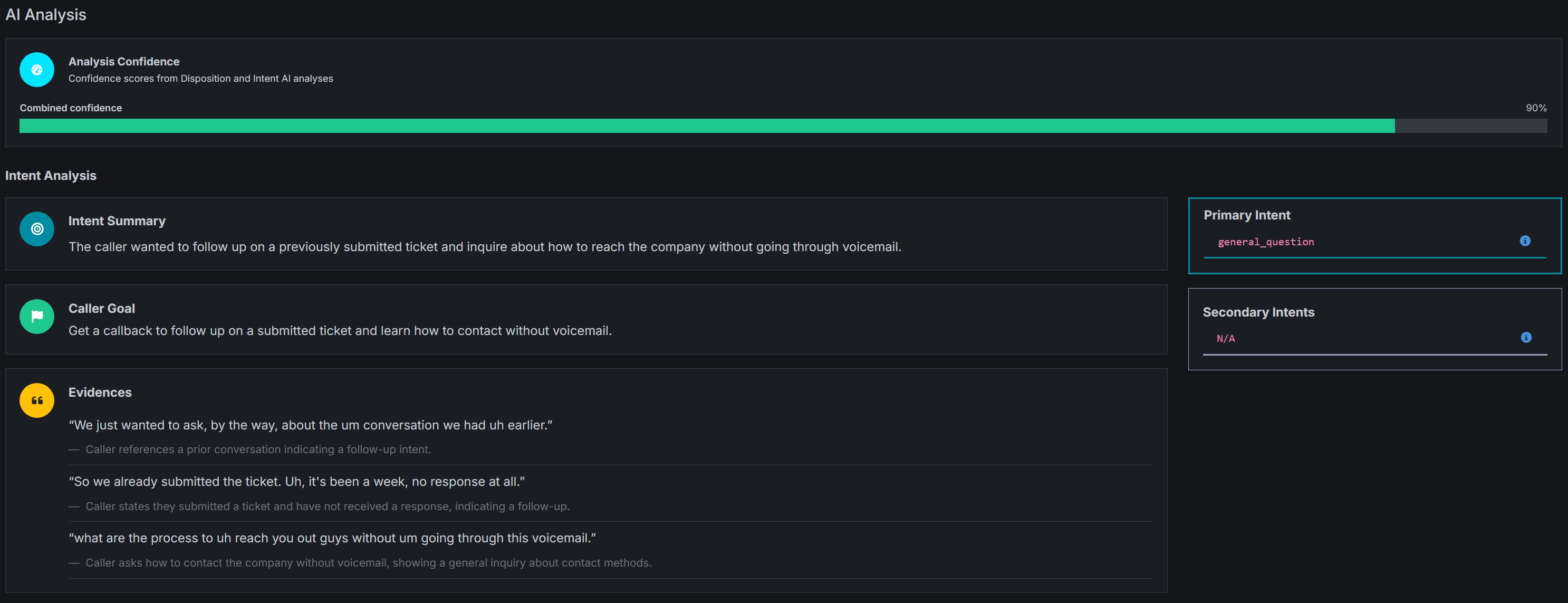
The AI Analyst feature takes the heavy lifting out of managing your conversations, so you never have to spend hours listening back to recordings and analyzing transcriptions by hand.
It acts like a digital assistant that transcribes and analyzes calls automatically for you. It then analyzes:
- The intent of the call to for you to figure out exactly what the caller wanted
- The outcome of the call for you to understand how the call ended
You can even prompt it yourself to ask the system questions, like - “What was the customer’s biggest concern?”.
It’s a faster, smarter way to get the “big picture” from your calls without the busywork. AI Analyst helps teams understand what happened on every call, surface patterns at scale, and take action faster without manual review.
Retreaver AI Analyst
Note
Only Superuser accounts have access to AI Analyst at the moment.
One-Off Analysis from Call Logs
You could run AI Analyst only on selected calls:
- Go to Call Dashboard -> Call Log (2.0)
- Apply filters (example: receivable calls only)
- Click AI Analyst
- Choose how much of each call to transcribe
- Click Analyze
This is ideal for audits, QA sampling, or testing before enabling automatic AI analysis.
Automating the AI Analyst
And it could also be enabled anywhere you want calls to be automatically transcribed and analyzed.
Campaign Level
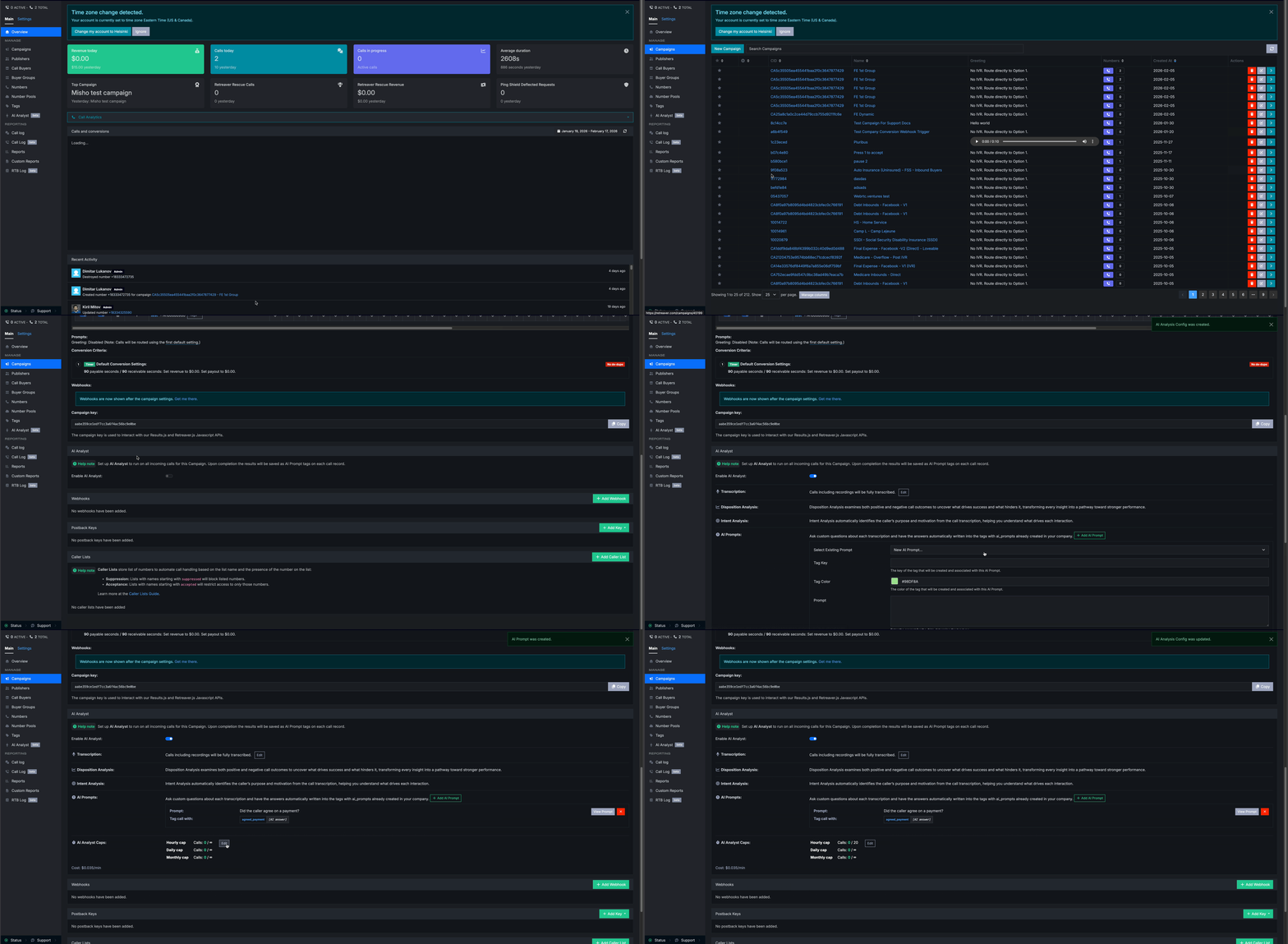
To analyze every call entering a campaign:
- Open the Campaign page
- Click the AI Analyst tab
- Select Enable AI Analyst
- Save your configuration
Once enabled, all calls routed through that campaign can be analyzed automatically.
Publisher, Buyer, and Buyer Group Level
AI Analyst can also be configured at different levels:
- Publisher Level — analyze calls from a specific traffic source
- Buyer Level — analyze calls reaching a specific buyer
- Buyer Group Level — analyze calls routed to a group of buyers
This is useful for comparing lead quality and performance across partners.
Configuring the AI Analyst
Transcription Settings
AI Analyst supports flexible transcription windows:
- Full call transcription
- First X minutes
- Last X minutes
For better accuracy, Retreaver recommends transcribing enough of the call to capture the full intent and outcome (often ~15 minutes or more).
Volume Caps
- Calls per hour
- Calls per day
- Calls per month
This allows teams to sample calls instead of analyzing every call.
Automated Analysis Filters
When AI Analyst is enabled on a Campaign, Publisher, Buyer, or Buyer Group, you can optionally add Filters to control which calls are automatically analyzed.
Where to configure filters
- Open the Campaign / Publisher / Buyer / Buyer Group page
- Go to the AI Analyst tab/section
- Click Edit
- In the Filters section, select filters from the Filter dropdown
- Click Update AI Analysis Config
This allows teams to narrow down the scope of which calls are worth analyzing, so you don’t have to analyze each and every call.
Examples
- Analyze only receivable calls
- Analyze only completed calls
- Analyze calls matching specific tags
Custom AI Prompts (Advanced)
You can also add custom questions to extract specific information, such as:
- Did the agent follow the script?
- Was the caller frustrated?
- Did the caller confirm eligibility?
- Was an appointment scheduled?
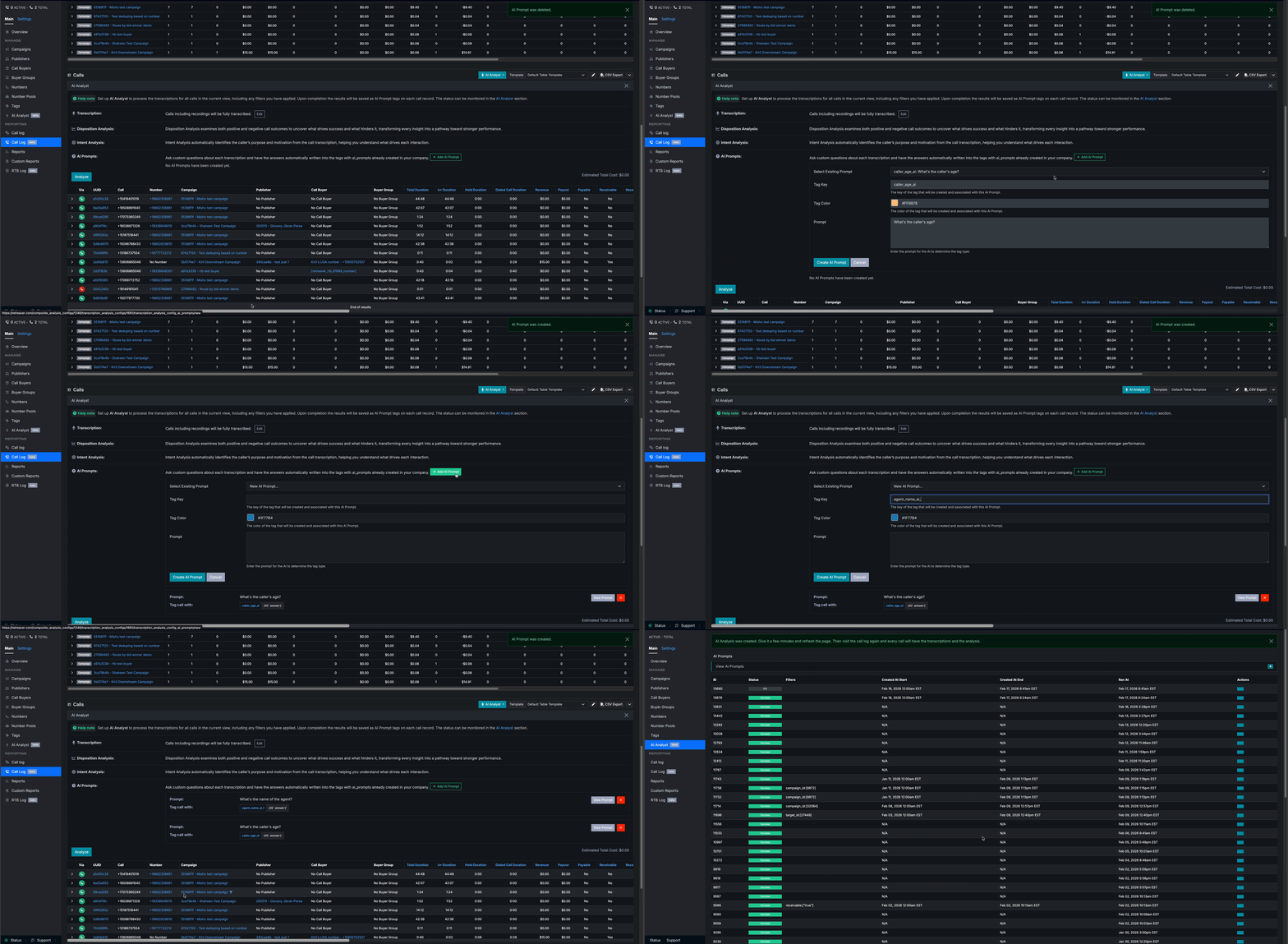
Custom prompts could also be configured to run with automatic campaign/publisher/buyer/buyer group AI Analysis.
Viewing Results
Once a call is transcribed and analyzed, each call will include:
- Confidence score
- Intent Analysis section
- Disposition Analysis section
- Full transcript
This allows fast review without listening to recordings.
Intent Analysis (What the Caller Wanted)
AI Analyst detects the caller’s primary intent, such as:
- Product/service inquiry
- Appointment request
- Support question
- Quote request
Note: These are only a few examples of the intents that the AI Analyst can extract from the call. A full list of intents will be added soon.
Each intent includes supporting evidence pulled directly from the transcript.
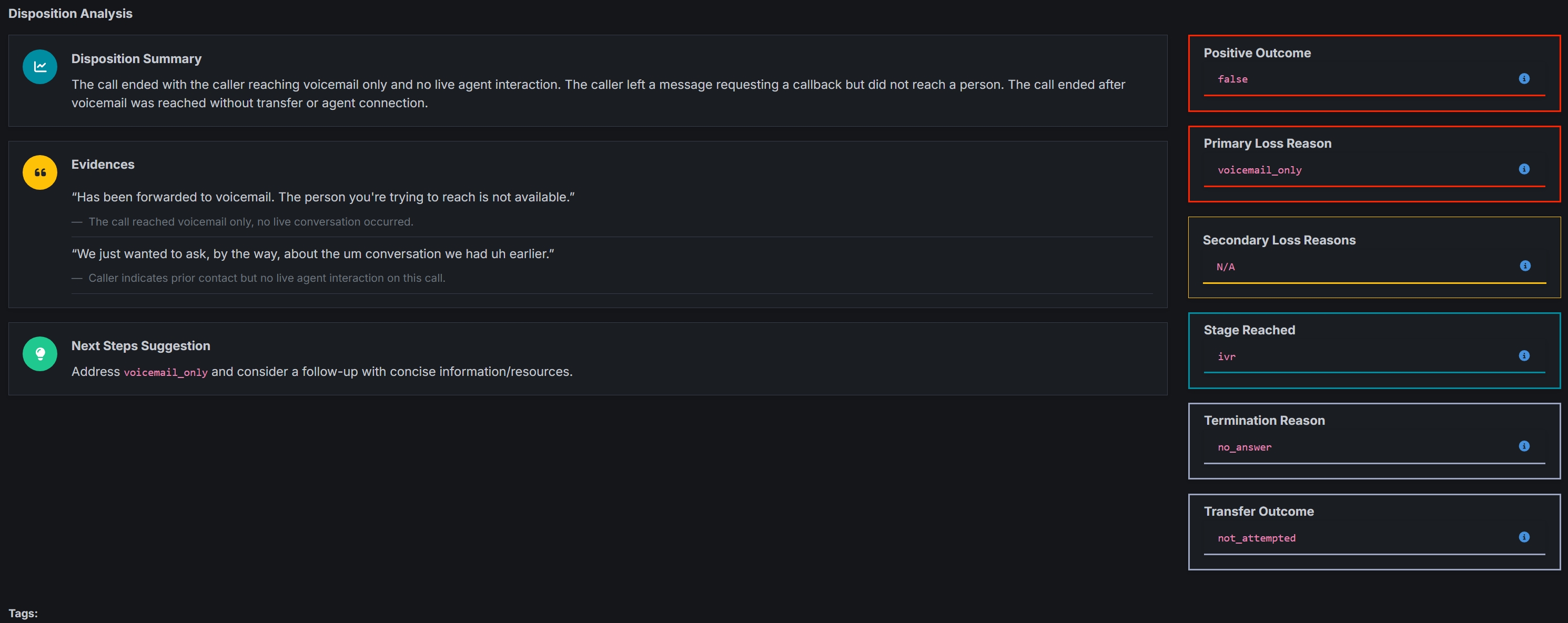
Disposition Analysis (How the Call Ended)
AI Analyst also determines call outcome, such as:
- Appointment booked
- Qualified lead
- Sale completed
- Positive outcome
- Hangup or early termination
- Transfer attempted or not
Note: These are only a few examples of the call outcomes that the AI Analyst can extract from the call. A full list of outcomes will be added soon.
Disposition tagging makes it easy to measure performance beyond call volume.
Filtering Calls by AI Tags
AI Analyst automatically tags calls with structured fields like:
- Intent topic
- Disposition code
- Positive outcome flag
You can then filter calls instantly:
- Show only “Appointment Set” calls
- Find negative outcomes needing review
- Compare intent types across campaigns
- Identify low-quality publisher traffic
AI tags turn your call log into an intelligence dashboard.
Webhook: After AI Analysis
If you need to trigger an external workflow only after AI Analyst has finished, you can use the Webhook trigger named After AI Analysis.
What it does
- Fires after a call’s AI analysis completes.
- Intended for “analysis complete” workflows like: pushing enriched results into a CRM, alerting Slack, triggering follow-up automation, etc.
How to use it
- Go to Webhooks
- Create a new webhook
- Set the trigger group to After AI Analysis
- Add your URL, using replacement tokens as needed
Common replacement tokens
- Disposition tokens:
[disposition_positive_outcome][disposition_stage_reached][disposition_disposition_code][disposition_primary_loss_reason][disposition_termination_reason][disposition_transfer_outcome][disposition_summary]
- Intent tokens:
[intent_primary_topic][intent_summary]
- Tag prompt results:
- Any tag key is replaceable once it exists on the call (example: if your tag key is
ai_topic, you can use[ai_topic]).
- Any tag key is replaceable once it exists on the call (example: if your tag key is
Vertical Use Cases
Below are two high-impact ways Retreaver users can use the AI Analyst today.
Medicare Agencies (Compliance + Qualification)
Medicare calls require strict qualification and compliance.
AI Analyst helps Medicare teams:
- Detect enrolment or appointment outcomes
- Monitor compliance scripts with custom prompts
- Flag negative outcomes or early hangups
- Reduce manual QA workload
Example prompt:
“Did the agent follow the required Medicare script?”
Home Services (Booking + Lead Quality)
Home service calls are fast-moving and booking-driven.
AI Analyst helps teams:
- Track booked jobs vs missed calls
- Identify high-intent quote requests
- Improve agent close rates
- Compare performance across traffic sources
Example prompt:
“Did the caller request emergency service or same-day availability?”
Pricing
AI Analyst is billed per minute of transcription.
- Pricing: 5 cents per minute (3$ per hour)
Pricing is usage-based, meaning you only pay when calls are analyzed.
Help us improve this article or request new support guides.
Previous
Auto-Suppression and Auto-Acceptance with Caller Lists
Next
How to export Calls as CSV and view as Excel spreadsheets