
Buyer Postback - Postback Conversions & Adding Data to Calls
Buyer Data Postback: Call buyers might have some information they wish to associate with a specific Retreaver call, this can include certain disposition details, or follow up notes.
Triggering Conversions: Call buyers might not always pay based on call-duration, rather they pay when an actual sale has occurred. In these cases, the call buyer will wish to post conversion details back to Retreaver to inform us that a conversion has happened.
Buyer Data Postback: Passing the call UUID and key to a buyer
Method 1: via webhook, for buyers not using SIP
Retreaver introduces the concept of call keys. Call keys are special API keys that are uniquely associated with a call. In conjunction with the call’s UUID, the call key grants the holder the ability to update calls using the Retreaver API.
Adding an “answered” ping Webhook.
- To add an answered ping, scroll to the “Webhooks” section of your campaign configuration. Click the green plus to add a new webhook group and set the trigger type to “answered”.
- To ensure the webhook is only triggered for calls routed to a specific buyer, use the Wizard to tag the webhook with your buyer’s
system_buyer_id. This webhook will now only be triggered for calls that have been accepted by the given buyer. - Your buyer will need to provide you with an HTTP endpoint capable of receiving and processing the request. Use replacement tokens to designate where the call UUID -
[call_uuid]- and key -[call_key]- will be inserted in the URL.
You will need to work with your Buyer to determine the format of the URL itself, at minimum they will need the call UUID and key to pass data back to Retreaver. They will most likely also need the caller ID of the caller so they can correlate the call with the correct contact record in their systems.
Method 2: via SIP header
You can pass call UUIDs and keys to your buyers via webhook or through SIP headers.
If your Buyer is using a SIP-based phone number, the call UUID and key will be automatically passed to them via SIP headers. They should look for headers named X-PH-RetreaverUUID and X-PH-RetreaverKey in the SIP INVITE, and store these values for later use.
Buyer Data Postback: Adding tags to calls via our Call Data Writing API
Follow the Applying Tags to Calls using Call Data Writing
Note
If “Repeat Caller Handling” is enabled on a campaign toggle - Tags associated to prior calls will be carried over to subsequent return calls.
This could cause duplicate tag issues if the tags assigned via the add_tags method were meant for a single call instance, such as the case with ping/post integrations that return bids or transfer numbers.
In order to prevent repeat caller handling from retagging subsequent calls, please open a support ticket to request a flag on your account in order to disable this feature while still maintaining the ability to route to previous or new buyers that come with the repeat caller handling functionality.
(Modern) Triggering Conversions: Informing Retreaver of a conversion
Trigger buyer postback conversions to Retreaver involves a 3 step process:
- Forward the Retreaver
[call_uuid]to your buyer when they answer the call. - Create a ‘postback’ link for the buyer to post back a conversion value.
- Create a conversion criteria using a ‘Postback’ trigger.
1) Passing the Call UUID to your buyer
The goal for this step is to pass the [call_uuid] value to your publisher, as they need to supply this value back into the postback URL for Retreaver to identify which call this postback is intended for.
A) Have your buyer first provide an HTTP endpoint capable of receiving data.
B) Edit the Retreaver buyer and implement the datapost following their instructions.
C) Set the webhook trigger to ‘when buyer answers the call’.
D) Ensure that you are passing the [call_uuid] value following their unique API specifications so that they have access to the [call_uuid] value when they trigger the postback conversion on their end.
2) Creating a ‘postback’ link for a buyer
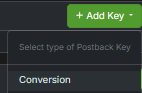
A) Navigate to your buyer profile, scroll down to the ‘Postback Keys’ section and press ‘Add Key’:
B) Provide a memorable name and then press ’Create Postback Key“:

C) This will create the postback key for your publisher:
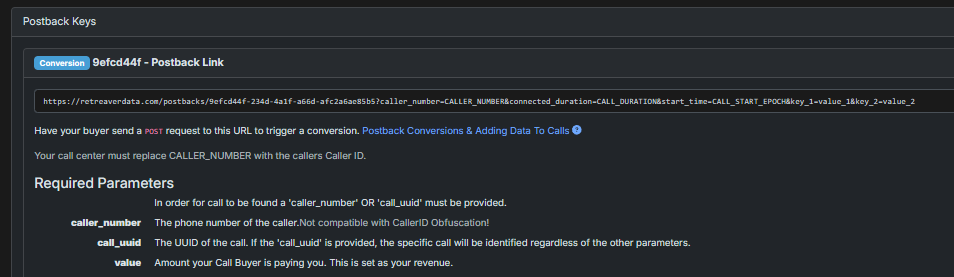
Note that the postback URL has 3 required parameters that the publisher should supply when making a POST request:
https://retreaverdata.com/postbacks/example-key?caller_number=CALLER_NUMBER&call_uuid=CALL_UUID&value=REVENUE
3) Creating a Campaign ‘Postback’ Conversion Criteria
Configuring a postback conversion with dynamic posted-back revenue value.
1) Firstly apply a filter tag to the “matches” field, this will instruct Retreaver to only allow a conversion postback if the call came from a certain publisher or was processed by a particular endpoint. At minimum, it is required that you tag at least one publisher or buyer to this conversion criteria, who will presumably trigger this postback.
2) The “Postback Timeout” field defines how many seconds after the call ends Retreaver should wait before deeming the call non-converted. Retreaver waits until a postback is received or the timeout is reached before firing any post-call webhooks. The default value is 600 seconds or 10 minutes.
3) You can set a modifier in the “posted-value payout modifier” field, if you wish to modify the posted back payout.
In order to multiply the value posted back by 0.8, enter *0.8 in the field. For a call with $10.00 in revenue, this would cause the payout to be set to $8.00. If the modifier field is left blank, the payout will be set to the revenue amount, which is likely not what you want.
Note
The string that you enter in the field will be evaluated operation-by-operation from left to right, and the operators can include * (multiplication), / (division), - (subtraction), and + (addition).
Note
In cases where you are not paying a publisher, set the payout to zero by setting the modifier to *0.
Note
You can also set a static payout value by multiplying the revenue by zero, then adding the static payout value as such: *0+(payout_value), example: *0+50.
4) Once you are finished configuring the postback criteria, update the campaign to apply your changes.
5) Your buyer can now trigger the postback you created in step 2 by sending a POST HTTP webhook request to confirm a conversion from their end.
Example Posted-back buyer URL format:
https://retreaverdata.com/postbacks/example-key?caller_number=CALLER_NUMBER&call_uuid=CALL_UUID&value=REVENUE
(Legacy) Triggering Conversions: Informing Retreaver of a conversion
Setting an appropriate postback timeout
When using postback conversions, all post-call webhooks are delayed until it has been decided whether or not the call has converted. By default, a timeout of 10 minutes after the call ends is set.
If we don’t receive a postback from your Buyer, the call will be counted as non-converted and any non-conversion webhooks will be processed. If a conversion value is posted back after this happens, we’ll mark the call as converted and process any conversion webhooks.
In cases where tag data is posted back that doesn’t cause a conversion to be triggered, a non-conversion will not be triggered until the postback timeout expires.
Help us improve this article or request new support guides.