
Number Pools
In Retreaver there are two ways of creating campaign phone numbers: a single static number configured in your campaign (see our Numbers guide), or dynamic numbers generated on the landing page with a Number Pool. The sections below explain how static and dynamic numbers differ, then how pools recycle numbers, map URL parameters for concurrent visits, and support real-time page tracking.
Static vs Dynamic Phone Numbers
Call tracking lets you use dynamic phone numbers on websites and landing pages so analytics and segmentation stay tied to each visit or source—not only to clicks.
What is a dynamic phone number?
A dynamic number is a phone number shown on a page that can change based on who is viewing it and how they arrived—for example, organic search might show one number while a paid ad shows another. Swapping numbers live in the page is called Dynamic Number Insertion (DNI).
A static number is plain text (or a fixed tel: link): every visitor sees the same digits. It is simple to publish but does not change with traffic source, URL parameters, or session data.
Why use dynamic numbers instead of static?
-
Attribution. Clicks from ads and emails are easy to track until someone dials a static number on your homepage or shared lander—you then lose the connection to the specific campaign. Dynamic numbers let one page serve many campaigns while still tying each call to the right source, keyword, or creative (in Retreaver, that pairing is driven by URL parameter mapping and tags on the number the visitor saw).
-
Localization. Businesses that want a “local” presence sometimes paste many static numbers on a contact page, which is hard to maintain. Dynamic presentation can show numbers that match a region or strategy without juggling separate pages for every geography—subject to how your numbers and campaigns are set up.
-
Number recycling. Campaign-specific static numbers are easy to over-provision or use once and abandon. Number pools reuse numbers after a lease ends or a call completes, so inventory stays manageable and you avoid buying new numbers for every small test. That behavior is covered in more detail under Recycling numbers to attribute multiple sources.
How number pools work
Recycling numbers to attribute multiple sources
Number Pools are ideal when you have multiple sources who send small amounts of traffic. Essentially, Retreaver’s Number Pools save you money by allowing you to automatically assign numbers for Publishers (Call Sources) as they reach your landing page and recycling these numbers back into the pool once a call is completed. That model also reins in “number sprawl” from creating too many one-off static campaign numbers you rarely reuse.
You won’t need to preconfigure specific numbers for individual AFID/SubIDs. With Retreaver’s number display script on your landing page, new AFID/SubIDs are automatically detected and assigned a temporary number to them on-the-fly. You can extend existing offers with pay-per-call support without requiring your Publishers (Call Sources) to manage and promote phone numbers.
Utilize Parameter mapping to track URL tokens for concurrent impressions
Of course, you can track anything, not just AFID and SubIDs, the URL Parameter mapping (set in the Company page or the individual Campaign) will tell Retreaver what to capture from the URL and recognize as Tags attributed to calls.
Create custom tokens that are recognized at your landing page and used as a tracking attribute for the generated phone numbers. This flexibility provides you with granular tracking of attributes like ClickID, allowing you to fully track the effectiveness of your online advertising campaigns. You can optimize your campaigns automatically using A/B testing and passing a ClickID to your landing page. Retreaver will pass that ClickID back to your tracking software for every call. Discover the effectiveness of different AdWords ads using AdWords ValueTrack parameters. By passing in the creative ID, discover which ads are resulting in the most pay-per-call conversions. In practice, that is how one landing page can still separate performance by ad or placement while using dynamic numbers instead of a different static number per line item.
Real-Time Page Tracking
Retreaver can monitor events on a landing page, from button presses to form fills - and can apply tags dynamically to the currently presented number on a page. Gather comprehensive caller profiles, automatically qualify leads and personalize calls by attaching unique attributes to the presented number. Once a lead calls the tracking number on the page, Retreaver will apply any gathered information that it can use to personalize, route and convert calls. Best of all, number pools automatically recycle numbers at the end of a call, which means they can support several concurrent impressions happening on a single page.
In summary, you will need a Number Pool configured for your Campaign if you want numbers dynamically generated on the landing page for your caller data to uniquely be attributed to calls.
Because Retreaver Tags numbers dynamically as visitors reach your landing page, you might need a large number pool depending on the number of unique keyword and ad combinations you want to track, but limited to the number of concurrent visitors you expect.
Once the visitor calls the number that is displayed, we automatically tag the call using data that has been set during that session.
You will need to use Retreaver.js — our JavaScript library for displaying trackable phone numbers. It offers a flexible API so developers can interact with our services in a way that is both straightforward and compliant with modern standards. It is able to be cached by the visitor’s browser and quickly distributed via a CDN.
Creating a Number Pool
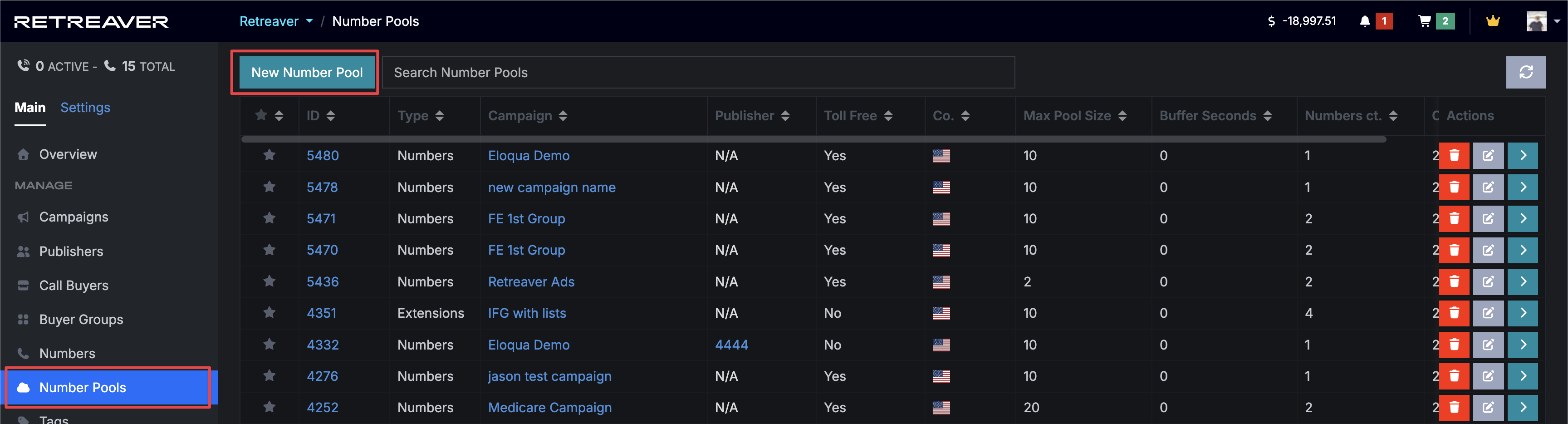
Click on Number Pools, then on New Number Pool
-
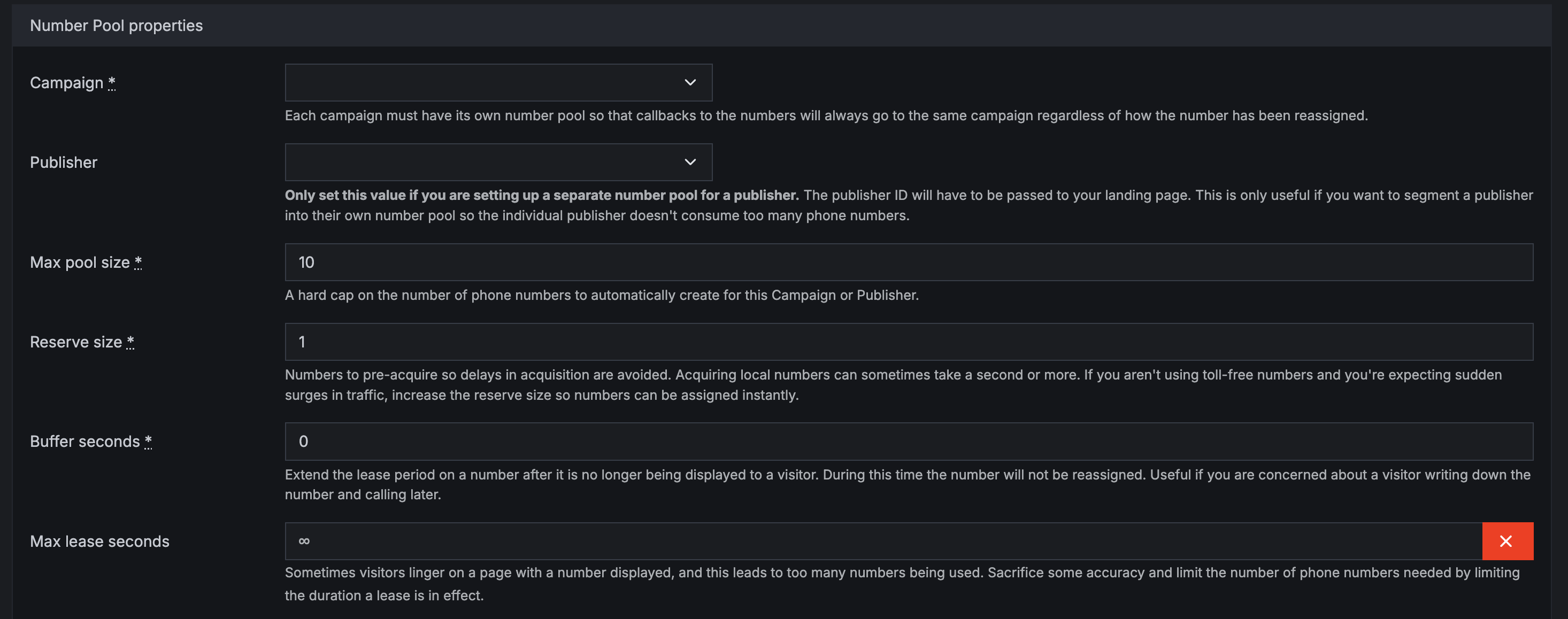
Choose the desired Campaign that this pool is associated with.
-
If this pool is being created for an individual Publisher (Call Source), choose their name from the drop-down. You may do this if you find they are consuming too many numbers, this is an effective alternative. Otherwise, leave blank.
We ping from your site to Retreaver to know when a consumer is looking at a number.
- The Buffer Seconds dictates that after they leave, how much longer we hold onto the number/extension.
- The Max Lease Time dictates how long we let them view it without calling before we release the number/extension back into the pool.
Also once a call is ended, if there are no other users calling the same number, it is released back into the pool. A new visitor will reset the timer on the Max Lease Time, but once the Max Lease Time or the last visitor leaves, the number is returned back into the pool.
Default Number
You need a default number in the source code in order to display to viewers as a fallback when your Number Pool is full. This Default Number is there to work alongside the Number Pool. You would add a sub_id Tag for this Number and have it equal default number so you know what this number is for in the future. It will be used when the number pool is not sized properly and we need to show a static number from our system. You lose tracking information about why the lander was called, but you won’t lose the call.
Setting Default Parameter Mapping
To configure your default Retreaver.js URL parameter mapping settings you have to tell Retreaver what to look for in the URL. These defaults will make setting up new campaigns much quicker, especially if you have multiple levels of sub-affiliates to deal with. To edit your company settings, click Settings, then Company and select Edit at the top.
Default Parameter Mapping settings. Once you’ve opened the edit screen, you can choose what keywords to map out of the URL and what Tag name you want it to be assigned. In the example below, f_n is being assigned first_name in Retreaver.
Adding a URL parameter to map for in Company settings.
How Many Numbers do I Need?
This depends on how deeply you plan to track. You may primarily want to just track back to AffID and SubID. If tracking down to the ClickID, you will need one number displayed per page viewer, which can add up fast.
Example 1: If you are only tracking kw=test and 50,000 people are all looking at that keyword, they all get the same number. However, if each browser has a different &kw= they will all get a different number. If all kinds of visitors have the same zoneid, they all see the same number. No reason to generate a new number per visitor if you are only tracking that field and it is the same for many visitors.
Example 2: If you send URL Source and SubSource, and in this example, you only had 3 sources and 10 subsources, that is only a total combination of 30. So your Number Pool only needs 30 numbers and will track with 100% accuracy.
Example 3: 1 million visitors are viewing a web page and the URL reads:
http://yourdomain.com/?a=ABC&s=testThis results in 1 million viewers all seeing the same number since they share all the same tracking data.
In summary, it just depends on how long you set the Max Lease Time in the pool and what you are tracking. If you are tracking down to ClickID, it will be a unique number per visitor, that is how many concurrent visitors you have within the lease time. Try setting the Max Pool Size you think will work and then if we contact you via email saying that your pool is too small, you can either:
-
Ignore it and lose a bit of tracking details.
-
Increase the pool size to track what you want more accurately.
Help us improve this article or request new support guides.