
Route By Performance
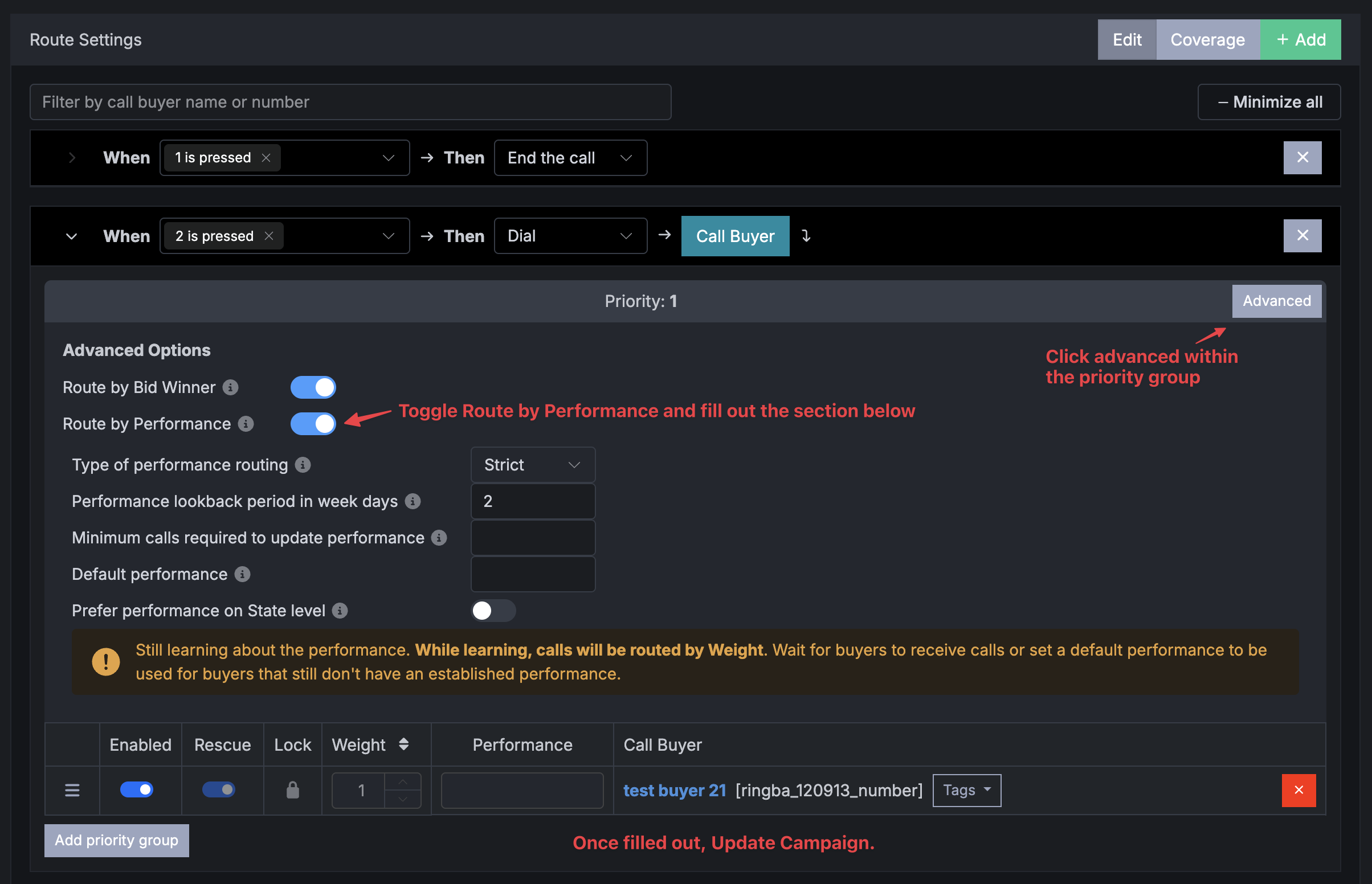
Above are the steps in order to customize the Route by Performance once the feature is enabled on your account in the Store.
Performance Overview
In the past, Retreaver users could only influence call endpoint routing flows using endpoint priority and weight settings. However, with the release of the new “Route by Performance” feature, users now have two options to influence how they want their calls routed to their downstream buyers.
Routing By Performance Formula:
The routing by performance formula is calculated as EPC=revenue/(total calls - repeated calls). Buyers with the highest EPC will receive the most calls using this feature.
Available Routing Options
- Strict Routing: A “strict” type of performance routing means calls will always be routed strictly to the buyer with the highest performance.
- Weighted Routing: A “weighted” type of performance routing means the performance value is used as a weight to distribute calls between buyers within a given priority group. The highest performing buyer will get most of the calls, however, lower performing buyers will get calls in order to continually calculate performance and distribute calls between all buyers within each priority group.
Available Customization Options
- Performance Lookback Period: This is a customizable tab where you indicate how long Retreaver looks at the performance of a buyer for the look back period, up to the time of the creation of the campaign.
- Minimum calls required to update performance: This is where we update the performance of a buyer only after they have received the minimum amount of calls for the look back period.
Example: If a buyer has a performance of 13.2, the minimum calls required is 30, and they’ve received only 11 calls, we will not update their performance. It will stay at 13.2. This option can be left blank, and Retreaver will try to use a reasonable value based on the campaign. It can also be set to 0 if the user wants to update the performance of a buyer even when they’ve received no calls. Note that this could lead to performance being set to 0.
- Default Performance: Default performance is optional. Retreaver will wait to establish the performance of targets. This period is called “learning.” While “learning,” calls will be routed by “weight.” Default performance can be set to skip the learning period and tell Retreaver what is the relative performance of the target.
The “default performance” is used only until the buyer receives the minimum calls for the look back period. After that, Retreaver knows the performance of the buyer.
Example: Say you set default_performance: 20 on a route’s priority group. When you add “New Buyer A” to this route they have no established performance so they will be evaluated at 20. Once some calls complete with this Buyer they will be assigned a performance value, for example performance = 25. NOTE: If you later change default_performance to 30 for the parent priority group, this will not overwrite the existing performance evaluations, “New Buyer A” will still be evaluated at 25 , only any new additional Buyers added to the route’s priority group will be evaluated at 30.
- Route by Performance on State Level: When this option is selected, Retreaver will only look at the performance of a state level and route by it without taking into account overall performance of all buyers in all states cumulatively. Enabling the Route by Performance feature is done on a request basis. Contact Retreaver support and we will be happy to enable the feature for you.
For any questions, please feel free to contact Retreaver support directly.
Help us improve this article or request new support guides.