
Webhook Output Modifiers
Output modifiers allow you to adjust specific values returned by a webhook response before they are used inside Retreaver. These settings are commonly used with RTB setups when a buyers webhook returns values such as payout, revenue, or conversion timer and you want Retreaver to apply a calculation to those values automatically.
For call tracking purposes, output modifiers can be used to:
- Adjust a returned payout value before storing it on the call.
- Adjust a returned revenue value before storing it on the call.
- Increase or decrease a returned conversion timer.
- Normalize values returned by third-party auction or routing platforms.
- Apply revenue share or payout share logic directly in the webhook configuration.
Output modifiers are typically used alongside your Ping Output Map, which extracts values from the webhook response and stores them in Retreaver output tags.
How to use Output Modifiers
Output modifiers are available inside the webhook configuration area after expanding Toggle Optional Output Modifiers.
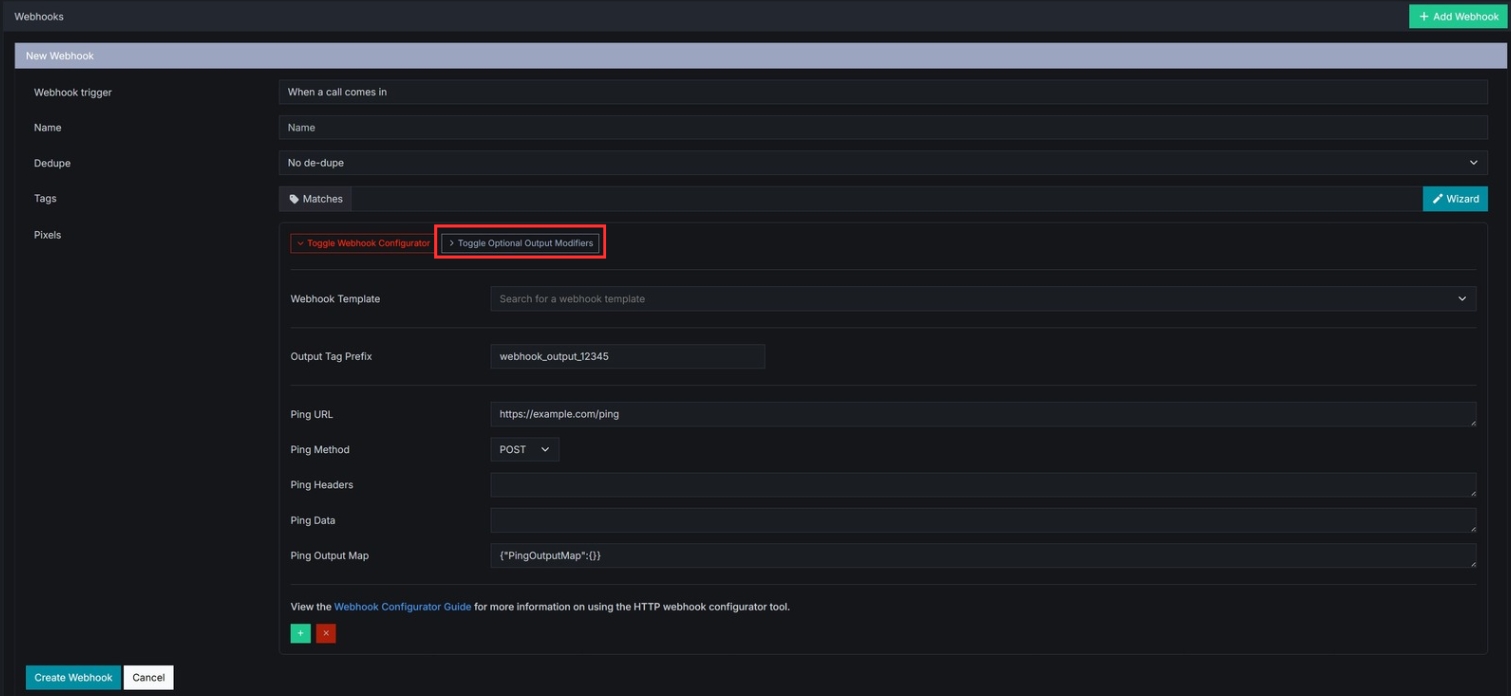
These fields allow you to reference output tags returned by your webhook response and apply calculations to them before they are used in Retreaver.
The available output modifier fields are:
- Payout Token
- Payout Multiplier
- Revenue Token
- Revenue Multiplier
- Timer Token
- Timer Modifier
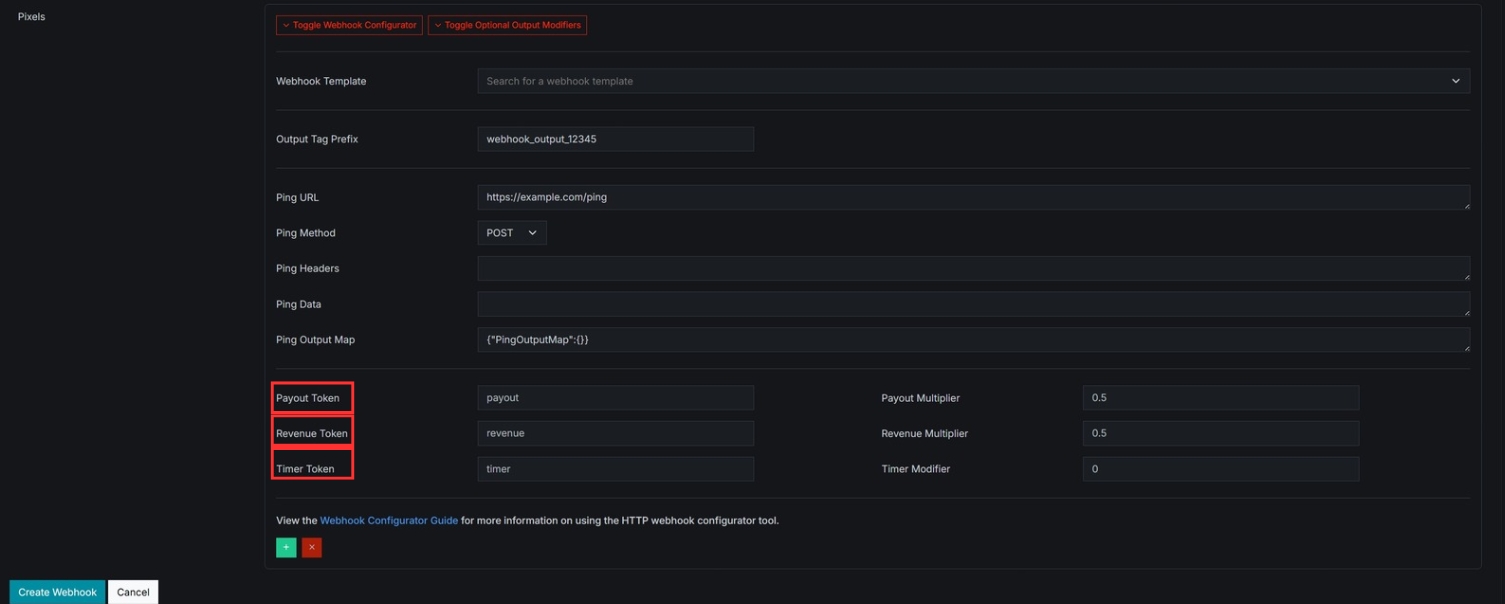
Each field is explained below.
How do Output Modifiers work?
Output modifiers work by taking a value returned in your webhook response, referencing it through an output tag, and then applying a calculation to that value.
For example, if your webhook returns a payout value of 20 and your payout multiplier is set to 0.5, Retreaver will calculate the final payout as 10.
This makes output modifiers useful when integrating with systems that return raw bid values, gross revenue values, or timer values that need to be adjusted before they are used in your call flow.
Payout Token
The Payout Token identifies which output tag contains the payout value returned by the webhook response.
This should match a key from your webhook output map.
Example:
If your ping_output_map contains:
{"PingOutputMap":{"payout":"bid.payout"}}Then your payout token would be:
payoutRetreaver will use the value stored in that output tag as the base payout value.
Payout Multiplier
The Payout Multiplier is used to multiply the payout value stored in the payout token.
This value must be a decimal between 0.0 and 1.0.
Example:
Returned payout value:
20Payout multiplier:
0.5Final payout:
10This is commonly used when only a portion of the returned payout should be applied.
Revenue Token
The Revenue Token identifies which output tag contains the revenue value returned by the webhook response.
This should match a key from your webhook output map.
Example:
If your ping_output_map contains:
{"PingOutputMap":{"revenue":"bid.amount"}}Then your revenue token would be:
revenueRetreaver will use the value stored in that output tag as the base revenue value.
Revenue Multiplier
The Revenue Multiplier is used to multiply the revenue value stored in the revenue token.
This value must be a decimal between 0.0 and 1.0.
Example:
Returned revenue value:
40Revenue multiplier:
0.5Final revenue:
20This is commonly used when applying a revenue share or reducing a returned value before storing it.
Timer Token
The Timer Token identifies which output tag contains a timer value returned by the webhook response.
This is usually used for a conversion timer or another timing-related value returned by a third-party system.
Example:
If your ping_output_map contains:
{"PingOutputMap":{"timer":"bid.conversion_timer"}}Then your timer token would be:
timerRetreaver will use the value stored in that output tag as the base timer value.
Timer Modifier
The Timer Modifier is used to add or subtract seconds from the timer value stored in the timer token.
This value must be an integer between -999 and 999.
Example:
Returned timer value:
90Timer modifier:
30Final timer:
120You can also use a negative value to reduce the timer.
Example:
Returned timer value:
90Timer modifier:
-15Final timer:
75Example Output Modifier Setup
Below is a simple example showing how output modifiers can be configured using tags returned by a webhook response.
Example output map
{"PingOutputMap":{"payout":"bid.payout","revenue":"bid.amount","timer":"bid.conversion_timer"}}Example modifier values
Payout Token: payout
Payout Multiplier: 0.5

Revenue Token: revenue
Revenue Multiplier: 0.5

Timer Token: timer
Timer Modifier: 30Example webhook response
{
  "bid": {
    "payout": 20,
    "amount": 40,
    "conversion_timer": 90
  }
}Result
- Final payout:
10 - Final revenue:
20 - Final timer:
120
When should Output Modifiers be used?
Output modifiers are helpful when:
- A third-party system returns raw payout or revenue values.
- You need to apply a percentage split to a payout.
- You need to apply a percentage split to a revenue value.
- You need to increase or decrease a returned timer value.
- You want Retreaver to automatically adjust returned values instead of handling those calculations externally.
Frequently Asked Questions
Do output modifiers change the original webhook response?
No. Output modifiers do not change the original response sent by the third-party system. They only affect how Retreaver interprets and stores the returned values.
Do I need to use output modifiers?
No. Output modifiers are optional. If you want to use the raw values returned by the webhook, you can leave these fields blank.
Do the token names need to match the webhook response exactly?
Not directly. The token should match the output tag name created in your ping_output_map or post_output_map, not necessarily the raw JSON field name itself.
Can I use a negative timer modifier?
Yes. The timer modifier can be a negative number, which will subtract seconds from the returned timer value.
What happens if the token does not exist?
If the token does not exist in the output map or the returned value is invalid, Retreaver will not be able to apply the modifier correctly. Double check your output map and returned response values when troubleshooting.
General Output Modifier Troubleshooting Guidelines
- Confirm that the returned webhook response contains the value you expect.
- Confirm that the value is being correctly mapped in your
ping_output_maporpost_output_map. - Confirm that the token field matches the output tag name exactly.
- Confirm that your multiplier values are valid decimals between
0.0and1.0. - Confirm that your timer modifier is a valid integer between
-999and999. - Review the pixel fired log on the call flow page to verify the webhook response and mapped values.
Output Modifier Support
If you have any questions about output modifiers or webhook response mapping, please open a support ticket. The Retreaver support team can assist with reviewing your webhook response, output mapping, and modifier settings.
Be sure to include any relevant details such as:
- The webhook endpoint you are attempting to configure.
- A sample webhook response.
- Your
ping_output_maporpost_output_map. - The token and modifier values you are using.
- Any relevant Retreaver campaign or buyer links.
Help us improve this article or request new support guides.