
Write call data straight from your Buyers
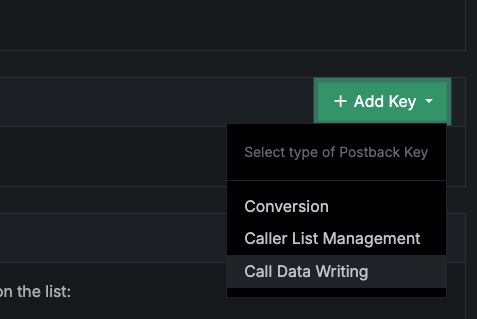
Data Writing keys now live on Buyers (Targets) and Buyer Groups (Handler Groups), not just Sources (Affiliates) and Campaigns. Your buyers can push their own dispositions and outcome data back onto the exact calls they handled — and once it’s on the call, it’s just another tag you can report on.
Why this matters
The most valuable signal about a call often arrives after the call ends, and it lives with the buyer: Did the sale close? Was the contract signed? What was the final payout? There have always been ways to get that back to Retreaver — Data Writing on Buyers is a newer, cleaner, scoped one.
Because everything a buyer sends becomes a tag on the call, it drops straight into the same reporting you already use for call-tracking data. You can slice, dice, roll up, drill down, and pivot on buyer-reported outcomes side by side with the metrics Retreaver already captures — revenue, duration, source/affiliate links, campaign, UTM parameters — all in one place.
Concretely, you can now answer questions like:
For every call the Retreaver AI Analyst tagged
disposition=sale, coming fromutm_campaign=2026-08-X, where the buyer reportedbuyer_disposition=contract signed— show me the revenue.
External tags from the AI Analyst, source-side UTM parameters, and buyer-reported dispositions — joined against revenue and duration, in a single pivot. No exports, no stitching spreadsheets together.
What’s new
A Data Writing key is issued to something — a Source, a Campaign, and now a Buyer or a Buyer Group. That ownership now matters: a Buyer’s key can only write to calls that were actually routed to that Buyer. It can’t reach across and tag another buyer’s calls, even if two calls share the same caller number.
The recommended flow is unchanged and still the default: send data by caller_number before the call to have Retreaver apply it to the next matching call, or by call_uuid after the call to target one exact call. What’s new is simply who can hold a key and the guardrail that keeps each key to its own calls.

Make sure to go through the full guide about using Call Data Writing
Choosing the level: Buyer or Buyer Group
Where you issue the key sets both who can write and how far they can reach — so the level is really an access-control and granularity decision:
- Buyer — the key writes only to this buyer’s calls. Tightest scope: the buyer can report on the calls they handled, and nothing else.
- Buyer Group — the key writes to any call handled anywhere in the group. Any buyer in the group can apply data across all of the group’s calls.
Pick the level that matches the business case. Use a Buyer key when each buyer should stay in their own lane; use a Buyer Group key when a group operates as one team and a shared, group-wide key is simpler than one key per buyer.
How to use it
Every extra key=value parameter is stored as a tag on the matched call. Send the buyer’s Data Writing key plus a caller_number or a call_uuid.
Report an outcome after the call, against a specific call:
curl "https://retreaverdata.com/data_writing?key=YOUR_BUYER_KEY&call_uuid=CALL_UUID&buyer_disposition=contract%20signed&payout=850"Write ahead of the call, keyed to the caller (Retreaver applies it to the next call from this caller number):
curl "https://retreaverdata.com/data_writing?key=YOUR_BUYER_KEY&caller_number=%2B14165551234&buyer_disposition=contract%20signed"The same request shape works for a Buyer Group key — the key simply scopes to calls handled anywhere in that group.
Prefer call_uuid over caller_number
For calls that have already ended, call_uuid is the more precise identifier and the direction we recommend: it pinpoints the exact call.
caller_number still works, but it identifies calls by phone number rather than by the call itself. Not often, but sometimes, more than one call can match a caller number — and when that happens the data may land on a different call than you expected. It works as intended the vast majority of the time; the small remainder comes down to timing, and even then the data is applied correctly to a matching call, just perhaps not the one you had in mind.
A practical way to adopt call_uuid: have Retreaver send the buyer a webhook at the start of the call carrying the call_uuid. The buyer holds onto it, and reports against that exact call at the end.
If you want to launch today, caller_number is perfectly fine — start there and move to call_uuid over the following days or weeks.
Then report on it: filter and group by buyer_disposition alongside disposition, utm_campaign, revenue, and duration in your call reports to build the pivot above.
Access
Data Writing keys are managed from the Buyer (or Buyer Group) you want to issue them for, wherever you already manage postback keys. Each key writes only to calls belonging to that buyer or buyer group — a key from one buyer will never tag another buyer’s calls.
Help us improve this article or request new support guides.