
Set Please Hold and Please Hold TCPA per Buyer. How they differ from the Buyer Greeting
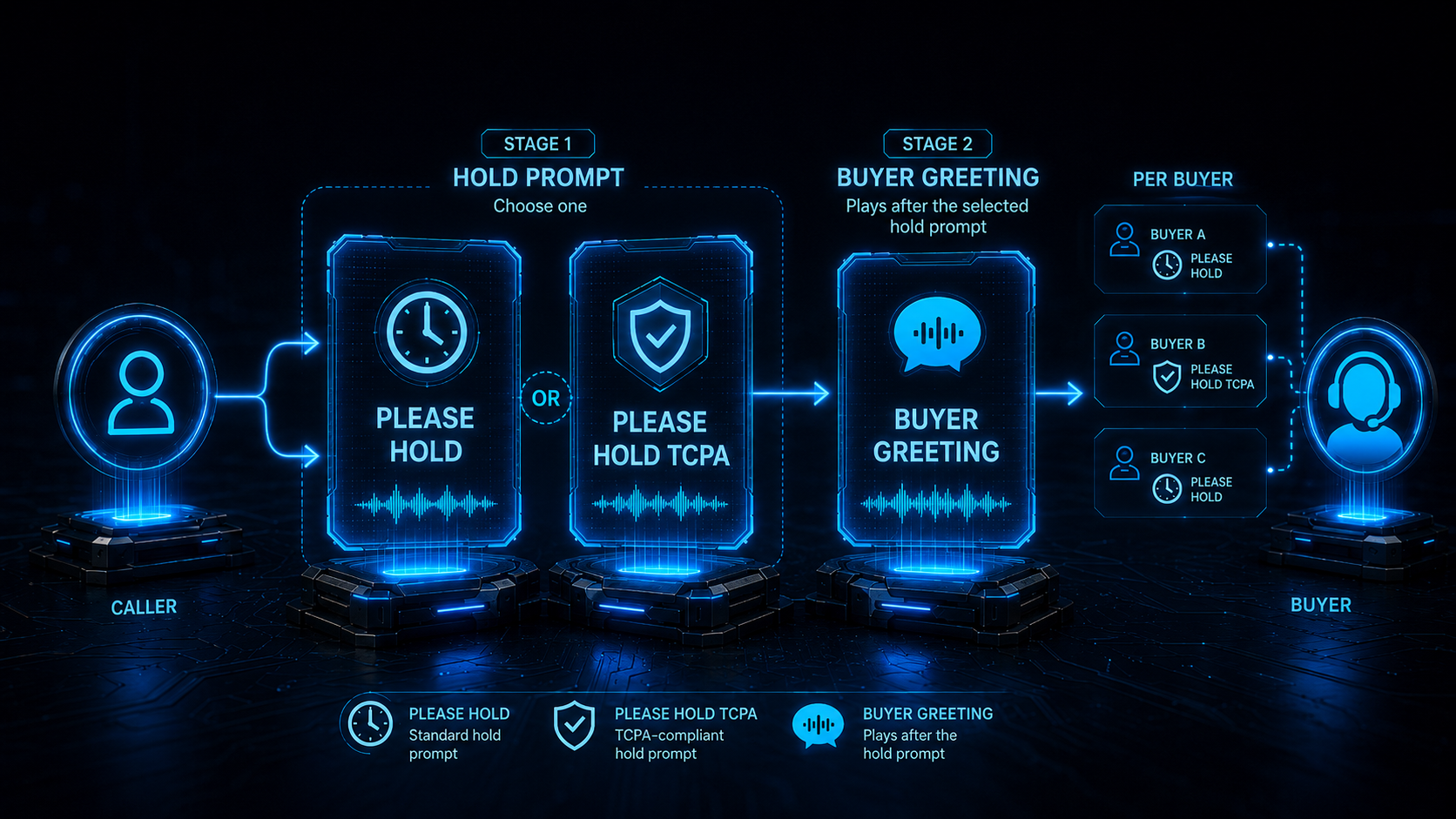
Set Please Hold and Please Hold TCPA per Buyer and how they differ from the Buyer Greeting
You can now configure Please Hold and Please Hold TCPA on an individual Buyer. When a Buyer has one, it plays instead of the campaign-level prompt for that Buyer only, so each Buyer can play its own pre-connection message to the caller, including its own compliance disclosure. This is most useful for campaigns that distribute calls to multiple Buyers who each require different wording.
One safeguard applies throughout: a Buyer’s plain Please Hold never replaces a campaign’s TCPA disclosure. The details are under “Which prompt wins” below.
This article also explains the difference between Please Hold, Please Hold TCPA and the Buyer Greeting, since they all play to the caller just before connection.
Why this matters
Campaigns that route calls to several Buyers often need different pre-connection messaging for each one, especially for TCPA disclosures, where each Buyer may be a separate legal entity with its own approved script.
Campaign-level Please Hold and Please Hold TCPA remain the right tool when every Buyer should hear the same message. Per-Buyer prompts add finer control on top of that: you can tailor the hold message or the compliance disclosure to the specific Buyer a caller is about to reach.
What’s new
Please Hold and Please Hold TCPA are now available as per-Buyer prompts, alongside the existing per-Buyer Buyer Greeting. If a Buyer has one configured, it plays instead of the campaign’s. If not, the campaign-level prompt still applies.
Which prompt wins
When both the campaign and the Buyer have hold prompts configured, the rules are:
- The Buyer’s prompt beats the campaign’s. A Buyer’s Please Hold TCPA even replaces a campaign’s plain Please Hold. Useful when a specific Buyer needs a disclosure the campaign doesn’t.
- Plain Please Hold beats Please Hold TCPA when both exist at the winning level.
- The compliance safeguard: if the campaign has only Please Hold TCPA (no plain Please Hold), a Buyer’s plain Please Hold is ignored, only the Buyer’s own Please Hold TCPA can play in its place. A courtesy hold message can never silence a required disclosure.
Choosing between Buyer Greeting, Please Hold, and Please Hold TCPA
All three play to the caller, right before they’re connected to the Buyer. The quickest way to choose:
- Buyer Greeting → a friendly, Buyer-specific intro.
- Please Hold → a general “please hold” courtesy.
- Please Hold TCPA → a legally required disclosure that must also play on repeat calls.
Buyer Greeting vs Please Hold — Both are caller-facing pre-connection messages. Use Please Hold for a simple “please hold” courtesy message, use Buyer Greeting for a branded or identity message tied to a specific Buyer. If both exist, the caller hears Please Hold first, then the Buyer Greeting, and is then connected.
When each prompt plays
Only one hold prompt — Please Hold or Please Hold TCPA, plays per connection. The Buyer Greeting is separate and plays after it. The table shows what the caller hears in each situation:
| Call situation | Hold prompt (Please Hold / Please Hold TCPA) | Buyer Greeting |
|---|---|---|
| First-time call to a single buyer | ✅ The Buyer’s if set, otherwise the campaign’s. Plain Please Hold wins over TCPA — see “Which prompt wins” | ✅ Plays, after the hold prompt |
| Repeat caller — no Previous Buyer Greeting set | ✅ TCPA only: the Buyer’s if set, otherwise the campaign’s. A plain Please Hold never plays on repeat calls | ✅ Plays |
| Repeat caller, Previous Buyer Greeting set | ❌ None — Previous Buyer Greeting plays instead | ❌ Skipped |
| Simultaneous (ring-all) dial to several buyers | ✅ The campaign’s only — per-Buyer prompts don’t apply because no single buyer has been chosen yet | ❌ Skipped |
| Call handed off to an internal buyer | ❌ None — the sending campaign’s prompts have already played | ❌ Skipped |
| Failover to the next buyer (previous didn’t answer) | ❌ None | ✅ Plays (except internal buyers) |
A few terms used above:
- Previous Buyer Greeting — a separate campaign prompt that plays at the start of repeat calls that reconnect to the same buyer.
- Internal buyer — a buyer whose number is another Retreaver number, so the call is routed inside Retreaver rather than out to a carrier.
How to use it
- Open the Buyer you want to configure.
- Go to its Prompts section.
- Add a Please Hold or Please Hold TCPA prompt and enter your message (text-to-speech or an audio file).
- Save. Calls routed to this Buyer will now play this message before connecting, instead of the campaign one.
Notes and caveats
- Per-Buyer prompts are rolling out in stages. If Please Hold or Please Hold TCPA isn’t available on your Buyers yet, contact Retreaver support to have it enabled for your account.
- These prompts play to the caller before connection, they are not played to the Buyer.
- A Buyer’s prompt plays in place of the campaign one only for that Buyer. It doesn’t change the campaign default for other Buyers.
- A Buyer’s plain Please Hold never replaces a campaign’s TCPA disclosure. On a campaign that has only Please Hold TCPA, a Buyer’s plain Please Hold is ignored and the disclosure still plays (the Buyer’s own, if set, otherwise the campaign’s).
- If a Buyer requires a TCPA disclosure, configure only Please Hold TCPA on that Buyer. Adding a plain Please Hold alongside it replaces the disclosure on first-time calls; the TCPA version then plays only on repeat calls and on TCPA-only campaigns.
- A Buyer’s plain Please Hold never carries over to repeat calls. The repeat-call slot plays TCPA prompts only.
- If you need a disclosure that plays on repeat calls as well as first-time calls, use Please Hold TCPA — it’s the only prompt that does both. No hold prompt, TCPA included, plays when a call is handed off to an internal buyer. On those calls the sending campaign’s prompts have already played.
Help us improve this article or request new support guides.
Previous
Set Music on Hold per Buyer
Next
Authenticate RTB SIP calls with an IP whitelist *or* credentials