
Authenticate RTB SIP calls with an IP whitelist *or* credentials
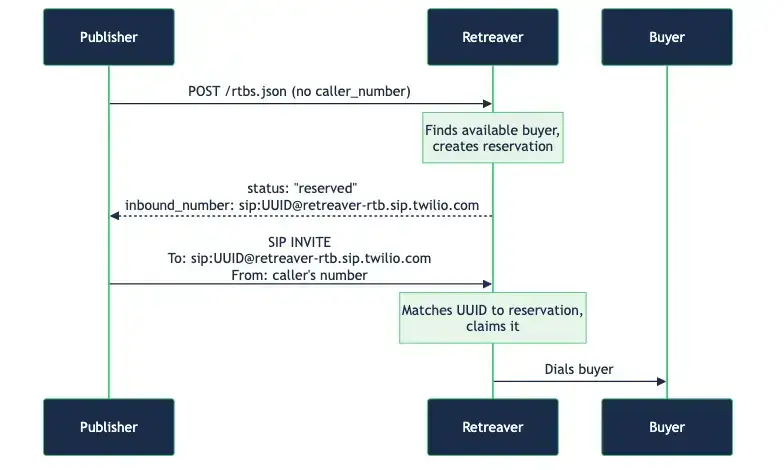
RTB keys can now let the publisher’s system authenticate either by IP address or by username and password — whichever the publisher’s setup can actually provide.
Why this matters
When a publisher wins an RTB bid, we hand back a dynamic SIP address for that specific reservation, and the publisher’s system connects the call to it. Until now, the only way to authorize that connection was an IP whitelist: the publisher’s originating IP addresses had to be pre-approved, and we accepted calls only from those.
That works great when the publisher dials from their own infrastructure with fixed IPs. But it falls apart for a growing category of setups:
- AI voice agents and hosted dialers (and many modern SIP/CPaaS platforms) don’t give the publisher a stable IP to whitelist. They rotate through dynamic IPs, or never expose one at all. What they do provide is a username and password.
- Some publishers simply can’t share or commit to a fixed IP range.
For these publishers an IP whitelist is a non-starter — there’s no IP to list. They need to prove who they are with credentials instead.
What’s new
Every RTB key now has a SIP authentication setting with two choices:
- IP Whitelist (default) — calls are accepted only from the publisher’s pre-approved IP addresses. This stays the recommended option whenever the publisher has static IPs; nothing changes for your existing keys.
- Credentials — calls are authenticated with a username and password instead of an IP. Use this when the publisher’s system has dynamic IPs (for example an AI agent) and can’t be whitelisted.
It’s one or the other per key — the publisher doesn’t need both, and no one is forced into an IP they can’t provide.
Two factors, not one — a stronger security model
Whichever method you pick, it’s layered on top of the reservation itself. Every SIP address we return already carries a unique, single-use reservation identifier that is hard to guess and expires quickly. To connect a call, the publisher’s system now has to satisfy both checks:
- the correct reservation identifier, and
- an approved IP address — or valid credentials.
That’s effectively two-factor authentication for every call: a per-call secret plus proof of who the publisher is. It’s meaningfully more secure than approaches that rely on a single check — only a reservation identifier, or only an IP/credential — where compromising that one thing is enough.
If your team has security or compliance requirements that call for two-factor authentication, this is designed to meet them. And if you don’t have that requirement, you still get the stronger model automatically — it’s simply good practice, at no extra effort.
Important: these credentials are only for RTB’s dynamic SIP addresses
The username and password used here authenticate the publisher’s connection to the dynamic SIP address returned by an RTB key — the per-reservation address the publisher receives when they win a bid.
They are not the same as the SIP username and password used for a static SIP address on a buyer/endpoint. Those are separate and unaffected. The new credentials apply only to the dynamic RTB SIP addresses, and setting them has no effect on any static SIP configuration.
How to use it
- Open the RTB key (under your campaign’s postback keys).
- Set SIP authentication:
- IP Whitelist — keep this if the publisher dials from fixed IPs (make sure their originating IPs are whitelisted).
- Credentials — choose this if the publisher’s system (AI agent, hosted dialer, etc.) authenticates with a username and password.
- When the publisher wins a bid, their system connects the call to the SIP address we return, using the authentication method configured on the key.
For now, the credentials for a key are provisioned for you — contact support to have them set up. Self-service credential management is coming.
Access
- Requires Real-Time Bidding to be enabled on your account.
- Existing keys are unchanged and continue to use IP Whitelist by default.
- To switch a key to Credentials, reach out to support so we can provision the username and password for you.
Help us improve this article or request new support guides.
Previous
Set Please Hold and Please Hold TCPA per Buyer. How they differ from the Buyer Greeting
Next
New API Docs and AI Chat improvements