
Improved SIP Set Up
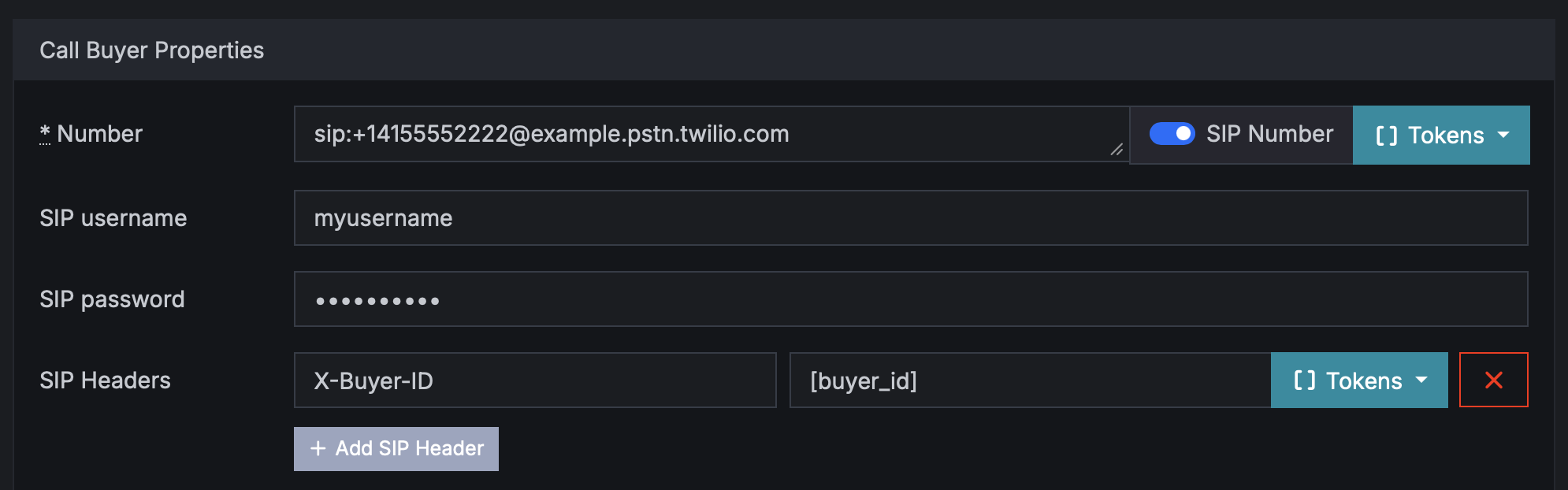
We recently rebuilt the Buyer > SIP Number set up form to be more user-friendly.
Retreaver allows you to input regular numbers (+18885551234) or SIP endpoints (sip:username@example.com). When you enter a number starting with sip:, the form will automatically switch to the SIP number set up form.
SIP Number Set Up Form
The new form now has two sections:
- Number: enter for example
sip:username@example.com - SIP Username and Password: these optional fields are used to authenticate with the SIP server.
- SIP Headers: pass any additional headers you need, for example authentication or passing data to buyers PBX system
SIP Number vs Username and Password
For a SIP target, the value in Number like sip:username@example.com is the destination SIP address we dial. In other words, the username in the URI is the user/extension/address part of where the call should go, not the authentication login by itself.
The SIP Username and SIP Password fields are separate. When you fill them in, our system passes them as outbound SIP authentication credentials to the provider when placing the call. If you leave them blank, we still dial the SIP URI in Number, but we do not derive auth credentials from that URI and we do not send SIP auth unless those form fields are explicitly set.
So the practical difference is:
sip:username@example.comtells us where to send the callSIP Username/SIP Passwordtell us how to authenticate with that SIP server, if authentication is required
SIP Headers
A common SIP Header use case is routing the call differently on the buyer’s PBX based on metadata.
Example: you send a call to:
sip:agentqueue@example.com
and include a SIP Header like:
X-Campaign-ID: 1234

X-Publisher-ID: 5678
Their SIP server can read those headers and decide things like:
- send calls from campaign
1234to a specific queue - prioritize certain publishers
- save metadata to a dialer/CRM
Read more in our guide How to Route Calls to a SIP Address
Help us improve this article or request new support guides.