
AI Analyst Columns in the Call Log and Reports
“Which sources are sending us callers who are interested in getting a quote, but the calls end up failing because the quote is not for them and they needed more information?”
We’ve added new columns to the Call Log that surface the results of AI-powered disposition and intent analysis directly in the table — no need to open each call individually.
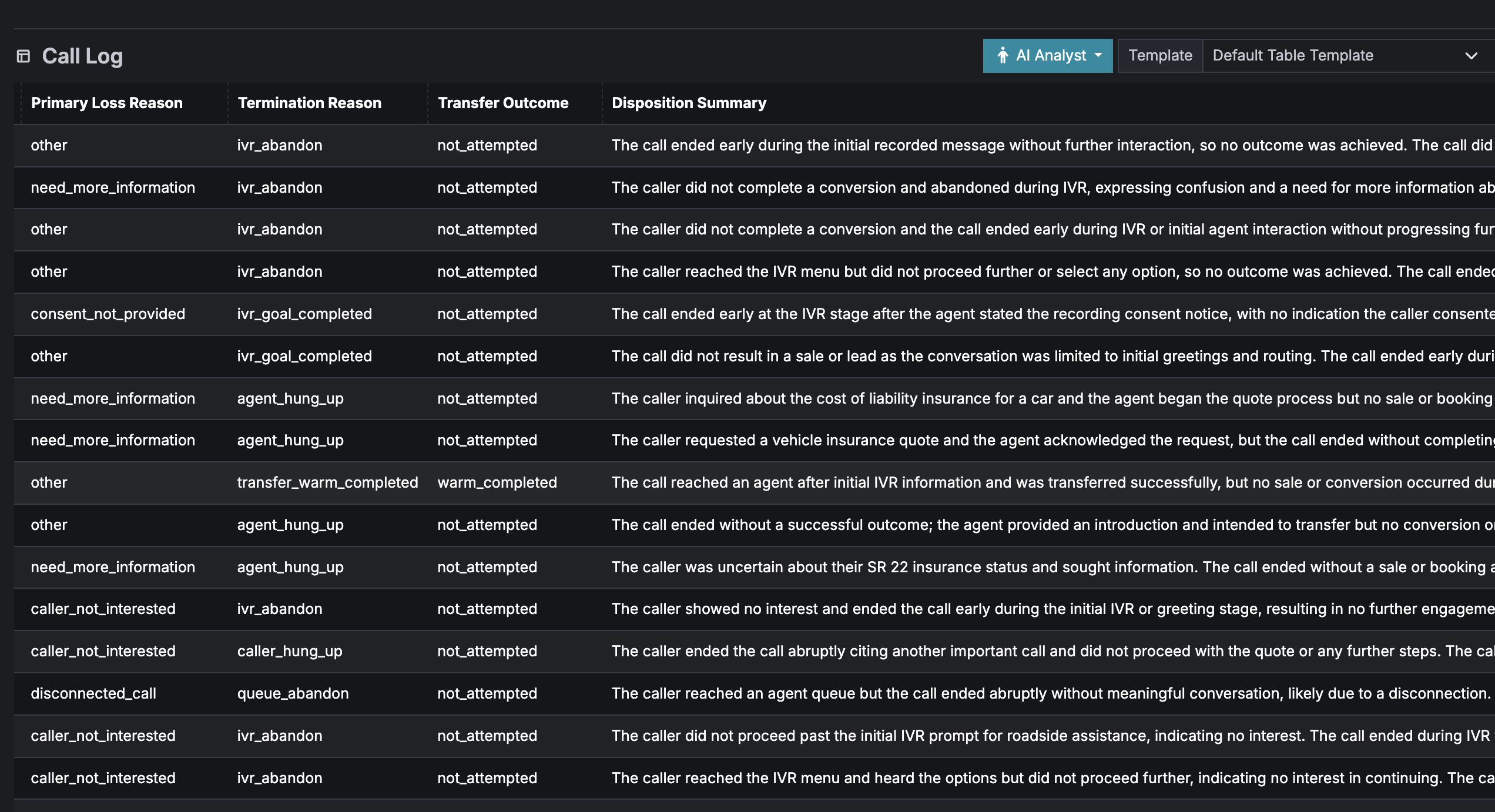
New Disposition Columns
The following fields are now available as dedicated columns in the Call Log:
- Positive Outcome — whether the call resulted in a successful outcome
- Stage Reached — how far the caller progressed (IVR, queue, agent, transfer)
- Disposition Code — the specific outcome type (e.g. warm_transfer_success)
- Primary Loss Reason — why the call didn’t convert
- Termination Reason — how the call ended
- Transfer Outcome — result of any transfer attempt
- Disposition Summary — a plain-English sentence describing the overall call outcome
New Intent Columns
- Primary Intent — what the caller was looking for (e.g. qualification, pricing, scheduling)
- Intent Summary — a one-sentence description of what the call was about
Filter and Sort
Every new column is filterable and sortable. For example, you can quickly find all calls between 1 and 2 minutes where the primary loss reason is “need_more_information”, “caller_not_interested”, or “agent_unavailable_or_busy” — in a few clicks, without listening to a single recording.
For example: “Which sources are sending us callers who are interested in getting a quote, but the calls end up failing because the caller needed more information before committing?”
To answer this:
- Filter Primary Intent =
pricing_or_quote— these are callers who came in looking for a price - Filter Primary Loss Reason =
need_more_information— the call didn’t convert because the caller wasn’t ready to commit - Sort by Source — see which publishers are driving these underqualified leads
- Read the Intent Summary — confirms what each caller was after (“Caller wanted a quote for Medicare Advantage coverage”)
- Read the Disposition Summary — shows what happened (“The caller asked about pricing but had questions about eligibility requirements and ended the call without proceeding”)
The intent tells you they came in ready to talk price. The disposition tells you they left because they didn’t have enough information upfront. This pattern points to a source-level problem — the landing page or ad copy may be setting wrong expectations, or the caller isn’t being pre-qualified before the call. You can then work with that publisher to improve their pre-call flow rather than wasting agent time on calls that were never going to convert.
Available in CSV Exports
All new columns are included when you download a report. This means you can export your analysis results to a spreadsheet for further review, share them with your team, or feed them into your own reporting tools.
A Note on AI Accuracy
These results are generated by AI. Like all AI, it can occasionally misinterpret a call — it may get the disposition wrong or misidentify the caller’s intent. We recommend using these columns to identify trends and patterns rather than making decisions about individual calls. For example, if you notice a spike in “caller_not_interested” across a particular source, that’s a signal worth investigating — but verify before taking action. The AI is most valuable as a time-saver that helps you focus your attention where it matters.
Help us improve this article or request new support guides.