
Analyze your inbound RTB traffic — in the dashboard, via API, or by asking an AI assistant

Why this matters
We’ve seen the questions. We’ve seen the struggle. 1M requests and 152 calls. What is happening with these RTB requests?
Real-time bidding is inherently hard to reason about: dozens of buyers responding in milliseconds, for duplicate requests, from many publishers, revenue/payout math all interacting on every single inbound call. When a campaign’s RTB numbers look off, you need to slice that log fast — by campaign, by publisher, by status. The RTB Dashboards 2.0 provides all this but sometimes you just need to put the data in an external tool and start asking it questions. Questions that most of the time are already answered on the Retrewaver Dashboard, but hey - we are not going to stop you and we would even try to help you get this data to an external tool and analyse it there. If you find something helpful and interesting that you otherwise don’t see on the Retreaver Dashboard, please, let us know.
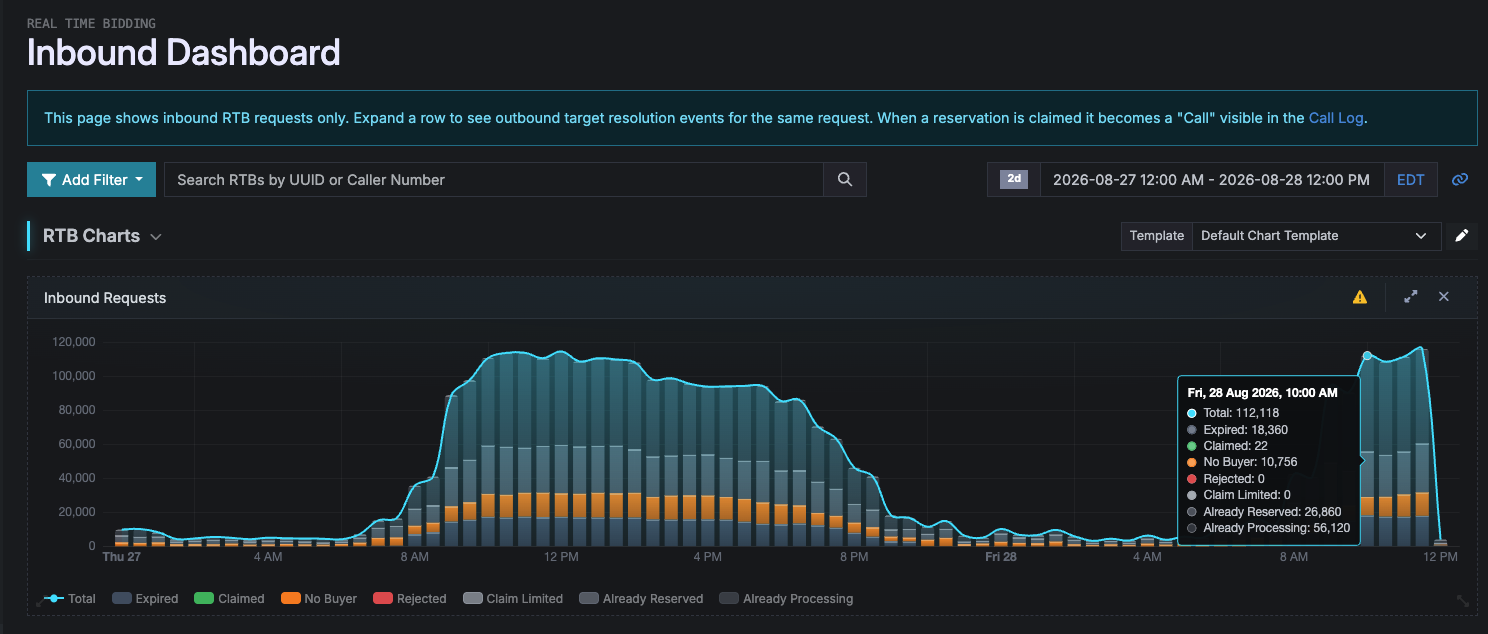 This release makes the inbound RTB log queryable the same way our other high-volume logs already are, across three surfaces, so you can go from “something looks wrong” to “here’s why” a lot
faster.
This release makes the inbound RTB log queryable the same way our other high-volume logs already are, across three surfaces, so you can go from “something looks wrong” to “here’s why” a lot
faster.
We’re also opening this data up to external tools and LLMs, via API and MCP, on purpose. RTB tuning and configuration has historically proven, to sometimes needed someone who already knew where to look; connecting the log to an AI assistant (or your own analytics tooling) means anyone on your team can point a model at it and ask “why did this campaign’s bid rate drop” or “which publishers are doing funny things” — and get an answer without having to be the one who knows the schema.
What’s new
- Drill-down tables for inbound RTB. The
/rtb_inboundslog now has the same pivot/rollup drill-down experience as Calls and Fired Pixels: group by campaign, publisher, target, status, duplicate/original, and more, and get rollup metrics (bid vs. no-bid, revenue/payout sums, ping-shield estimates, average and winning bid) per group in one pass instead of scrolling the raw log. - CSV export. An Export button is now available on the inbound RTB log and drill-down
tables, matching the export you already use on Fired Pixels. It generates the complete
filtered result set as a downloadable file, no row limit and no manual paging.
You can find the CSV Export button on the Log section of the dashboard

In the exported CSV, the caller number is replaced with a short one-way token instead of the real number (the same caller always gets the same token, but the token can’t be reversed back into a number). This is intentional, to keep bulk exports from becoming a way to mine caller phone numbers out of the system. If you have a legitimate use case that needs the real caller number in an export, get in touch with support and we can talk through it.
- API and MCP access. Both the raw log and the drill-down/rollup view are now available as a JSON API and as MCP tools, so you (or an AI assistant on your behalf) can query and analyze inbound RTB programmatically, not just through the dashboard.
- This is the first of two releases in this series — Payout Bid Modification Tables get the same treatment (drill-down + export + API/MCP) in an upcoming release.
How to use it
Browser. Visit retreaver.com/v2/rtb_inbounds_dashboard (link). Apply your
filters, then click Export to generate a CSV — this works the same way as the existing Calls export.
API. For a bounded, ad-hoc look at recent rows, use the index endpoint:
curl "https://api.retreaver.com/v5/rtb_inbounds?api_key=$API_KEY&campaign_id[]=123&created_at=last_2d"⚠️ Don’t use
/api/v5/rtb_inbounds(or/v2–/v4) to pull bulk data. This endpoint is capped at 100 rows per page by design — it’s meant for spot-checks and small windows, not for walking the whole log page by page. If you need the complete result set for a date range, use the export endpoint instead:
# Start the export
curl -X POST \
  -d "api_key=$API_KEY" -d "export[format]=csv" -d "export[params][campaign_id][]=123" \
  -d "export[params][created_at]=last_2d" \
  "https://api.retreaver.com/api/v5/exports/rtb_inbounds"

# Poll until it's done, then download
curl "https://api.retreaver.com/api/v5/exports/rtb_inbounds/{id}?api_key=$API_KEY"created_at (used the same way on the index endpoint above) only accepts relative window
tokens like last_2d/last_1w/today. For an explicit date/range instead of a rolling
window, drop created_at and pass created_at_start / created_at_end (or
report[params][created_at_start] / _end] for the export) as ISO 8601 timestamps instead,
e.g. created_at_start=2026-08-01T00:00:00Z.
The export writes the entire filtered result set to a file for you to download, no matter how large — you’re not limited to 100 rows at a time, and you’re not making dozens of requests to collect it.
MCP. Three tools are now available to any MCP-connected assistant:
rtb_inbounds.read— list/filter the raw logrtb_inbound_drill_down_tables.read— the same grouped rollup view as the dashboardexports.rtb_inbounds.manage— create and poll a full CSV export
Ask your assistant something like “what’s our duplicate rate on inbound RTB for campaign X this week” and it can pull the answer directly — including reaching for the export tool automatically instead of paging through results when you need the complete set.
Here is an example conversation
Permissions
All three surfaces (dashboard, API, MCP) require superuser access and the
real-time bidding feature to be enabled on your account. Without both, you’ll get a
403 Forbidden (API/MCP) or won’t see the pages in the dashboard. If you believe you should
have access, reach out to your account manager.
Help us improve this article or request new support guides.
Previous
Payout Bid Modification: A New Way to Increase Profit as a Network
Next
Announcing RTB Dashboard 2.0