
Introducing Calls Dashboard
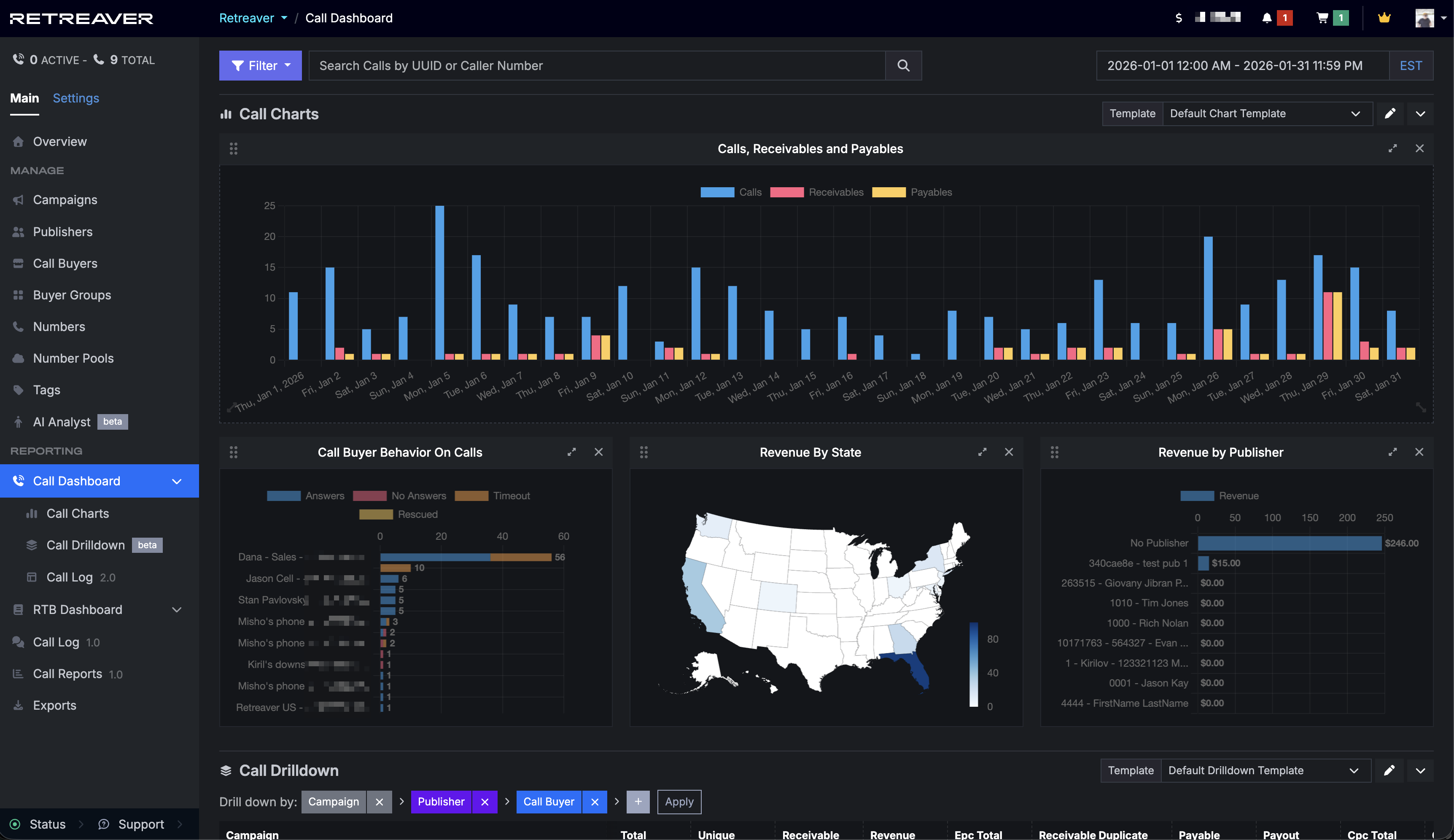
We’ve launched a new Calls Dashboard to give you a clearer, faster way to understand your call performance. From one place, you can view logs of incoming and completed calls, analyze trends with charts, export data, and drill down to group and compare performance across campaigns, buyers, and more.
The goal of our new dashboard is a single place to:
- Clearer overview of our incoming and completed calls
- Better charts and graphs to breakdown where your calls are going and areas to improve
- Less need to export to spreadsheets so you can accomplish what you need in-app
- Clearer breakdowns of revenue and payouts, whether by buyer, publisher, or US state
Try out the new dashboard: https://retreaver.com/calls_dashboard
Overview of Calls Dashboard
The Dashboard is composed of three parts Charts, Drilldown, and Tables:
Calls Charts
New charts to help you quickly understand performance, revenue, and buyer behavior
- Calls Receivables and Payable
- Revenue by Payable
- Revenue by State
- Call Buyer Behaviour on Calls
With more coming soon… (ping us if you have any Chart ideas you’d like to see)
Try out the new charts: https://retreaver.com/calls_charts
Calls Drilldown Report
Drilldown reports let you see data grouped by “levels” (Campaigns, Buyers, Publishers etc) and compare various stats by “drilling down” (expanding rows). For example, this way you can see all calls for a Campaign broken down by Buyer, then see payout for each.
Try out the new drilldown: https://retreaver.com/calls_clickhouse_drill_down_tables
Calls Log 2.0
A new version of our Call Log is available within Calls Dashboard with better performance, customizable columns, AI analyst, CSV Export, and a good foundation to further improve how you analyze calls on Retreaver.
Try out the new calls table: https://retreaver.com/calls_clickhouse
If you’re a fan of the old Call Log 1.0 (which is still accessible at https://retreaver.com/calls) please send us any feedback on how we can fully recapture everything you need in the new Call Log.
Customize your Dashboard

Each section of the dashboard is customizable
- Table columns can be hidden or reordered
- Chart sizes are customizable and can be reordered
- Drilldown columns can be hidden/reordered and the levels can be saved
All customizations in individual tables/charts/drilldown can be saved as “Templates” (sometimes called Views on other dashboards), where you can swap back and forth between different variations of your dashboard. For example: one for a buyer, one for tracking payouts.
We have further improvements in the pipeline such as a offering a collection of default templates to help you use Retreaver, new charts, new table columns, and an easier way to create and save entire Dashboard templates.
Help us improve this article or request new support guides.
Previous
Retreaver's Waiting Room
Next
Publisher Prioritization, Granular Traffic Control, and Buyer Capacity Protection