
See your live calls: "In Progress" comes to the Call Dashboard

Why this matters
Most reporting tells you about the past: how many calls came in yesterday, last week, last month. That’s great for trends, but it can’t answer the question you actually have when the phones are busy: what’s happening right this second?
In Progress closes that gap. It’s a live pulse on your traffic — the calls that are connected and still on the line as you watch. When something spikes (or goes quiet), you see it as it happens, not in tomorrow’s report.
What’s new
Every breakdown in the Call Dashboard now includes an In Progress count next to its other metrics. Because it lives in the same grouped, filterable view you already use, the live number inherits all of your slicing — every dimension you can group or filter by, you can now group or filter in-progress calls by too.
That turns a single number into something you can actually interrogate. A few of the questions you can now answer at a glance:
- How many calls are in progress right now by state State?
- How many live calls from a given Publisher¹ are connected to a particular Call Buyer² on a specific Campaign?
- Of those, how many are in each group age 70, age 60, age 50?
- And how many of those arrived as a warm transfer, and inbound?
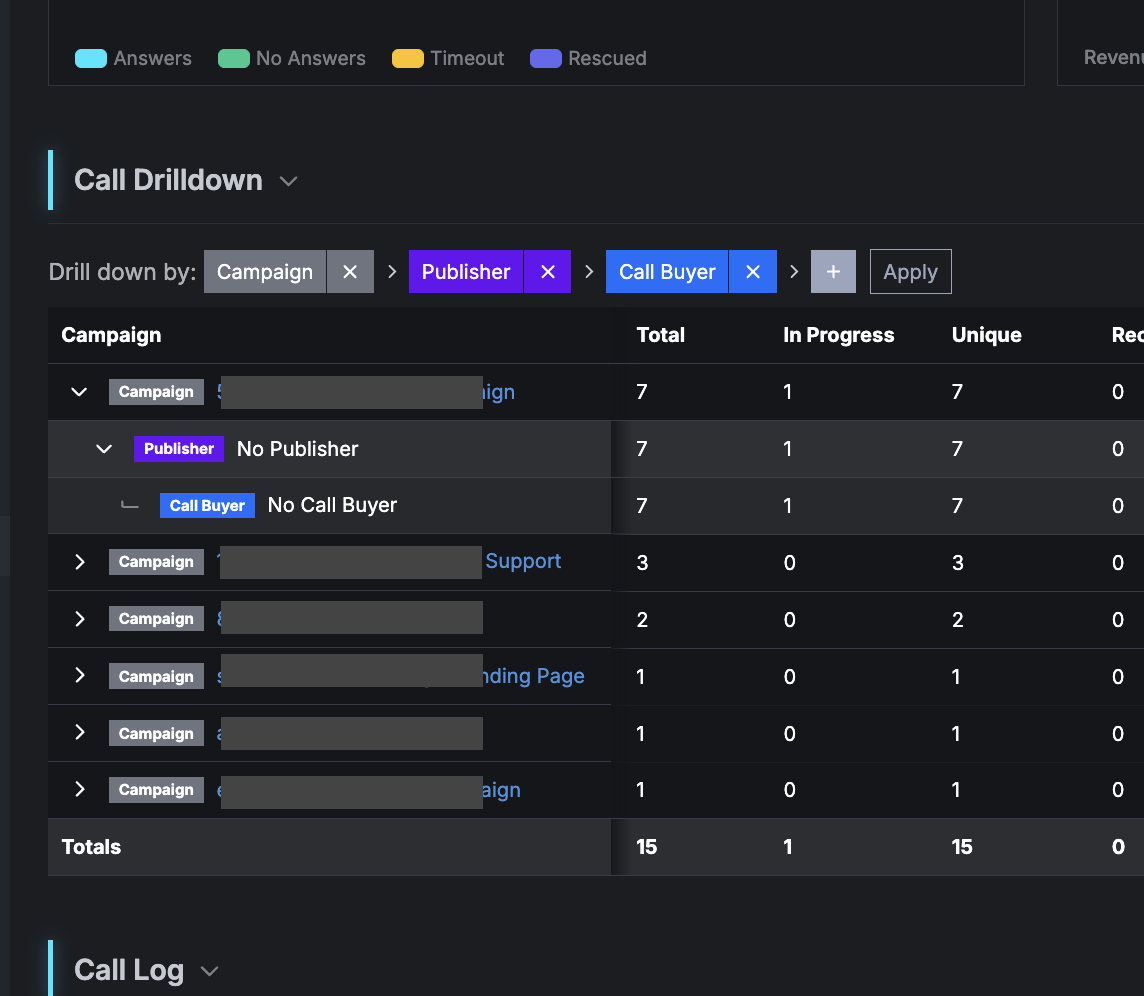 You can stack all of that into one drill-down — sum the calls in progress for a
specific state and source, going to a target on a given campaign, tagged with age
70, that came in as a warm transfer — and get the live count for exactly that
slice. The same filters you trust for historical reporting now point at the
present moment.
You can stack all of that into one drill-down — sum the calls in progress for a
specific state and source, going to a target on a given campaign, tagged with age
70, that came in as a warm transfer — and get the live count for exactly that
slice. The same filters you trust for historical reporting now point at the
present moment.
How to use it
- Open the Call Dashboard.
- Find the new In Progress column in the results table.
- Group or filter as you normally would — by State, Publisher, Call Buyer, Campaign, tag, warm transfer, and so on — and the In Progress count follows your selection, updating to reflect only the live calls in that slice.
Watch it during a campaign launch, a media buy going live, or a sudden traffic swing to understand your call flow as it unfolds.
Help us improve this article or request new support guides.
Previous
Give your publishers exactly the tags they need — and nothing more
Next
Download numbers from a Caller List