
Adding Voicemail Endpoints on your Campaigns
Quick summary
Some businesses are unable to process calls 24/7, in such a case it would be wise to include a final voicemail endpoint to handle any calls off business hours.
Adding Voicemail Endpoints
Some businesses are unable to process calls 24/7, in such a case it would be wise to include a final voicemail endpoint to handle any calls off business hours.
There are various dedicated voicemail providers, Retreaver recommends using Copycall for your dedicated VM needs.
-
Purchase a dedicated VM line from your chosen provider, copycall provides dedicated lines for $5 a month.
-
Create a voicemail call buyer inside of the Retreaver platform.
-
Apply the newly created VM endpoint to the campaign of your choice using a campaign routing setting.
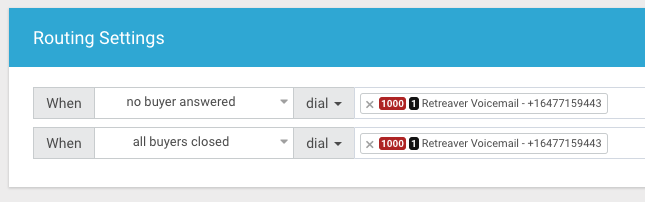
Retreaver will automatically process the call and route to the voicemail endpoint you created earlier using the campaign routing settings, it will also fire any associated webhooks to store or process incoming caller attributes for later use.
Help us improve this article or request new support guides.