
Routing Options
Routing Options decide where a Campaign sends a call: one Routing Option for each key press, voice topic or the default route. A dialing Routing Option holds a list of Targets (and Target Groups), called Routing Options Targets, with the priority, weight and routing flags that apply to each one.
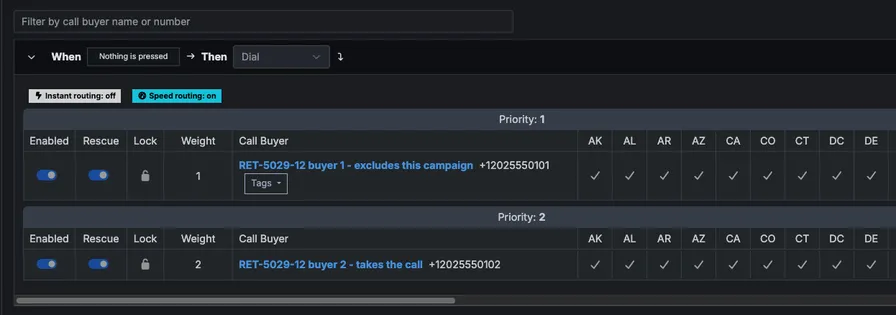
This is what a routing option is visually:
Use these endpoints to add a Target to a Campaign, change how it is prioritized, or take it out again, one small request at a time. You do not need to read or send the whole Campaign: adding a Target is a single POST that answers with a single row, so it takes the same time whether the Campaign has 3 Targets or 300.
Note
Only users who are superusers of the Campaign’s Company can use these endpoints. Anyone else, and any Campaign, Routing Option or row outside the Companies you manage, gets 403 Forbidden.
URL structure
These endpoints are part of the versioned API, at /api/v2 through /api/v5; they behave the same in each version. The examples use /api/v5. See Version.
The URLs follow one rule:
- List and create go through the parent, because you need the parent to list its children or add a new one. Routing Options are listed and created under their Campaign; Routing Options Targets under their Routing Option.
- Get, update and delete go straight to the record by its own
id, because the record already knows its parent. You do not repeat the Campaign or Routing Option in the URL.
| Action | Routing Options | Routing Options Targets |
|---|---|---|
| List | GET /api/v5/campaigns/{campaign_id}/routing_options |
GET /api/v5/routing_options/{routing_option_id}/routing_options_targets |
| Create | POST /api/v5/campaigns/{campaign_id}/routing_options |
POST /api/v5/routing_options/{routing_option_id}/routing_options_targets |
| Get | GET /api/v5/routing_options/{id} |
GET /api/v5/routing_options_targets/{id} |
| Update | PUT /api/v5/routing_options/{id} |
PUT /api/v5/routing_options_targets/{id} |
| Delete | DELETE /api/v5/routing_options/{id} |
DELETE /api/v5/routing_options_targets/{id} |
So /api/v5/routing_options/{id} is one Routing Option, never a list: there is no URL that lists Routing Options across Campaigns. The id you get back from a list or a create is all you need for the other calls.
Routing Option object
Example Routing Option:
{
  "routing_option": {
    "id": 456,
    "campaign_id": 123,
    "action": 1,
    "action_name": "dial",
    "options": ["1"],
    "topic": null,
    "topic_hint": null,
    "instant_routing": false,
    "speed_routing": false,
    "target_campaign_ids": [],
    "routing_options_targets_count": 3
  }
}| Field | Type | Description |
|---|---|---|
id |
integer | Retreaver’s internal ID of the Routing Option. Use it in the Routing Options Target endpoints. |
campaign_id |
integer | The Campaign this Routing Option belongs to. |
action |
integer | What the Routing Option does: 1 dial its Targets, 2 redirect to another Campaign, 3 block the caller, 6 end the call, 7 route to CAKE. |
action_name |
string | Readable name for action, e.g. dial. |
options |
array<string> | The keys that select this Routing Option — see Default route. |
topic |
string | null | Voice topic that selects this Routing Option (voice menus only). |
topic_hint |
string | null | Hint words for the voice topic (voice menus only). |
instant_routing |
boolean | Instant routing. Cannot be combined with speed_routing. |
speed_routing |
boolean | Speed routing. Cannot be combined with instant_routing. |
target_campaign_ids |
array<integer> | Campaigns to redirect to (action 2). |
routing_options_targets_count |
integer | Number of Targets and Target Groups on this Routing Option. The list endpoint returns this count instead of the rows. |
Default route
Every Campaign has one Routing Option that takes the call when the caller does not choose anything. This is the default route. If you just want a Target to take calls on a Campaign, add it to the default route.
options lists what the caller does to reach a Routing Option. Most values are keys on the phone keypad. A few are special values for things the caller did not do:
options value |
Meaning |
|---|---|
"1" – "9", "0", "*", "#" |
The caller pressed that key. |
"-1" |
The caller pressed nothing. |
"-2" |
The caller pressed a key that no other Routing Option uses. |
To find the default route, look through the Campaign’s Routing Options in this order and take the first one whose options contains:
"1". On a Campaign without a phone menu every call goes here, so this is usually the default route."-1", if no Routing Option has"1"."-2", if neither of the above exists.
The default route cannot be deleted.
Routing Options Target object
A Routing Options Target is the link between one Target (or Target Group) and one Routing Option. It is not the Target itself.
A Target is created once and can be reused: the same Target can be on many Routing Options, in one Campaign (for example on key 1 and key 2) or across many Campaigns. Each of these gets its own Routing Options Target, with its own id and its own settings. So:
- Adding a Target to another Routing Option creates a new row. Use the Target’s existing
target_id; do not create the Target again. - Changing a row (its priority, weight,
disabledor routing flags) changes how the Target is routed on that Routing Option only. - Removing a row takes the Target off that Routing Option only. The Target stays on every other Routing Option and is not deleted.
- A new buyer that does not exist yet can be created and added in one call by sending its number — see Add a Target to a Campaign.
- Changing the Target with the Targets API (its number,
paused, caps or business hours) applies everywhere it is used. Rows withlockedset totruealso follow the Target’s own priority and weight.
To change or remove a Target on one Routing Option, use the row’s id, not the target_id.
Example Routing Options Target:
{
  "routing_options_target": {
    "id": 1011,
    "routing_option_id": 456,
    "target_id": 789,
    "target_group_id": null,
    "name": "Retreaver Support",
    "priority": 1,
    "weight": 1,
    "locked": true,
    "disabled": null,
    "enable_route_by_bid": null,
    "enable_route_by_performance": null,
    "enable_route_by_state_performance": null,
    "performance_type": "strict",
    "min_calls_required": null,
    "performance_lookback_period_value": null,
    "default_performance": null
  }
}| Field | Type | Description |
|---|---|---|
id |
integer | Retreaver’s internal ID of the row. Not the Target’s ID. |
routing_option_id |
integer | The Routing Option this row belongs to. |
target_id |
integer | null | The Target this row routes to. Set either target_id or target_group_id. |
target_group_id |
integer | null | The Target Group this row routes to. |
name |
string | The name of the Target or Target Group. |
priority |
integer | Lowest value is considered first when routing calls. |
weight |
integer | Randomizes order among rows with equal priority. |
locked |
boolean | true means the row follows the Target’s own priority and weight. Set it to false to use the priority and weight on this row instead. |
disabled |
boolean | null | Skip this row when routing, without removing it. |
enable_route_by_bid |
boolean | null | Route by bid. Requires the Company’s advanced routing feature. |
enable_route_by_performance |
boolean | null | Route by performance. Requires the Company’s advanced routing feature. |
enable_route_by_state_performance |
boolean | null | Route by performance in the caller’s state. Requires the Company’s advanced routing feature. |
performance_type |
string | strict or weighted. |
min_calls_required |
integer | null | Calls needed before performance is used for routing. |
performance_lookback_period_value |
integer | null | How far back performance is measured. |
default_performance |
integer | null | Performance to assume until min_calls_required is met. |
List Routing Options of a Campaign
curl "https://api.retreaver.com/api/v5/campaigns/123/routing_options.json?api_key=[api_key]&company_id=1"The above command returns an array of Routing Option objects.
Returns a Campaign’s Routing Options, each with its routing_options_targets_count but without its rows. Use the Routing Options Target list to read the rows.
The list is paginated like the rest of the API: 25 per page by default, at most 100 with per_page, and Total and Link response headers. See Pagination.
HTTP Request
curl "https://api.retreaver.com/api/v5/campaigns/{campaign_id}/routing_options.json?api_key=[api_key]&company_id=1"Path Parameters
| Parameter | Type | Description |
|---|---|---|
campaign_id |
integer | Retreaver’s internal ID of the Campaign. This is the id, not the cid. |
Get a specific Routing Option
curl "https://api.retreaver.com/api/v5/routing_options/456.json?api_key=[api_key]&company_id=1"The above command returns a single Routing Option object.
Unlike the list, this URL does not include the Campaign: a Routing Option is reached by its own id. See URL structure.
HTTP Request
curl "https://api.retreaver.com/api/v5/routing_options/{id}.json?api_key=[api_key]&company_id=1"Path Parameters
| Parameter | Type | Description |
|---|---|---|
id |
integer | Retreaver’s internal ID of the Routing Option. |
Create a Routing Option
curl -s \
    -X POST \
    "https://api.retreaver.com/api/v5/campaigns/123/routing_options.json?api_key=[api_key]&company_id=1" \
    -H "Content-Type: application/json" \
-d '{"routing_option":{"action":1,"options":["2"],"routing_options_targets_attributes":[{"target_id":789}]}}'The above command returns the newly created Routing Option object.
Creates a Routing Option on a Campaign, here one that dials Target 789 when the caller presses 2. A dialing Routing Option (action 1) must be created with at least one row in routing_options_targets_attributes. Add more Targets later with Add a Target to a Campaign.
HTTP Request
curl -X POST "https://api.retreaver.com/api/v5/campaigns/{campaign_id}/routing_options.json?api_key=[api_key]&company_id=1" \
-H "Content-Type: application/json"Body Parameters
All parameters must be nested under a routing_option key.
| Parameter | Type | Required | Description |
|---|---|---|---|
action |
integer | required | 1 dial Targets, 2 redirect to another Campaign, 3 block the caller, 6 end the call, 7 route to CAKE. |
options |
array<string> | The keys that select this Routing Option, e.g. ["2"]. A key can only be used once per Campaign. |
|
topic |
string | Voice topic that selects this Routing Option. | |
topic_hint |
string | Hint words for the voice topic. | |
instant_routing |
boolean | Cannot be combined with speed_routing. |
|
speed_routing |
boolean | Cannot be combined with instant_routing. |
|
target_campaign_ids |
array<integer> | Campaigns to redirect to (action 2). |
|
routing_options_targets_attributes |
array | required for action 1 |
The first rows, using the row parameters below. |
Update a Routing Option
curl -s \
    -X PUT \
    "https://api.retreaver.com/api/v5/routing_options/456.json?api_key=[api_key]&company_id=1" \
    -H "Content-Type: application/json" \
-d '{"routing_option":{"speed_routing":true}}'The above command returns the updated Routing Option object.
Changes the Routing Option’s own fields. Its rows are changed with the Routing Options Target endpoints, not here.
HTTP Request
curl -X PUT "https://api.retreaver.com/api/v5/routing_options/{id}.json?api_key=[api_key]&company_id=1" \
-H "Content-Type: application/json"Body Parameters
All parameters must be nested under a routing_option key. Send only the fields you want to change: action, options, topic, topic_hint, instant_routing, speed_routing and target_campaign_ids, as described under Create a Routing Option.
Delete a Routing Option
curl -s \
    -X DELETE \
"https://api.retreaver.com/api/v5/routing_options/456.json?api_key=[api_key]&company_id=1"The above command returns
204 No Content.
Deletes a Routing Option and its rows. The Targets themselves are not deleted. The default route cannot be deleted and answers 422.
HTTP Request
curl -X DELETE "https://api.retreaver.com/api/v5/routing_options/{id}.json?api_key=[api_key]&company_id=1"Add a Target to a Campaign
curl -s \
    -X POST \
    "https://api.retreaver.com/api/v5/routing_options/456/routing_options_targets.json?api_key=[api_key]&company_id=1" \
    -H "Content-Type: application/json" \
-d '{"routing_options_target":{"target_id":789}}'The above command returns the newly created Routing Options Target object.
Adds Target 789 to Routing Option 456. This is the one call to make for each Target you add, and it does not read or send the rest of the Campaign. To add a Target Group, send target_group_id instead of target_id.
To add a buyer that does not exist yet, send its number in target_attributes instead. Retreaver creates the Target in your Company and adds it in the same call, the way the Campaign editor does:
curl -s \
    -X POST \
    "https://api.retreaver.com/api/v5/routing_options/456/routing_options_targets.json?api_key=[api_key]&company_id=1" \
    -H "Content-Type: application/json" \
-d '{"routing_options_target":{"target_attributes":{"number":"+12125550199"}}}'The new Target gets only a number. Use the Targets API to name it and set its caps and business hours; to set those up front, create the Target first and add it by target_id.
Buyers can only be added to a Routing Option that dials (action 1).
To find the Routing Option, list the Campaign’s Routing Options once and use the ID of the default route. It does not change, so you can keep it.
HTTP Request
curl -X POST "https://api.retreaver.com/api/v5/routing_options/{routing_option_id}/routing_options_targets.json?api_key=[api_key]&company_id=1" \
-H "Content-Type: application/json"Path Parameters
| Parameter | Type | Description |
|---|---|---|
routing_option_id |
integer | Retreaver’s internal ID of the Routing Option. |
Body Parameters
All parameters must be nested under a routing_options_target key.
| Parameter | Type | Default | Required | Description |
|---|---|---|---|---|
target_id |
integer | one of target_id / target_group_id |
The Target to add. It must belong to the same Company as the Campaign. | |
target_group_id |
integer | one of target_id / target_group_id |
The Target Group to add. | |
target_attributes |
object | Create a new Target and add it: {"number": "+12125550199"}. Use instead of target_id. Create only. |
||
priority |
integer | Lowest value is considered first. Used when locked is false. |
||
weight |
integer | Randomizes order among rows with equal priority. Used when locked is false. |
||
locked |
boolean | true |
true follows the Target’s own priority and weight. Set false to use the row’s. |
|
disabled |
boolean | Skip this row when routing. | ||
enable_route_by_bid |
boolean | Requires the Company’s advanced routing feature. | ||
enable_route_by_performance |
boolean | Requires the Company’s advanced routing feature. | ||
enable_route_by_state_performance |
boolean | Requires the Company’s advanced routing feature. | ||
performance_type |
string | strict |
strict or weighted. |
|
min_calls_required |
integer | Calls needed before performance is used for routing. | ||
performance_lookback_period_value |
integer | How far back performance is measured. | ||
default_performance |
integer | Performance to assume until min_calls_required is met. |
List a Routing Option’s Targets
curl "https://api.retreaver.com/api/v5/routing_options/456/routing_options_targets.json?api_key=[api_key]&company_id=1&page=1&per_page=100"The above command returns an array of Routing Options Target objects.
Returns the rows of a Routing Option, 25 per page by default and at most 100. The Total response header holds the number of rows and the Link header the URLs of the next and previous pages. See Pagination.
curl -s -D - "https://api.retreaver.com/api/v5/routing_options/456/routing_options_targets.json?api_key=[api_key]&company_id=1&page=2&per_page=100"
# Total: 300
# Link: <...page=3&per_page=100>; rel="next", ...HTTP Request
curl "https://api.retreaver.com/api/v5/routing_options/{routing_option_id}/routing_options_targets.json?api_key=[api_key]&company_id=1&page=1&per_page=100"Get a specific Routing Options Target
curl "https://api.retreaver.com/api/v5/routing_options_targets/1011.json?api_key=[api_key]&company_id=1"The above command returns a single Routing Options Target object.
HTTP Request
curl "https://api.retreaver.com/api/v5/routing_options_targets/{id}.json?api_key=[api_key]&company_id=1"Path Parameters
| Parameter | Type | Description |
|---|---|---|
id |
integer | Retreaver’s internal ID of the row: the id returned when the Target was added. |
Update a Routing Options Target
curl -s \
    -X PUT \
    "https://api.retreaver.com/api/v5/routing_options_targets/1011.json?api_key=[api_key]&company_id=1" \
    -H "Content-Type: application/json" \
-d '{"routing_options_target":{"priority":2,"locked":false}}'The above command returns the updated Routing Options Target object.
Changes how one Target is routed on this Routing Option only, e.g. its priority, its weight or whether it is disabled. Set locked to false for priority and weight to take effect.
HTTP Request
curl -X PUT "https://api.retreaver.com/api/v5/routing_options_targets/{id}.json?api_key=[api_key]&company_id=1" \
-H "Content-Type: application/json"Body Parameters
All parameters must be nested under a routing_options_target key. Send only the fields you want to change, as described under Add a Target to a Campaign.
Remove a Target from a Campaign
curl -s \
    -X DELETE \
"https://api.retreaver.com/api/v5/routing_options_targets/1011.json?api_key=[api_key]&company_id=1"The above command returns
204 No Content.
Removes the row from the Routing Option. The Target itself is not deleted, and stays on any other Routing Option that uses it. You can remove the last Target of a dialing Routing Option. Calls that reach it then get the same handling as when all its Targets are closed.
HTTP Request
curl -X DELETE "https://api.retreaver.com/api/v5/routing_options_targets/{id}.json?api_key=[api_key]&company_id=1"Errors
| Status | Body | Meaning |
|---|---|---|
403 |
{"error": "Forbidden"} |
The Campaign, Routing Option or row is not in a Company you manage as a superuser. |
422 |
{"errors": ["..."]} |
A routing rule refused the change, for example: a dialing Routing Option created without a Target, the default route being deleted, a key press or voice topic used twice (IVR options must be unique.), instant and speed routing both on, a row with neither target_id nor target_group_id, a Target added to a Routing Option that does not dial, a simuldial Target Group on a Campaign that converts on Attempt, or a Target or Target Group from another Company. |
See Errors for the other status codes.
Demo script
The script below walks through the whole flow with curl and jq: it creates a paused Target, lists the Campaign’s Routing Options, adds the Target to the default route, lists the Routing Options again to show the row count went up by one, and reads the new row back.
Set API_KEY, COMPANY_ID and CAMPAIGN_ID (the Campaign’s internal id) and run it. Set ROUTING_OPTION_ID to add the Target to a specific Routing Option instead of the default route.
#!/usr/bin/env bash
set -euo pipefail

# API_KEY=[api_key] COMPANY_ID=1 CAMPAIGN_ID=123 ./routing_options_demo.sh
BASE="${BASE:-https://api.retreaver.com}"
: "${API_KEY:?API_KEY is required}"
: "${COMPANY_ID:?COMPANY_ID is required}"
: "${CAMPAIGN_ID:?CAMPAIGN_ID is required}"
AUTH="api_key=${API_KEY}&company_id=${COMPANY_ID}"
RUN="$(date +%s)"

echo "== 1. Create a paused Target"
target=$(curl -sS -X POST "${BASE}/api/v5/targets.json?${AUTH}" \
  -H "Content-Type: application/json" \
  -d "{\"target\":{\"name\":\"Routing options demo ${RUN}\",\"number\":\"+1212555$(printf %04d $((RANDOM % 10000)))\",\"client_tid\":\"routing-options-${RUN}\",\"paused\":true}}")
echo "$target" | jq .
TARGET_ID=$(echo "$target" | jq -r '.target.id')

echo "== 2. List the Campaign's Routing Options"
routing_options=$(curl -sS "${BASE}/api/v5/campaigns/${CAMPAIGN_ID}/routing_options.json?${AUTH}")
echo "$routing_options" | jq .
# The default route: key "1" (no voice menu), else "-1" (nothing pressed), else "-2".
ROUTING_OPTION_ID="${ROUTING_OPTION_ID:-$(echo "$routing_options" | jq -r '
  map(.routing_option) | (map(select(.options | index("1"))) + map(select(.options | index("-1"))) + map(select(.options | index("-2")))) | .[0].id // empty')}"
: "${ROUTING_OPTION_ID:?the Campaign has no default Routing Option; set ROUTING_OPTION_ID}"

echo "== 3. Add the Target to Routing Option ${ROUTING_OPTION_ID}"
row=$(curl -sS -X POST "${BASE}/api/v5/routing_options/${ROUTING_OPTION_ID}/routing_options_targets.json?${AUTH}" \
  -H "Content-Type: application/json" \
  -d "{\"routing_options_target\":{\"target_id\":${TARGET_ID}}}")
echo "$row" | jq .
ROW_ID=$(echo "$row" | jq -r '.routing_options_target.id')

echo "== 4. List the Routing Options again: the row count went up by one"
curl -sS "${BASE}/api/v5/campaigns/${CAMPAIGN_ID}/routing_options.json?${AUTH}" | jq .

echo "== 5. Read the new row back: it routes to Target ${TARGET_ID}"
curl -sS "${BASE}/api/v5/routing_options_targets/${ROW_ID}.json?${AUTH}" | jq .The Target is created paused, so it takes no calls until you unpause it. To remove the demo data afterwards, remove the Target from the Campaign and then delete the Target.
Help us improve this article or request new support guides.